Community Center | Not monitored
Tag not monitored by Microsoft.

This browser is no longer supported.
Upgrade to Microsoft Edge to take advantage of the latest features, security updates, and technical support.
' cx='32' cy='32' r='32' /%3E%3Ctext x='50%25' y='55%25' dominant-baseline='middle' text-anchor='middle' fill='%23FFF' %3EYM%3C/text%3E%3C/svg%3E)
Hello
If i will implement Azure EXPRESSROUTE and i will have Cisco ASA on Azure.
shall we configure VPN site to site between Azure and Onprmise?
what is required to achieve Hub and Spoke?
how we will position the Cisco ASA ?
Tag not monitored by Microsoft.
Answer accepted by question author
' cx='32' cy='32' r='32' /%3E%3Ctext x='50%25' y='55%25' dominant-baseline='middle' text-anchor='middle' fill='%23FFF' %3ESM%3C/text%3E%3C/svg%3E)
@yasser Mohamed AbdelMoneim I understand that you want to configure a VPN over EXPRESSROUTE circuit using a Cisco ASA between Azure and your on-premises network. Please correct me otherwise.
Here is how to establish an IPsec/IKE VPN connection from your on-premises network to Azure over the private peering of an Azure ExpressRoute circuit using Azure Virtual WAN. The connectivity establishment will be as follows:
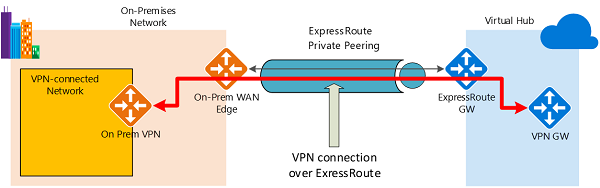
An important aspect of this configuration is routing between the on-premises networks and Azure over both the ExpressRoute and VPN paths. Please refer to this article for steps for setting up the Circuits and routing for the same.
The Cisco ASA will be sitting in the Hub Network (instead of the Azure VPN) and all traffic from the Peered Vnets(Spokes) would be pointing the on-premise traffic to this ASA which will be then forwarded via the VPN over ER circuit. Hope this helps.
Please let us know if you have any further questions and we will be glad to assist you further. Thank you!
Remember:
Please accept an answer if correct. Original posters help the community find answers faster by identifying the correct answer. Here is how.
Want a reminder to come back and check responses? Here is how to subscribe to a notification.