Microsoft 365 and Office | Development | Microsoft 365 Publishing
End-to-end process of building, validating, and distributing custom apps and add-ins across Microsoft 365 platforms

This browser is no longer supported.
Upgrade to Microsoft Edge to take advantage of the latest features, security updates, and technical support.
' cx='32' cy='32' r='32' /%3E%3Ctext x='50%25' y='55%25' dominant-baseline='middle' text-anchor='middle' fill='%23FFF' %3ENM%3C/text%3E%3C/svg%3E)
I am debugging a canvas app and have turned to the app monitor for help, it seems like a good place to start, it shows errors that I could go and fix but rarely shows the broken function or the control which houses it
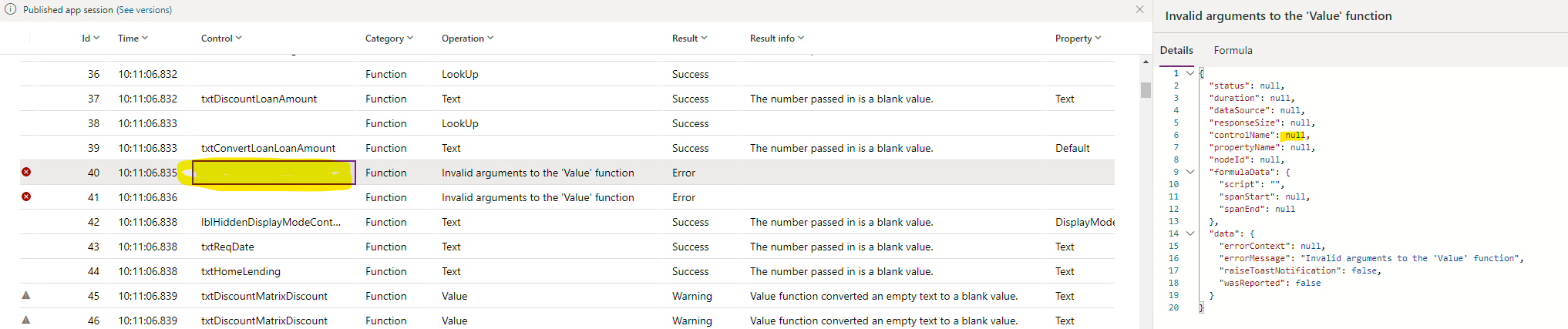
Many of the controls are hidden and just used to store values that are then used to pick records which are then used visibly in the app. How am I expected to bridge the gap between "There was an error in the Value function" and where the error is so I can do something/anything about it?
End-to-end process of building, validating, and distributing custom apps and add-ins across Microsoft 365 platforms