MDX: Sum values with different dimensions (SQL Server Analysis Services 2008R2)

arno sebastian 21 Reputation points
2022-02-25T11:29:03.73+00:00

Hello,
I would like to sum year-to-date data plus budget data from now on until the end of the year. My problem looks like this:

With --calculating the sums over time
Member [Time].[AllTime].[ytd] As aggregate([Time].[AllTime].[Month].[Jul 21]:[Time].[AllTime].[Month].[Jan 22]), VISIBLE=0
Member [Time].[AllTime].[rest] As aggregate([Time].[AllTime].[Month].[Feb 22]:[Time].[AllTime].[Month].[Jun 22]), VISIBLE=0

Select
( {[Info].[InfoID].&[act],[Info].[InfoID].&[bud]}
* {[Time].[AllTime].[ytd],[Time].[AllTime].[rest]} )
On Columns,
{[Measures].[X]} On Rows
From [Sales]

This is the result:

act act bud bud
ytd rest    ytd rest

X 2 4 8 16

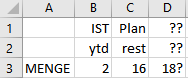
How can I get 2+16=18 in columns? How can I calculate (actytd+budrest)=forecast?

(My problem behind is that I have to feed the columns of my frontend with mdx statements for ytd and rest separately from Excel ranges. But this is the next problem when I know what the complete mdx statement should look like.)

Thank you
arno

SQL Server Analysis Services
A Microsoft online analytical data engine used in decision support and business analytics, providing the analytical data for business reports and client applications such as Power BI, Excel, Reporting Services reports, and other data visualization tools.
0 comments No comments
{count} votes

Answer accepted by question author
  1. Alexei Stoyanovsky 3,416 Reputation points
    2022-02-25T16:05:47.617+00:00

    What you want is an arbitrary-shaped set, and it by definition cannot be expressed as a crossjoin. So instead of

    { [Info].[InfoID].&[act],[Info].[InfoID].&[bud] } 
    * { [Time].[AllTime].[ytd],[Time].[AllTime].[rest] } 
    

    you should use

    { ( [Info].[InfoID].&[act], [Time].[AllTime].[ytd] ) 
    , ( [Info].[InfoID].&[bud], [Time].[AllTime].[rest] ) } 
    

2 additional answers

Sort by: Most helpful
  1. ZoeHui-MSFT 41,536 Reputation points
    2022-02-28T02:46:10.027+00:00

    Hi @arno sebastian ,

    Please check below code:

    With --calculating the sums over time  
    Member [Time].[AllTime].[ytd] As aggregate([Time].[AllTime].[Month].[Jul 21]:[Time].[AllTime].[Month].[Jan 22])  
    Member [Time].[AllTime].[rest] As aggregate([Time].[AllTime].[Month].[Feb 22]:[Time].[AllTime].[Month].[Jun 22])  
    Member [Info].[InfoID].&[Forcast] AS aggregate({([Info].[InfoID].&[act],[Time].[AllTime].[ytd]),  
    ([Info].[InfoID].&[bud],[Time].[AllTime].[rest])})  
    Member [Info].[InfoID].&[Actual] AS aggregate({([Info].[InfoID].&[act],[Time].[AllTime].[rest]),  
    ([Info].[InfoID].&[bud],[Time].[AllTime].[ytd])})  
    Select  
    {[Info].[InfoID].&[Forcast],[Info].[InfoID].&[Actual] }  
    On Columns,  
    {[Measures].[X]} On Rows  
    From [Sales]  
    

    --

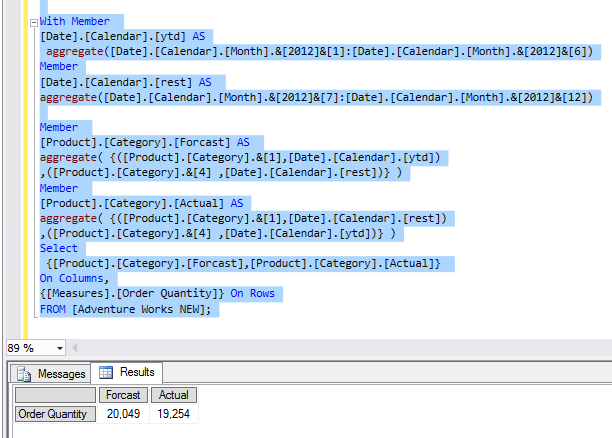
    With Member  
    [Date].[Calendar].[ytd] AS  
    aggregate([Date].[Calendar].[Month].&[2012]&[1]:[Date].[Calendar].[Month].&[2012]&[6])  
    Member  
    [Date].[Calendar].[rest] AS  
    aggregate([Date].[Calendar].[Month].&[2012]&[7]:[Date].[Calendar].[Month].&[2012]&[12])  
     
    Member  
    [Product].[Category].[Forcast] AS  
    aggregate( {([Product].[Category].&[1],[Date].[Calendar].[ytd])  
    ,([Product].[Category].&[4] ,[Date].[Calendar].[rest])} )  
    Member  
    [Product].[Category].[Actual] AS  
    aggregate( {([Product].[Category].&[1],[Date].[Calendar].[rest])  
    ,([Product].[Category].&[4] ,[Date].[Calendar].[ytd])} )  
    Select  
    {[Product].[Category].[Forcast],[Product].[Category].[Actual]}  
    On Columns,  
    {[Measures].[Order Quantity]} On Rows  
    FROM [Adventure Works NEW];  
    

    178257-456.jpg
    Regards,

    Zoe


    If the answer is the right solution, please click "Accept Answer" and kindly upvote it. If you have extra questions about this answer, please click "Comment".

    Note: Please follow the steps in our documentation to enable e-mail notifications if you want to receive the related email notification for this thread.


  2. arno sebastian 21 Reputation points
    2022-02-28T10:06:06.967+00:00

    Thank you Zoe,

    however, your MDX is mixing products and time. I changed the mdx to my cube of 2008R2 Adventure Works:

    With Member
    [Date].[Calendar].[ytd] AS
    aggregate([Date].[Calendar].[Month].&[2007]&1:[Date].[Calendar].[Month].&[2007]&[6])
    Member
    [Date].[Calendar].[rest] AS
    aggregate([Date].[Calendar].[Month].&[2007]&[7]:[Date].[Calendar].[Month].&[2007]&[12])

    Member
    [Product].[Category].[Forcast] AS
    aggregate( {([Product].[Category].&1,[Date].[Calendar].[ytd])
    ,([Product].[Category].&[4] ,[Date].[Calendar].[rest])} )
    Member
    [Product].[Category].[Actual] AS
    aggregate( {([Product].[Category].&1,[Date].[Calendar].[rest])
    ,([Product].[Category].&[4] ,[Date].[Calendar].[ytd])} )

    --Totals
    Select
    {[Product].[Category].[Forcast],[Product].[Category].[Actual]}
    On Columns,
    {[Measures].[Order Quantity]} On Rows
    FROM [Adventure Works];

    --Details
    Select
    {[Date].[Calendar].[ytd], [Date].[Calendar].[rest]}*
    {[Product].[Category].&1, [Product].[Category].&[4]}

    On Columns,
    {[Measures].[Order Quantity]} On Rows
    FROM [Adventure Works]; --Version: Adventure Works DW 2008R2

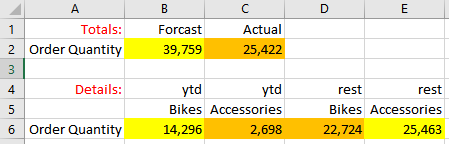
    Results Totals:

    178446-image.png

    Results Details:
    178389-image.png

    Pls. check the colours, it is adding bikesytd + accessoriesrest.

    0 comments No comments

Your answer

Answers can be marked as 'Accepted' by the question author and 'Recommended' by moderators, which helps users know the answer solved the author's problem.