SQL Server Integration Services
A Microsoft platform for building enterprise-level data integration and data transformations solutions.
This browser is no longer supported.
Upgrade to Microsoft Edge to take advantage of the latest features, security updates, and technical support.
' cx='32' cy='32' r='32' /%3E%3Ctext x='50%25' y='55%25' dominant-baseline='middle' text-anchor='middle' fill='%23FFF' %3ESA%3C/text%3E%3C/svg%3E)
I Want to update my SQL version, I could not find any options to update my SQL version.
' cx='32' cy='32' r='32' /%3E%3Ctext x='50%25' y='55%25' dominant-baseline='middle' text-anchor='middle' fill='%23FFF' %3EAM%3C/text%3E%3C/svg%3E)
Hi @Sanjay Addagudi ,
How are things going? Do the answers help you?
Please feel free to let us know if you have any other question.
If the post in the thread is helpful, you could kindly accept it as answer.
Best Regards,
Amelia
' cx='32' cy='32' r='32' /%3E%3Ctext x='50%25' y='55%25' dominant-baseline='middle' text-anchor='middle' fill='%23FFF' %3EMT%3C/text%3E%3C/svg%3E)
When you run the installer for a newer version of SQL Server then in the initial setup UI it has an option to change or upgrade an existing instance. You would use that to do an in place upgrade of an existing SQL Server instance.
The instructions are available here. Note that you cannot upgrade really old versions of SQL to really new versions of SQL. Refer to the documentation linked earlier for supported upgrade paths.
Hi @Sanjay Addagudi ,
Do you mean to upgrade SQL Server in-place? If I misunderstood, please feel free to let me know.
Please run the setup file you want to upgrade to as admin and start the SQL Server installation Center, then go to Installation on the left panel -> click Upgrade from a previous version of SQL Server on the right panel to start upgrade wizard. Please refer to this doc for more details.
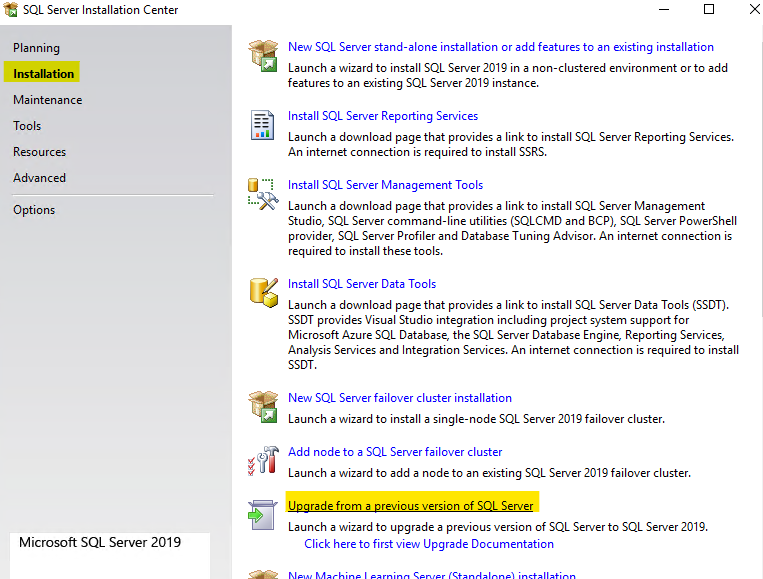
If you want to upgrade an existing instance of SQL Server to a different edition, please go to the SQL Server Installation Center click Maintenance -> select Edition Upgrade.
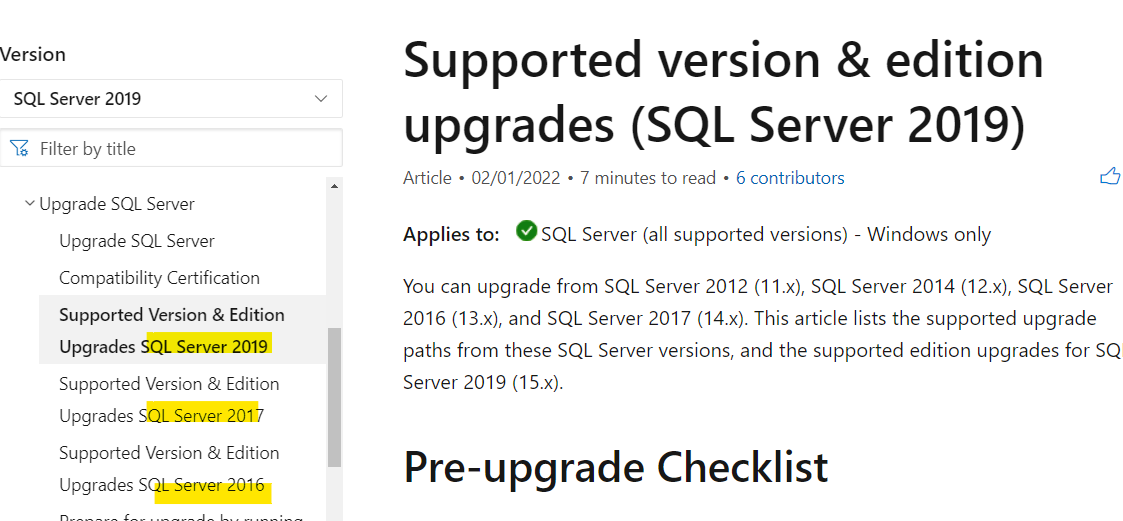
In addition, please check this doc to ensure the edition and version of SQL Server is supported for upgrade.
Best Regards,
Amelia
If the answer is the right solution, please click "Accept Answer" and kindly upvote it. If you have extra questions about this answer, please click "Comment".
Note: Please follow the steps in our documentation to enable e-mail notifications if you want to receive the related email notification for this thread.

I Want to update my SQL version,
Update to a newer build number? For this you can get SP = "Service Packs" and CU = "Cumulative Updates", see https://sqlserverbuilds.blogspot.com/
Or Upgrade to a newer SQL Server version? Then you have to purchase licenses for the newer version and install the version (in-place or side-by-side upgrade).