Developer technologies | ASP.NET Core | Other
A set of technologies in .NET for building web applications and web services. Miscellaneous topics that do not fit into specific categories.
This browser is no longer supported.
Upgrade to Microsoft Edge to take advantage of the latest features, security updates, and technical support.
' cx='32' cy='32' r='32' /%3E%3Ctext x='50%25' y='55%25' dominant-baseline='middle' text-anchor='middle' fill='%23FFF' %3EAM%3C/text%3E%3C/svg%3E)
I am using this source code to specify a repository path to download files.
    FileNameLink.NavigateUrl = Repository + "/AuthorizedUser/R1/" + gvITD.SelectedRow.Cells[9].Text;
    FileNameLink.Text = gvITD.SelectedRow.Cells[10].Text;
But when I bring my cursor to the hyperlink it the, it shows wrong path.
file:///D:/D%20Drive/MyApplication/RepotingService/SRC/Repository//AuthorizedUser/R1/2022
Why is it adding file:// before the Drive?
A set of technologies in .NET for building web applications and web services. Miscellaneous topics that do not fit into specific categories.

Why is it adding file:// before the Drive?
The NavigateUrl property should point to the virtual directory within the web application not a physical file path. See the following SO post which illustrates how to download a file from using a physical path and the code behind.
https://stackoverflow.com/questions/37650/how-to-implement-a-file-download-in-asp-net
Answer accepted by question author

this is the default browser behavior. For. E.g. consider the following Html
<a href="d:\test.html">testing</a>
You may see the markup include the reference to the local disk. The browser will convert the link to the local disk to file:// format
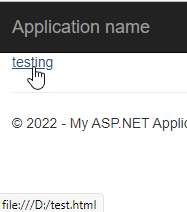
To understand whether ASP.Net actually converts the link to file:// format, please refer the source of the generated page.
' cx='32' cy='32' r='32' /%3E%3Ctext x='50%25' y='55%25' dominant-baseline='middle' text-anchor='middle' fill='%23FFF' %3EYS%3C/text%3E%3C/svg%3E)
Hi @Adeel Mirza ,
I think you could use Server.MapPath to get the virtual path of the physical file.
Server.MapPath(path)
Best regards,
Yijing Sun
If the answer is helpful, please click "Accept Answer" and upvote it.
Note: Please follow the steps in our documentation to enable e-mail notifications if you want to receive the related email notification for this thread.