Microsoft 365 and Office | Microsoft Viva | Viva Learning
A Microsoft Viva module that provides employees with formal and informal learning.

This browser is no longer supported.
Upgrade to Microsoft Edge to take advantage of the latest features, security updates, and technical support.
' cx='32' cy='32' r='32' /%3E%3Ctext x='50%25' y='55%25' dominant-baseline='middle' text-anchor='middle' fill='%23FFF' %3EMK%3C/text%3E%3C/svg%3E)
How can I allow users to save their files in Desktop and My documents ONLY and restrict them to save files and folders on C:\ Drive
' cx='32' cy='32' r='32' /%3E%3Ctext x='50%25' y='55%25' dominant-baseline='middle' text-anchor='middle' fill='%23FFF' %3EMT%3C/text%3E%3C/svg%3E)
By default users only have write access to their profile which contains the desktop and documents. A normal user cannot write to C:\ directories and unless an app changes their permissions then they wouldn't have write access to subfolders either.
If this is not the case for your machine then you should check the permissions on the file system and reset them such that users don't have write permissions.
By default any domain user can create folder on C:\ Drive.
Please advice how I can restrict this
Authenticated Users can create folders off C:\ only. If you want to change that go to the C:\ and change the ACLs to remove that right from Authenticated Users. Then they will only have read/execute rights.
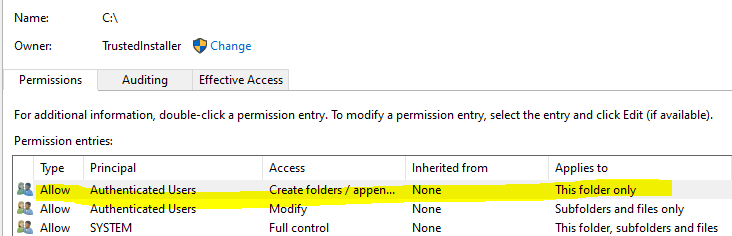
You can also do that via Group Policies but it is more involved. The steps are given here.
' cx='32' cy='32' r='32' /%3E%3Ctext x='50%25' y='55%25' dominant-baseline='middle' text-anchor='middle' fill='%23FFF' %3EJM%3C/text%3E%3C/svg%3E)
Just checking in to see if above information was helpful. If you have any further updates on this issue, please feel free to post back.
I found a same case discussed this situation, it provides a way that you could create a Group policy object to block disk C. You could check to see if it is helpful to you.
If the answer is helpful, please click "Accept Answer" and kindly upvote it. If you have extra questions about this answer, please click "Comment".
Note: Please follow the steps in our documentation to enable e-mail notifications if you want to receive the related email notification for this thread.
But this Group Policy will restrict everything included My documents and desktop . I need to allow only theses two folders.