I'm currently working on PowerShell script to retrieve Conditional access policies configurations. The information is required in a csv file to help management with auditing requests. As of current upon running Get-AzureADMSConditionalAccessPolicy cmdlet, the only data that i can grab and save to a csv file is: Id, display name and state. Conditions and controls comes in an obfuscated format of "system.collections" which cannot be understood.
PS C:\Windows\system32> Get-AzureADMSConditionalAccessPolicy


Id              : a77d724e-b9f9-452d-b1f0-d041142413a0
DisplayName     : Block_Office365_Apps_Access_In_Android_Devices
State           : enabled
Conditions      : class ConditionalAccessConditionSet {
                    Applications: class ConditionalAccessApplicationCondition {
                    IncludeApplications: System.Collections.Generic.List`1[System.String]
                    ExcludeApplications: System.Collections.Generic.List`1[System.String]
                    IncludeUserActions: System.Collections.Generic.List`1[System.String]
                    IncludeProtectionLevels:
                  }

                    Users: class ConditionalAccessUserCondition {
                    IncludeUsers: System.Collections.Generic.List`1[System.String]
                    ExcludeUsers: System.Collections.Generic.List`1[System.String]
                    IncludeGroups: System.Collections.Generic.List`1[System.String]
                    ExcludeGroups: System.Collections.Generic.List`1[System.String]
                    IncludeRoles: System.Collections.Generic.List`1[System.String]
                    ExcludeRoles: System.Collections.Generic.List`1[System.String]
                  }

                    Platforms: class ConditionalAccessPlatformCondition {
                    IncludePlatforms: System.Collections.Generic.List`1[Microsoft.Open.MSGraph.Model.ConditionalAccessDevicePlatforms]
                    ExcludePlatforms: System.Collections.Generic.List`1[Microsoft.Open.MSGraph.Model.ConditionalAccessDevicePlatforms]
                  }

                    Locations:
                    SignInRiskLevels: System.Collections.Generic.List`1[Microsoft.Open.MSGraph.Model.ConditionalAccessRiskLevel]
                    ClientAppTypes: System.Collections.Generic.List`1[Microsoft.Open.MSGraph.Model.ConditionalAccessClientApp]
                  }

GrantControls   : class ConditionalAccessGrantControls {
                    _Operator: OR
                    BuiltInControls: System.Collections.Generic.List`1[Microsoft.Open.MSGraph.Model.ConditionalAccessGrantControl]
                    CustomAuthenticationFactors: System.Collections.Generic.List`1[System.String]
                    TermsOfUse: System.Collections.Generic.List`1[System.String]
                  }

SessionControls :
Condition section includes information about: applications, users, platforms, locations which is required to be retrieved
My script so far: Get-AzureADMSConditionalAccessPolicy | Select-Object -Property DisplayName, Id, State | Export-Csv -Path C:\CAccessResults.csv -NoTypeInformation
On further research, it looks like by running ((Get-AzureADMSConditionalAccessPolicy).Conditions).Applications can display
PS C:\Windows\system32> ((Get-AzureADMSConditionalAccessPolicy).Conditions).Applications

IncludeApplications ExcludeApplications IncludeUserActions IncludeProtectionLevels
------------------- ------------------- ------------------ -----------------------
{Office365}         {}                  {}
and the same applies for users, platforms, locations and grantcontrols.
PS C:\Windows\system32> ((Get-AzureADMSConditionalAccessPolicy).Conditions).users


IncludeUsers  : {350a541a-02f0-4759-b729-70922997e819}
ExcludeUsers  : {}
IncludeGroups : {}
ExcludeGroups : {}
IncludeRoles  : {}
ExcludeRoles  : {}

PS C:\Windows\system32> ((Get-AzureADMSConditionalAccessPolicy).Conditions).users


IncludeUsers  : {350a541a-02f0-4759-b729-70922997e819}
ExcludeUsers  : {}
IncludeGroups : {}
ExcludeGroups : {}
IncludeRoles  : {}
ExcludeRoles  : {}
The user querry returns GUID.
My goal is to have this friendly readable information queried and stored in the csv file. How can that be implemented?
My script so far:
$allpolicies = Get-AzureADMSConditionalAccessPolicy

$allpolicies | ForEach-Object{

    $policyID = $_.Id
    $policydisplayname = $_.DisplayName
    $policystate = $_.State
    $applications = ($_.Conditions).Applications.IncludeApplications
    $includedusers = ($_.Conditions).Users.IncludeUsers
    $includedgroups = ($_.Conditions).Users.IncludeGroups
    $includedlocation = ($_.Conditions).Locations.includelocations


    New-object -typename PSobject -property @{

        ID = $policyID
        DisplayName = $policydisplayname
        Policy_State = $policystate
        Includedapps =  $applications
        Users_Applied_The_Policy = $includedusers
        Groups_Applied_The_Policy = $includedgroups
        Locations_Applied_The_Policy = $includedlocation


    }

} | Sort-Object ID, DisplayName, Policy_State, Includedapps, Users_Applied_Policy, Groups_Applied_Policy, Locations_Applied | Export-Csv -Path C:\CAccessResults3.csv -NoTypeInformation
CSV output:
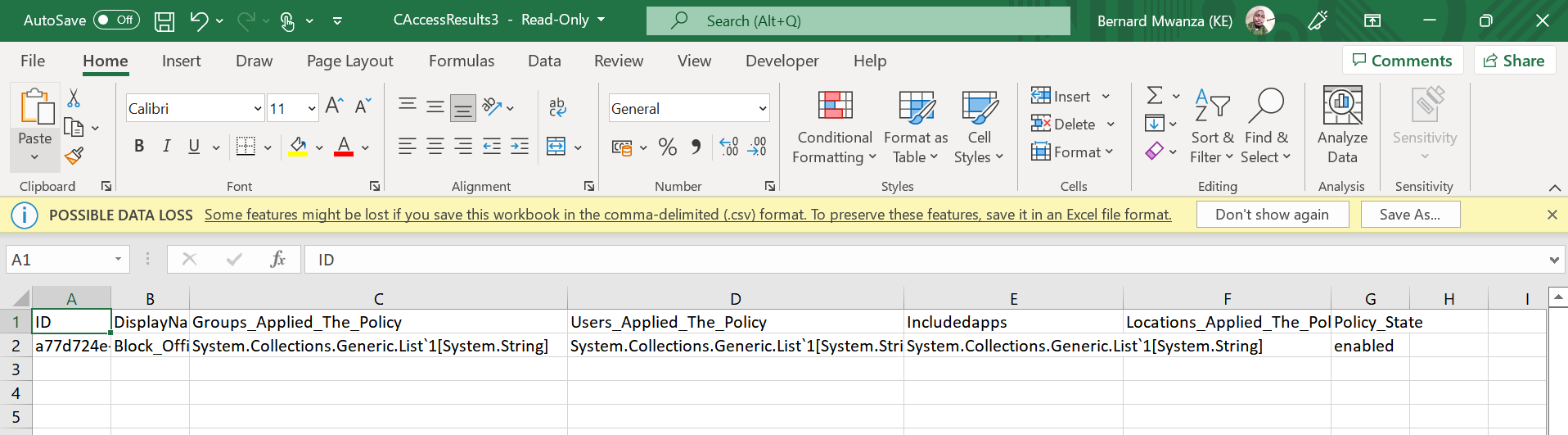
Running the script using powershell without saving the output in csv
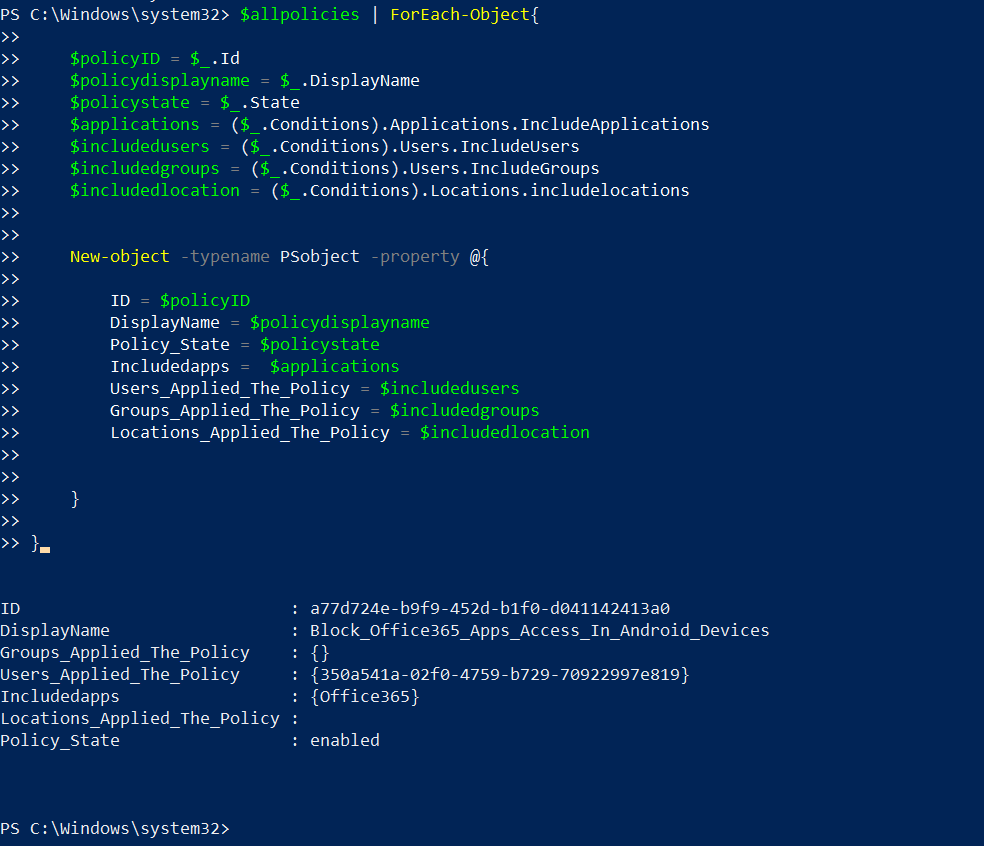
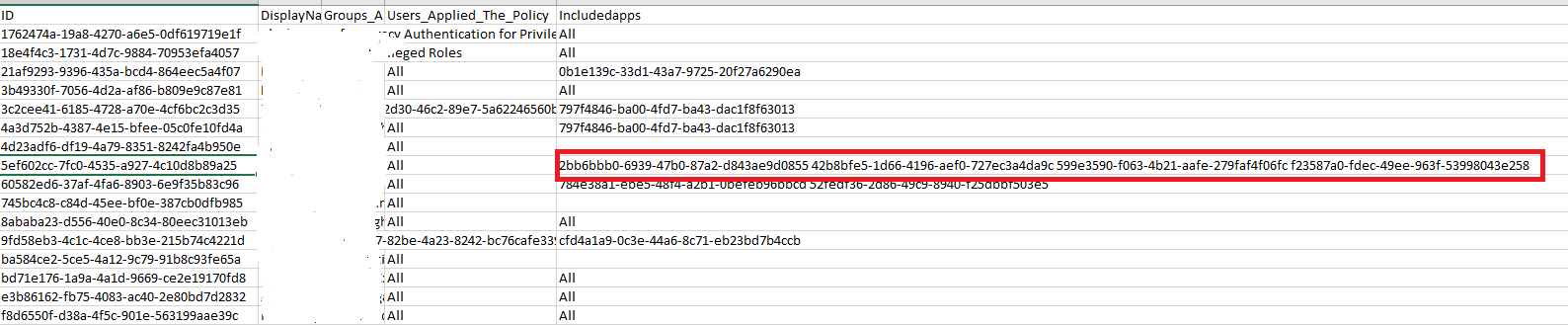
Is there a way to output the values for Includedapps, Users_Applied_Policy, Groups_Applied_Policy, Locations_Applied in a readable format and have them separated in each row.



' cx='32' cy='32' r='32' /%3E%3Ctext x='50%25' y='55%25' dominant-baseline='middle' text-anchor='middle' fill='%23FFF' %3ECM%3C/text%3E%3C/svg%3E)
' cx='32' cy='32' r='32' /%3E%3Ctext x='50%25' y='55%25' dominant-baseline='middle' text-anchor='middle' fill='%23FFF' %3ERM%3C/text%3E%3C/svg%3E)