Dear all,
I would like to accomplish some tweaking for each computer in MDT and therefore installed SQL express and management studio.
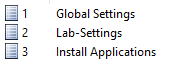
I have created a global settings that should be applied for all computers, and I did this under Advanced Configuration > Database > Roles
After that I created a computer in the section Computers and under Roles I added my global settings.
But the settings seems not to be applied, I moved CRoles to the end of my list for highest priority? Like below and what does the C and L and MM stands for?
My customsettings.ini looks like this: [Settings] Priority=Default, CSettings, CPackages, CApps, CAdmins, Locations, LSettings, LPackages, LApps, LAdmins, LRoles, MMSettings, MMPackages, MMApps, MMAdmins, MMRoles, RSettings, RPackages, RApps, RAdmins, Model, SetOSD, CRoles
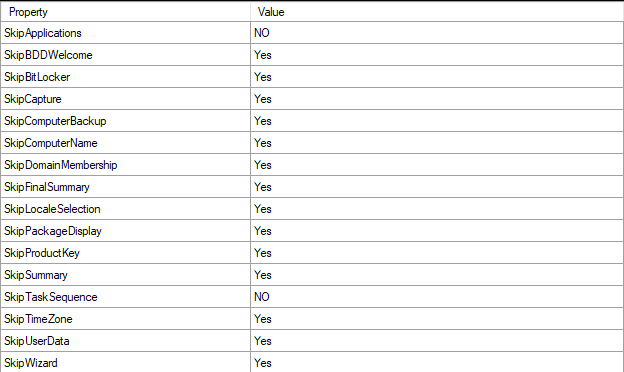
For example "Computer Details" appears on the client screen even that SkipComputername and SkipDomainMembership have the value "YES"
If I add these properties in the Default section in my customsettings.ini, then the computerdetails will disappear.
I also created an application were I can start litetouch.vbs from the desktop and choose which applications to be installed after OS deployment. But it does not work if I have specified a tasksequence under Roles (my global settings), let say 006 that would install the Operatingsystem and my application have the following arguments:
Start-Process -FilePath "Cscript.exe" -ArgumentList "\\I.P.A.d.d.r.e.s.s\DS\scripts\litetouch.vbs /TaskSequenceID:002 /SkipTaskSequence:YES" -WindowStyle Hidden
Which results that the computer will reboot and not start tasksequenceID:002 (which holds the applications). I guess 006 have higher priorites?
If I remove tasksequence 006 from my global settings, then there is no issue to start litetouch.vbs and select applications
Thaaaaanks!
' cx='32' cy='32' r='32' /%3E%3Ctext x='50%25' y='55%25' dominant-baseline='middle' text-anchor='middle' fill='%23FFF' %3EL%3C/text%3E%3C/svg%3E)