Which Edition of SQL Server ae you using?
Standard Edition supports only Basic availability groups, see
https://learn.microsoft.com/en-us/sql/sql-server/editions-and-components-of-sql-server-version-15?view=sql-server-ver15#RDBMSHA
No Option to choose Cluster Type under SQL always on
' cx='32' cy='32' r='32' /%3E%3Ctext x='50%25' y='55%25' dominant-baseline='middle' text-anchor='middle' fill='%23FFF' %3ED%3C/text%3E%3C/svg%3E)
DoFast
26
Reputation points
I am configuring Always-on availability group under sql 2016. WFCS is already configured with witness share. Also enabled Always-on availability groups under sql configuration manager.
Issue: I'm not getting the option to choose cluster type under the SQL availability group options wizard. is it normal or how can I enable it?
SQL Server | Other
{count} votes
-
' cx='32' cy='32' r='32' /%3E%3Ctext x='50%25' y='55%25' dominant-baseline='middle' text-anchor='middle' fill='%23FFF' %3ESX%3C/text%3E%3C/svg%3E) Seeya Xi-MSFT 16,676 Reputation points
Seeya Xi-MSFT 16,676 Reputation points2022-03-07T01:53:28.947+00:00 Hi @DoFast ,
We have not received a response from you. Did the reply could help you? If the response helped, do "Accept Answer". If it doesn't work, please let us know the progress. By doing so, it will benefit all community members who are having this similar issue. Your contribution is highly appreciated.
Best regards,
Seeya
Sign in to comment
3 answers
Sort by: Most helpful
-
 Olaf Helper 47,586 Reputation points
2022-03-03T11:08:05.897+00:00 -
DoFast 26 Reputation points
2022-03-03T11:29:53.757+00:00 SQL server Enterprise edition
Sign in to comment -
-
DoFast 26 Reputation points
2022-03-03T11:30:47.057+00:00 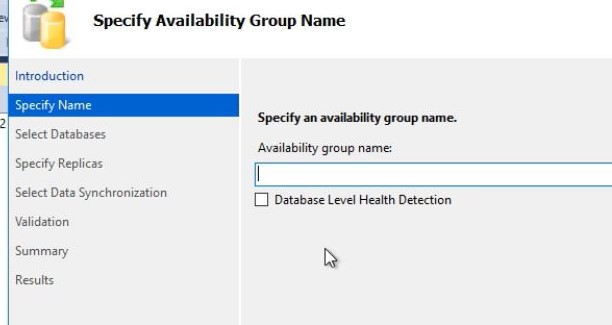
-
 Shashank Singh 6,251 Reputation points
2022-03-03T11:34:28.023+00:00 You have to specify AG name here, is that what you are asking. The AG name should be unique
-
DoFast 26 Reputation points
2022-03-03T13:26:00.813+00:00 No. there is one one more option is expected which is cluster type.
-
DoFast 26 Reputation points
2022-03-03T13:28:08.477+00:00 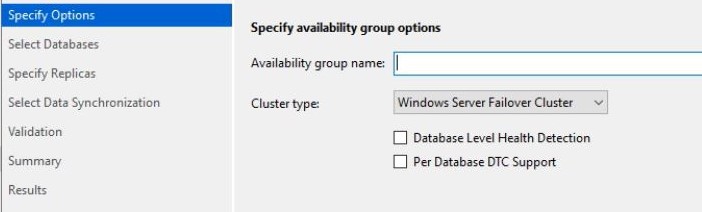
Please find the attached. this is from another server
-
Shashank Singh 6,251 Reputation points
2022-03-03T14:55:35.28+00:00 Are you creating Plain Ag or you are using SQL Server failover cluster in AG ?
-
 Erland Sommarskog 129.7K Reputation points MVP Volunteer Moderator
2022-03-03T22:51:45.517+00:00 Out of curiosity: why do you want to choose the cluster type, if it is already configured?
-
DoFast 26 Reputation points
2022-03-04T05:10:56.357+00:00 Cluster type should be selected while creating availability group. there are other options available in the scroll down
-
Erland Sommarskog 129.7K Reputation points MVP Volunteer Moderator
2022-03-04T22:22:27.143+00:00 So which other cluster type do you want to select?
Sign in to comment -
-
Seeya Xi-MSFT 16,676 Reputation points
2022-03-04T07:36:01.833+00:00 Hi @DoFast ,
Do you have other availability group in this node which has the option.
In my environment, i have two availability groups. When i start to create new availability group, the option is here.
Please see this related document: Specify Availability Group Options

Best regards,
Seeya
If the answer is the right solution, please click "Accept Answer" and kindly upvote it. If you have extra questions about this answer, please click "Comment".
Note: Please follow the steps in our documentation to enable e-mail notifications if you want to receive the related email notification for this thread.