Developer technologies | Universal Windows Platform (UWP)
A Microsoft platform for building and publishing apps for Windows devices.
This browser is no longer supported.
Upgrade to Microsoft Edge to take advantage of the latest features, security updates, and technical support.

Greetings All,
in my UWP user control I'm trying to create a circle of illumination of exactly the diameter I specify, in this specific case the circle of illumination should a diameter of 20.
To do this I calculate the angle between the centre if my proposed illumination circle, the spotlight centre and its edge, double it and use the result as the InnerConeAngleInDegrees and OuterConeAngleInDegrees value. The calculation is performed as follows: the Z value of the spotlight's Offset Vector3 structure is set to 50, the desired diameter of the circle of illumination is 20, therefore the distance between the centre of my illumination circle and its edge is 10.
To calculate the angle between the centre of my proposed illumination circle, the spotlight centre and its edge I calculate the tangent of that angle by dividing the distance between the centre of my illumination circle and it edge (i.e. 10) by the distance from the centre of my illumination circle to the spotlight (i.e. the spotlight's Offset Z value - 50) - basic trigonometry tan = opposite over adjacent.
I then convert the tangent value to degrees by calling the Math.Atan() function and convert the result from radians to degrees by multiplying my 180/Math.PI. I double the returned value and use the result as the InnerConeAngleInDegrees and OuterConeAngleInDegrees value.
I placed a rectangle (size 20 x 20) at the centre of the display in order to check the diameter of the spotlight 'beam'. However, the resulting illuminated circle is much bigger than the calculations should have produced as can be seen from the following screenshot.
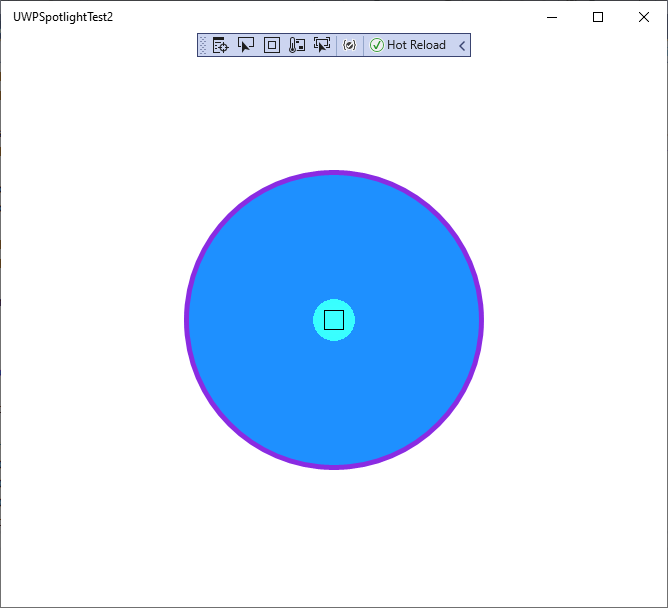
I have included the code from my user control, below. so it can be checked.
User Control Xaml:
<UserControl
    x:Class="UWPSpotlightTest2.TestSpotUserControl"
    xmlns="http://schemas.microsoft.com/winfx/2006/xaml/presentation"
    xmlns:x="http://schemas.microsoft.com/winfx/2006/xaml"
    xmlns:local="using:UWPSpotlightTest2"
    xmlns:d="http://schemas.microsoft.com/expression/blend/2008"
    xmlns:mc="http://schemas.openxmlformats.org/markup-compatibility/2006"
    mc:Ignorable="d"
    d:DesignHeight="300"
    d:DesignWidth="400" Loaded="UserControl_Loaded" SizeChanged="UserControl_SizeChanged">

    <Grid Name="TheGrid">
        <Grid.Lights>
            <local:TestAmbientLight/>
        </Grid.Lights>
        <Ellipse x:Name="OuterCirc" Fill="DodgerBlue" Width="300" Height="300" StrokeThickness="5" Stroke="BlueViolet"/>
        <Rectangle Fill="DodgerBlue" Width="{x:Bind SpotLightDimension}" d:Width="20" Height="{x:Bind SpotLightDimension}" d:Height="20" Stroke="Black" StrokeThickness="1"/>
    </Grid>
</UserControl>
User Control Code Behind:
    **public sealed partial class TestSpotUserControl : UserControl
    {
        private bool IsDataInitiated;

        private double gridWidth;
        private double gridHeight;
        private Point gridCentre;

        private SpotLight myLight;

        private const float SpotLightZVal = 50;
        private const float SpotLightWidth = 20;

        public float SpotLightDimension
        {
            get { return SpotLightWidth; }
        }

        public TestSpotUserControl()
        {
            this.InitializeComponent();
            IsDataInitiated = false;
        }

        private void UserControl_Loaded(object sender, RoutedEventArgs e)
        {
            InitInternalData();
        }
        private void InitInternalData()
        {
            gridWidth = TheGrid.ActualWidth;
            gridHeight = TheGrid.ActualHeight;
            gridCentre.X = gridWidth / 2;
            gridCentre.Y = gridHeight / 2;

            var gridVisual = ElementCompositionPreview.GetElementVisual(TheGrid);

            var compositor = gridVisual.Compositor;
            this.myLight = compositor.CreateSpotLight();
            this.myLight.CoordinateSpace = gridVisual;
            this.myLight.InnerConeColor = Colors.White;

            float halfAngle = (float)Math.Atan((SpotLightWidth / 2.0) / SpotLightZVal) * (float)(180 / Math.PI);
            this.myLight.InnerConeAngleInDegrees = this.myLight.OuterConeAngleInDegrees = (halfAngle * (float)2.0);

            float topX = (float)(gridCentre.X);
            float topY = (float)(gridCentre.Y);

            this.myLight.Offset = new Vector3(topX, topY, SpotLightZVal);
            this.myLight.Targets.Add(gridVisual);

            IsDataInitiated = true;
        }

        private void UserControl_SizeChanged(object sender, SizeChangedEventArgs e)
        {
            if (myLight != null && myLight.Offset != null)
            {
                Vector3 newOffset = new Vector3();
                newOffset.X = (float)(e.NewSize.Width / 2.0);
                newOffset.Y = (float)(e.NewSize.Height / 2.0);
                newOffset.Z = myLight.Offset.Z;
                myLight.Offset = newOffset;
            }
        }
    }**
I'm quite willing to admit that I may have made a mistake in my calculations and, if so, could someone please point out the error. If not, and my calculations are correct, then it would appear that there's a bug in the UWP spotlight class.
If this is a bug then can someone please tell me exactly how I go about reporting it?
Many thanks.
A Microsoft platform for building and publishing apps for Windows devices.
' cx='32' cy='32' r='32' /%3E%3Ctext x='50%25' y='55%25' dominant-baseline='middle' text-anchor='middle' fill='%23FFF' %3EA%3C/text%3E%3C/svg%3E)
Could you please share the code about <local:TestAmbientLight/> with us?
Please do not post another same question in Microsoft Q&A. You could edit your question to post your code.
Hi @Anonymous ,
did you get the code for TestAmbientLight? I'm having some real problems with the Q&A website. I couldn't reply to you with the code as it kept on asking me to sign in even though I had already signed in. It seems to work now.
I've included the code just in case didn't get it:
public class TestAmbientLight : XamlLight
     {
         protected override void OnConnected(UIElement newElement)
         {
             if (newElement != null)
             {
                 Compositor compositor = Window.Current.Compositor;

                 // Create AmbientLight and set its properties
                 AmbientLight ambLight = compositor.CreateAmbientLight();

                 ambLight.Color = Colors.White;


                 // Associate CompositionLight with XamlLight
                 this.CompositionLight = ambLight;


                 TestAmbientLight.AddTargetElement(GetId(), newElement);
             }
         }

         protected override void OnDisconnected(UIElement oldElement)
         {
             // Dispose Light when it is removed from the tree
             TestAmbientLight.RemoveTargetElement(GetId(), oldElement);
             //var temp
             CompositionLight.Dispose();
         }

         protected override string GetId()
         {
             return typeof(TestAmbientLight).FullName;
         }
     }
Please let me know if this is OK.
Answer accepted by question author
Hello,
Welcome to Microsoft Q&A!
I could reproduce your issue with the code you shared. There is nothing wrong with your calculation of the angle. The logic is correct. Now, please take a look at the SpotLight.InnerConeAngleInDegrees Property. It's an inner cone angle, expressed as a semi-vertical angle in degrees. So you don't need to double it when you assign the angle value to the property.
Change your code like this:
this.myLight.InnerConeAngleInDegrees = this.myLight.OuterConeAngleInDegrees = (halfAngle);
And it looks like this:
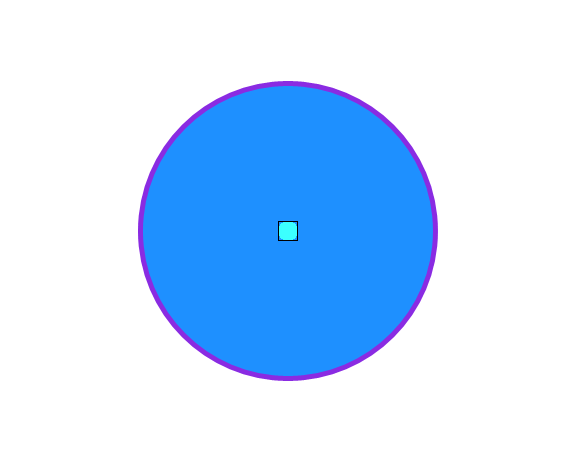
Please let me know if you have other questions.
Thank you.
If the answer is the right solution, please click "Accept Answer" and kindly upvote it. If you have extra questions about this answer, please click "Comment".
Note: Please follow the steps in our documentation to enable e-mail notifications if you want to receive the related email notification for this thread.
Hi @Anonymous ,
many thanks for your reply. I don't know how I missed that part in the documentation that stated the InnerConeAngleInDegrees and OuterConeAngleInDegrees were expressed as a semi-vertical angle. I'm sure I saw a diagram somewhere that indicated the angle value was the whole angle not just half but I was obviously mistaken.
I marking your reply as the answer, as it is the answer. Thanks, once again, for your help.
Kind regards.