
10,968 questions
This browser is no longer supported.
Upgrade to Microsoft Edge to take advantage of the latest features, security updates, and technical support.
' cx='32' cy='32' r='32' /%3E%3Ctext x='50%25' y='55%25' dominant-baseline='middle' text-anchor='middle' fill='%23FFF' %3EHD%3C/text%3E%3C/svg%3E)
After a TEAMS meeting I often want to schedule a follow-up meeting with the same invitee-emails and info. How can I just copy the invitation for another date? If I forward the invitation to another date, the original calendar note disappears from my calendar and I lose that record of the event, which I don't want to do.
' cx='32' cy='32' r='32' /%3E%3Ctext x='50%25' y='55%25' dominant-baseline='middle' text-anchor='middle' fill='%23FFF' %3ESL%3C/text%3E%3C/svg%3E)
Is it possible to do this within the Team's app itself? Or is it necessary to use Outlook or the web-based 365 Email login?
' cx='32' cy='32' r='32' /%3E%3Ctext x='50%25' y='55%25' dominant-baseline='middle' text-anchor='middle' fill='%23FFF' %3EMG%3C/text%3E%3C/svg%3E)
I had a similar ask. An answer I found and used worked. From Outlook, hover over the meeting with the pointer, press and hold the Control (Ctrl) key and drag the meeting to the desired date and time. In my case, the meeting was the next day and it was easy to drop it where I wanted it. I'm not sure how this would work if the follow-up is on a subsequent week.
' cx='32' cy='32' r='32' /%3E%3Ctext x='50%25' y='55%25' dominant-baseline='middle' text-anchor='middle' fill='%23FFF' %3EQ%3C/text%3E%3C/svg%3E)
Somehow helpful, but it doesn't let you to check the calendar of other participants.
' cx='32' cy='32' r='32' /%3E%3Ctext x='50%25' y='55%25' dominant-baseline='middle' text-anchor='middle' fill='%23FFF' %3ETP%3C/text%3E%3C/svg%3E)
They've disabled this functionality now in Office 365.
' cx='32' cy='32' r='32' /%3E%3Ctext x='50%25' y='55%25' dominant-baseline='middle' text-anchor='middle' fill='%23FFF' %3EJM%3C/text%3E%3C/svg%3E)
Yes, this works. However, participants won't get a notification for the new meeting if they have dismissed the notification for the meeting that already took place. I regularly miss meetings because the notifications are not in place and people have to ping me to ask me to join.
' cx='32' cy='32' r='32' /%3E%3Ctext x='50%25' y='55%25' dominant-baseline='middle' text-anchor='middle' fill='%23FFF' %3EAB%3C/text%3E%3C/svg%3E)
On teams 365, right click on existing meeting and select "Duplicate event". This will open the usual event config tab where you can adjust date/time etc.
' cx='32' cy='32' r='32' /%3E%3Ctext x='50%25' y='55%25' dominant-baseline='middle' text-anchor='middle' fill='%23FFF' %3ERG%3C/text%3E%3C/svg%3E)
My Teams is a standalone Teams for Windows and there is no such an option. Not sure if it's 365 or not
' cx='32' cy='32' r='32' /%3E%3Ctext x='50%25' y='55%25' dominant-baseline='middle' text-anchor='middle' fill='%23FFF' %3EMM%3C/text%3E%3C/svg%3E)
This worked for me, and it preserved the original meeting on the calendar and the meeting chat from the original meeting, which is what the original question included. I had to use the browser-based version of the calendar at https://outlook.office.com/calendar/view/workweek.
' cx='32' cy='32' r='32' /%3E%3Ctext x='50%25' y='55%25' dominant-baseline='middle' text-anchor='middle' fill='%23FFF' %3EA%3C/text%3E%3C/svg%3E)
You can right-click the meeting in MS Office, "New E-Mail to Attendees". Click on free space "To", then Ctrl+A to select all Attendees. Right-click, "copy address" will copy all e-mail addresses to your clipboard, which you can then paste into a new meeting in MS teams.
I don't want a new meeting, I want to create a new instance of the existing meeting, so (like with reoccurring meetings), it keeps the same meeting thread in Microsoft Teams.
' cx='32' cy='32' r='32' /%3E%3Ctext x='50%25' y='55%25' dominant-baseline='middle' text-anchor='middle' fill='%23FFF' %3EJM%3C/text%3E%3C/svg%3E)
How can I just copy the invitation for another date?
Step1: Go to Options > calendar and change these settings like the following picture:
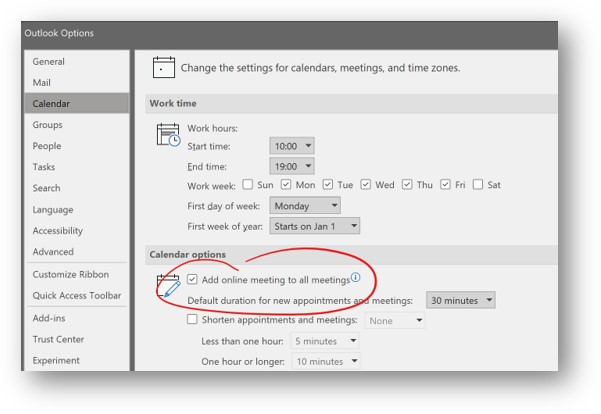
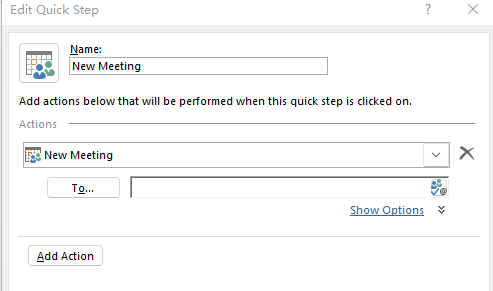
Step2: If you are using Office 365, you could try to create a quick step for Teams meeting in Outlook client. I did a test, click More option on "Quick Steps" area, then choose to Create New >New meeting , after finish it, click this New meeting Quick steps in Quick steps area to open it, then click Teams meeting in the Pop-up window. You will get a Teams meeting in Outlook.
If the answer is helpful, please click "Accept Answer" and kindly upvote it. If you have extra questions about this answer, please click "Comment".
Note: Please follow the steps in our documentation to enable e-mail notifications if you want to receive the related email notification for this thread.
It has been a while, how is everything going?
If you have any update about this issue, please feel free to post back.
' cx='32' cy='32' r='32' /%3E%3Ctext x='50%25' y='55%25' dominant-baseline='middle' text-anchor='middle' fill='%23FFF' %3ELV%3C/text%3E%3C/svg%3E)
I have used the following: Show meeting info --> Set recurrence --> custom (and I've chosen the exact number of days I needed the follow-up meeting to be, and also set the end date)
This doesn't seem to answer the question. It simply opens a new meeting.
The best (not optimal) solution I have found so far is to to reply to all participants to the meeting with a mail, and then reply to the same mail with a meeting. This preserves the meeting participants.
Ideally it would be possible to reply to a meeting with another meeting.