Microsoft 365 and Office | Access | Development
The creation and customization of database applications using Microsoft Access

This browser is no longer supported.
Upgrade to Microsoft Edge to take advantage of the latest features, security updates, and technical support.
' cx='32' cy='32' r='32' /%3E%3Ctext x='50%25' y='55%25' dominant-baseline='middle' text-anchor='middle' fill='%23FFF' %3EFR%3C/text%3E%3C/svg%3E)
Hello,
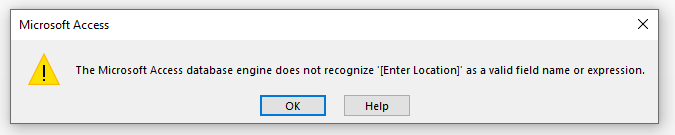
So from some previous assistance I now have a Union/Crosstab Query where I can enter a parameter. This does work for the query. Can this also be utilized to run an associated report? When I attempt to run the report based on the query, I receive the following...
Attached is a text file with the SQL.
180254-select.txt
The creation and customization of database applications using Microsoft Access
Answer accepted by question author

The IN operator does not accept a parameter as its argument. It must be a literal expression. However, many years ago Microsoft published a couple of functions which simulate the use of the IN operator with a parameter:
Function GetToken(stLn, stDelim)
Dim iDelim As Integer, stToken As String

iDelim = InStr(1, stLn, stDelim)

If (iDelim <> 0) Then
    stToken = LTrim$(RTrim$(Mid$(stLn, 1, iDelim - 1)))
    stLn = Mid$(stLn, iDelim + 1)
Else
    stToken = LTrim$(RTrim$(Mid$(stLn, 1)))
    stLn = ""
End If

GetToken = stToken
End Function
'============================================================
' The InParam() function is the heart of this article. When
' the query runs, this function causes a query parameter
' dialog box to appear so you can enter a list of values.
' The values you enter are interpreted as if you
' had entered them within the parentheses of the In() operator.
'============================================================
Function InParam(Fld, Param)
Dim stToken As String
'The following two lines are optional, making queries
'case-insensitive
Fld = UCase(Fld)
Param = UCase(Param)

If IsNull(Fld) Then Fld = ""
    Do While (Len(Param) > 0)
    stToken = GetToken(Param, ",")
    If stToken = LTrim$(RTrim$(Fld)) Then
        InParam = -1
        Exit Function
    Else
        InParam = 0
    End If
Loop
End Function
The syntax for calling the InParam function in a query is:
WHERE InParam([ColumnName],[Parameter]) = TRUE
You cannot include an aggregate function in a query's ORDER BY clause, but a query used as a report's RecordSource property should not be ordered in any case. It should be done by means of the report's internal sorting and grouping mechanism, so you can sort the report in descending order by the Total Of TotalAmount column in the normal way.
Thanks Ken! This report looks great.
As a second option, is it possible to do an ORDER BY Total Of TotalAmount DESC?
PS: I notice you say it works in the query. The only way I can think of that it would is that only a single value is entered as the parameter, which makes the use of the IN operator pointless as the equality operator, =, could be used more efficiently.
Thanks Ken!
As always, a follow-up question. I have modified the SQL per the attached where [Location] and [Fiscal Year] do not use the IN operator and the [Cost Element] has specific IN values. [Location] and [Fiscal Year] are using "=". Have I misunderstood you initial response?
Yes, that's what I was suggesting.
Hello Ken,
I am still receiving the same error message.

Attached is a text version with the name of the Report (that runs from a Crosstab query) that is based on the UNION ALL query. Can you assist?
Parameters in crosstab queries must be declared:
PARAMETERS [Enter Location] TEXT(50), [Enter FY] SHORT;
TRANSFORM SUM(qryBldg_PreXtb.TotalAmount) AS SumOfTotalAmount
etc……….