Microsoft Security | Windows Autopilot
A service that simplifies device provisioning and setup for end users, enabling zero-touch deployment

This browser is no longer supported.
Upgrade to Microsoft Edge to take advantage of the latest features, security updates, and technical support.
' cx='32' cy='32' r='32' /%3E%3Ctext x='50%25' y='55%25' dominant-baseline='middle' text-anchor='middle' fill='%23FFF' %3EMR%3C/text%3E%3C/svg%3E)
I'm trying to query devices, either by getting all records or by specific ID, however the results always come back with a hardwareIdentifier of null. Please note all UUIDs and other identifiers have been obfuscated below.
Call in Graph API explorer:
https://graph.microsoft.com/beta/deviceManagement/importedWindowsAutopilotDeviceIdentities/00000000-0000-0000-0000-000000000000
Results returned to Graph API explorer:
{
    "@odata.context": "https://graph.microsoft.com/beta/$metadata#deviceManagement/importedWindowsAutopilotDeviceIdentities/$entity",
    "id": "00000000-0000-0000-0000-000000000000",
    "groupTag": "AU",
    "serialNumber": "0000000",
    "productKey": "0000000",
    "importId": "00000000-0000-0000-0000-000000000000",
    "hardwareIdentifier": null,
    "assignedUserPrincipalName": null,
    "state": {
        "deviceImportStatus": "complete",
        "deviceRegistrationId": "00000000-0000-0000-0000-000000000000",
        "deviceErrorCode": 0,
        "deviceErrorName": "None"
    }
}
I tried expanding the record but apparently its not one that supports expansion. Any ideas?

@MitchellRichters-4091 Thanks for posting in our Q&A.
For this issue, I have done the test in my lab. It shows as same as yours. The value of "hardwareIdentifier" shows null.
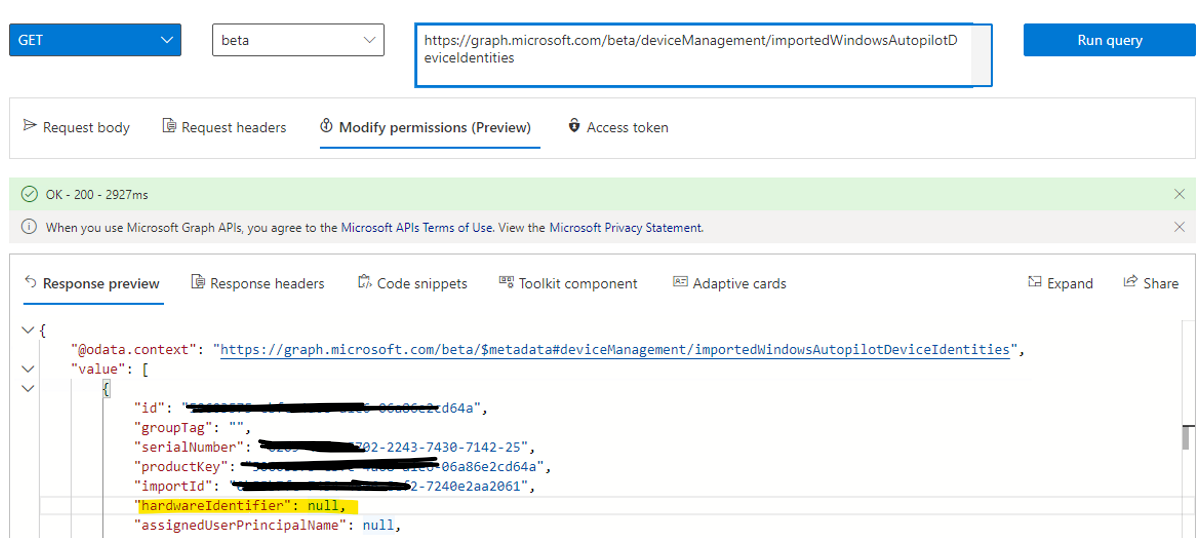
Honestly, I'm not sure if it is an issue or it is by design. To get more accurate help, it is suggested to create a premier support ticket. Here is the support link:
https://learn.microsoft.com/en-us/mem/get-support#premier-and-unified-support-customers
Hope everything goes well with you.
If the answer is the right solution, please click "Accept Answer" and kindly upvote it. If you have extra questions about this answer, please click "Comment".
Note: Please follow the steps in our documentation to enable e-mail notifications if you want to receive the related email notification for this thread.
I shouldn't need premier support with Microsoft to get returned data from an endpoint their documentation clearly shows returning some kind of data: https://learn.microsoft.com/en-us/graph/api/intune-enrollment-importedwindowsautopilotdeviceidentity-get?view=graph-rest-beta
I'll raise a case with them and see what they say, though.
I have seen this article that does show the value of hardwareIdentifier. However, the hardwareIdentifier shows null based on our test.
I totally understand your confusion, but there is no helpful information I can share with you about it. Let's wait the response from the online support engineer.