Developer technologies | Transact-SQL
A Microsoft extension to the ANSI SQL language that includes procedural programming, local variables, and various support functions.
This browser is no longer supported.
Upgrade to Microsoft Edge to take advantage of the latest features, security updates, and technical support.
' cx='32' cy='32' r='32' /%3E%3Ctext x='50%25' y='55%25' dominant-baseline='middle' text-anchor='middle' fill='%23FFF' %3ECP%3C/text%3E%3C/svg%3E)
Hello Community,
I am trying to concatentate date and time values which are currently created as Integer type fields and place the results into another field in the format YYYY-MM-dd hh:mm:ss
So, I have the following table
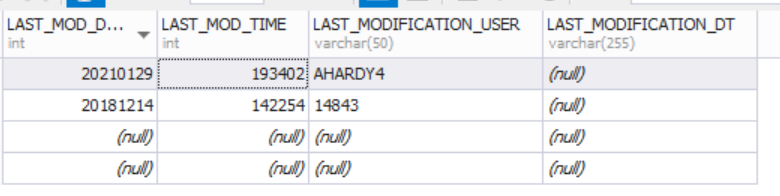
I would like concatenate LAST_MODE_DATE and LAST_MOD_TIME and place the results in LAST_MODIFICATION_DT, so that it appears as follows:

The data for the above is as follows:
CREATE TABLE #tmpTable (
    LAST_MOD_DATE int,
    LAST_MOD_TIME int,
    LAST_MODIFICATION_USER varchar(50),
    LAST_MODIFICATION_DT varchar(255))

INSERT #tmpTable VALUES
(NULL,NULL,NULL,NULL),
(20181214,142254,'14843',NULL),
(20210129,193402,'AHARDY4',NULL),
(NULL,NULL,NULL,NULL)

SELECT * FROM #tmpTable
Thanks

Try these acrobatics too:
update #tmpTable
set LAST_MODIFICATION_DT = format(LAST_MOD_DATE, '0000"-"00"-"00" "') + format(LAST_MOD_TIME, '00":"00":"00')
Now, that's I'm talking about ... thanks

Why varchar(255) for the LAST_MODIFICATION_DT column? What's wrong with datetime2(0)? Storing date/time values in strings is a lousy idea. Sooner or later you will be looking at 2023-02-29 25:12:76 or something equally silly.
Anyway, here is a query for you:
UPDATE #tmpTable
SET    LAST_MODIFICATION_DT = convert(varchar(255),
                                 convert(datetime2(0),
                                   convert(char(8), LAST_MOD_DATE) + ' ' +
                                   convert(char(2), LAST_MOD_TIME / 10000) + ':' +
                                   convert(char(2), (LAST_MOD_TIME / 100) % 100) + ':' +
                                   convert(char(2), LAST_MOD_TIME % 100)
                                ),
                            121)
ErlandSommarskog,
Thanks for getting in touch.
The "LAST_MODIFICATION_DT " will be datetime2, not VARCHAR(255) - that is my error.
However, I was hoping you could just take concatentate the two fields and place the results in the LAST_MODIFICATION_DT field.
The solution you provided seems very long.
However, I was hoping you could just take concatentate the two fields and place the results in the LAST_MODIFICATION_DT field.
I believe my solution to do this. Did you try it?
The solution you provided seems very long.
Yes the acrobatics you need to do when you have placed datetime values in strings or numbers are often tedious.
But now that we know that you will be using the correct data type, we can make it a little shorter:
UPDATE #tmpTable
SET    LAST_MODIFICATION_DT = convert(datetime2(0),
                                   convert(char(8), LAST_MOD_DATE) + ' ' +
                                   convert(char(2), LAST_MOD_TIME / 10000) + ':' +
                                   convert(char(2), (LAST_MOD_TIME / 100) % 100) + ':' +
                                   convert(char(2), LAST_MOD_TIME % 100)
                                )
No need for the final convert.

The "LAST_MODIFICATION_DT " will be datetime2, not VARCHAR(255) - that is my error.
In this case you should remember that the format of the returned value might be different from the one you wrote, but THIS IUS GOOD APPROACH and it does sound better from the performance point of view regarding the amount of data you pass to the client (DATETIME2 is between 6 to 8 bytes while the string will cost more)