Microsoft 365 and Office | SharePoint | For business | Windows
A group of Microsoft Products and technologies used for sharing and managing content, knowledge, and applications.

This browser is no longer supported.
Upgrade to Microsoft Edge to take advantage of the latest features, security updates, and technical support.
' cx='32' cy='32' r='32' /%3E%3Ctext x='50%25' y='55%25' dominant-baseline='middle' text-anchor='middle' fill='%23FFF' %3EMA%3C/text%3E%3C/svg%3E)
Why I cannot rename a folder in SharePoint online however I have the delete option working?

Hi @Mahmoud Abdel Moneim
As I could not reproduce this issue on my server, to do some troubleshooting, could you rename other folders in this site? If so, you could check whether you have right permission on this folder through "Manage access":
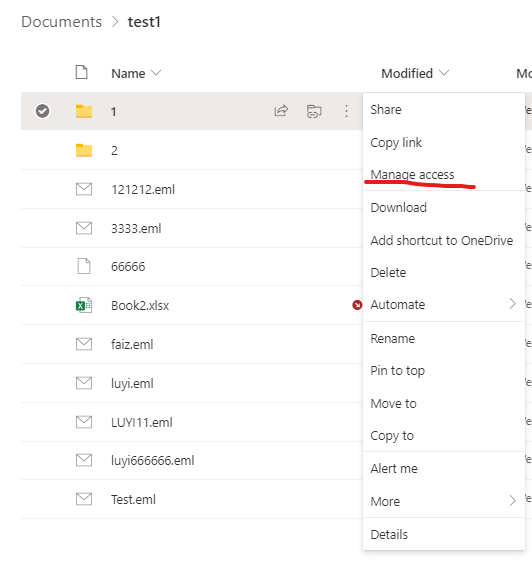
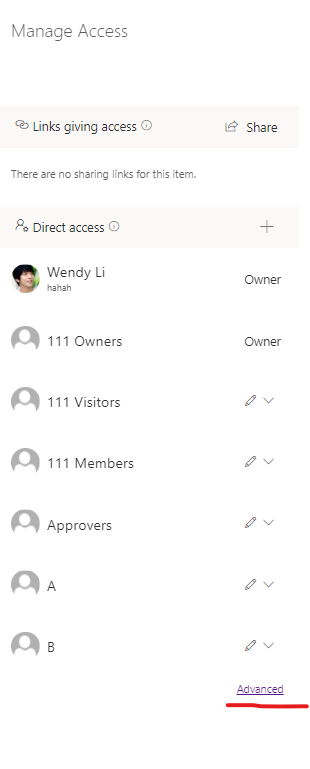
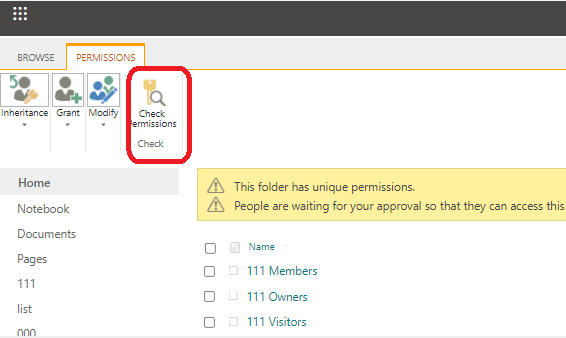
If not, you could check your site permission in site settings and permission in this library settings.
In addition, you could check whether this issue happens in other site or other accounts.
If the answer is helpful, please click "Accept Answer" and kindly upvote it. If you have extra questions about this answer, please click "Comment".
Note: Please follow the steps in our documentation to enable e-mail notifications if you want to receive the related email notification for this thread.
Hi YiLu-MSFT,
The permissions applied to these folders are contribute through a Sharepoint group and these are unique permissions, while the parent have Read only access to these groups, I changed the permission level to full control, and even that didn't work!
I can rename any subfolder under the mentioned folders.
BTW, I'm able to delete these folders normally, the problem that I can't rename any of these folders !!
Hi @Mahmoud Abdel Moneim
Are these folders different from other folders? For example: we could not rename the folders which are related to Microsoft Teams channel. Per my research, from Microsoft Teams, members and owners can rename channels, but if they go to the associated SharePoint sites they will not be able to rename the folder that is associated to the private channel.
When members or owners try to rename a SharePoint folder, they will be able to enter the new name and click Rename.
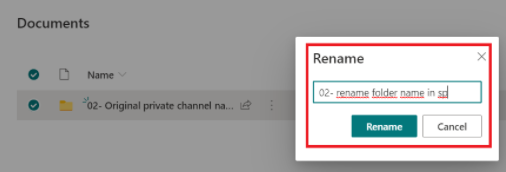
After clicking on Rename, there will be a X on the SharePoint tool bar to indicate that there is an issue.
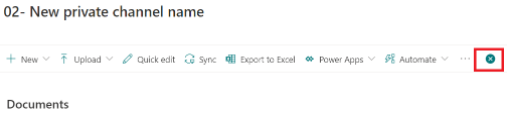
When you click on the X you’ll see the message that you cannot rename the folder from SharePoint, and that you should go to Teams to rename the channel. This is different from standard channels where you are allowed to rename the SharePoint folder that is associated with the channel.
Let say we have a tree of folder structure
1- Parent folder > all groups have read permissions
2- 2nd layer subfolders > we are stopping inheritance and applying unique permissions, so only dedicated groups have read access
3- 3rd layer subfolders (under 2nd layer), the unique permissions level changed for mentioned group form Read to Contribute permissions, that's why users can do everything within the folder except renaming these folders.
Hi @Mahmoud Abdel Moneim
Could you please pfrovide some scrrenshot? As per my research, the "rename" and "delete" permission are tied together, they are contained in this permission:
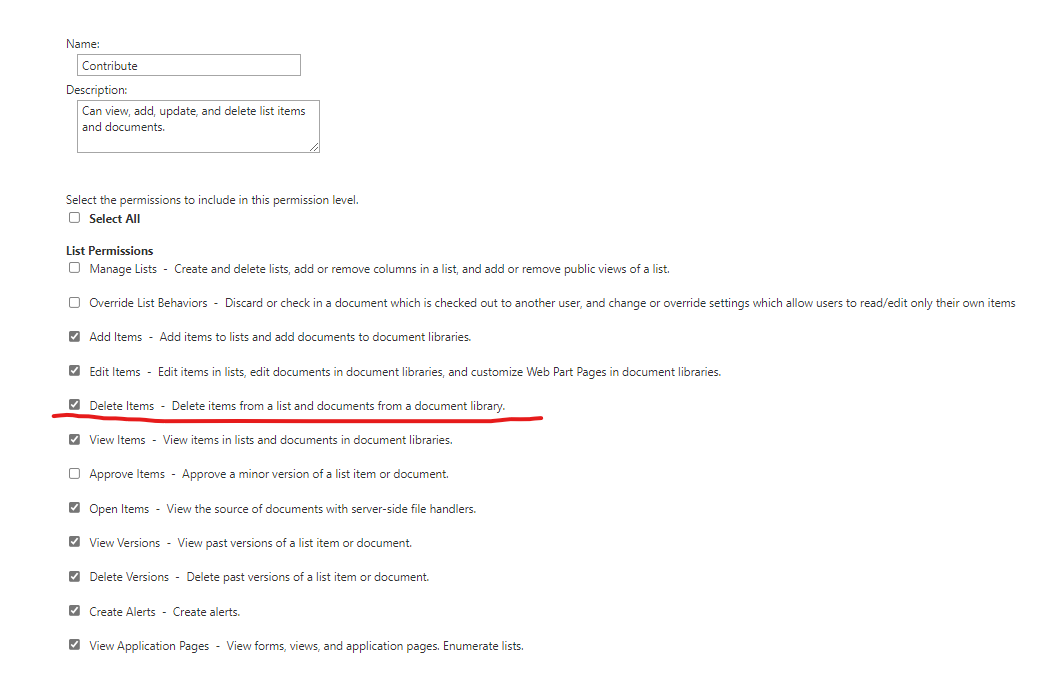
If we uncheck it, we will not have permission to rename or delete. So in my opinion, the problem might be in your folder instead of permission.
The applied permissions level is the same as u=you sent, if the problem related to folder, where I can check and troubleshoot?
Hi @Mahmoud Abdel Moneim
You could create another folder in the same location as the folders with problem to see whether it will have the same problem.
In addition, what is the specific phenomenon of this issue? Is the "Rename" option missing? Or is there some other error message?
Hi,
I created a new folder under that hierarchy and I was able to edit and rename normally.
The issue is related to rename, the function exists, but when I rename and save I get error message "Access is denied"
Hi @Mahmoud Abdel Moneim
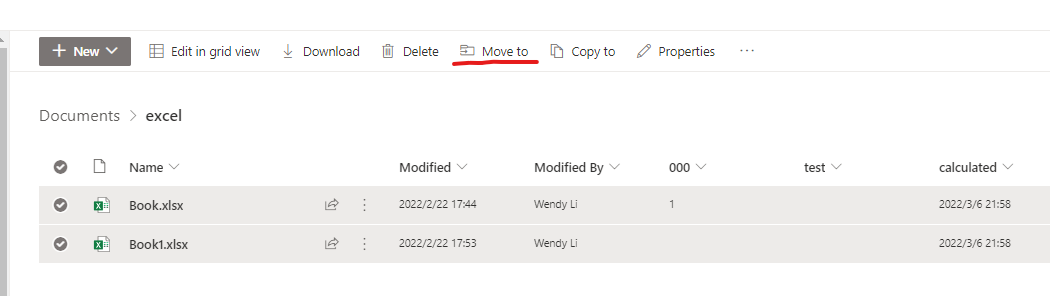
This issue is a bit strange and I could not reproduce it, luckily, it seems that the problem happens only to the specific folder, so as a workaround we could abandon it and recreate a new folder, then move the files to or copy to the new folder and delete the previous one:
If the answer is helpful, please click "Accept Answer" and kindly upvote it. If you have extra questions about this answer, please click "Comment".
Note: Please follow the steps in our documentation to enable e-mail notifications if you want to receive the related email notification for this thread.
Hi @Mahmoud Abdel Moneim
Would you please provide some update of this issue? Please feel free to reply.