Microsoft Security | Intune | Configuration Manager | Updates
Managing and deploying updates via Configuration Manager

This browser is no longer supported.
Upgrade to Microsoft Edge to take advantage of the latest features, security updates, and technical support.
' cx='32' cy='32' r='32' /%3E%3Ctext x='50%25' y='55%25' dominant-baseline='middle' text-anchor='middle' fill='%23FFF' %3EN%3C/text%3E%3C/svg%3E)
our wsus component of SCCM is broken. We went thru the process of uninstalling/installing WSUS and its failing at the post installation steps. The strange thing is that after it fails wsus still launches and SCCM can do its sync.
This is the log. I have tried running the command version of the post installation and i get the same result.
Apart from going sort of nuclear and removing wsus again, is there anything else i can try? I have followed this post for ideas
2022-03-09 14:08:01 Fetching ContentDir from registry store
2022-03-09 14:08:01 Value is F:\Source\Updates\WSUS
2022-03-09 14:08:01 Swtching DB to multi-user mode......
2022-03-09 14:08:01 Finished setting multi-user mode
2022-03-09 14:08:01 Writing DB settings to registry...
2022-03-09 14:08:01 Marking PostInstall done for UpdateServices-Database in the registry...
2022-03-09 14:08:01 Starting service W3SVC
2022-03-09 14:08:01 Configuring IIS...
2022-03-09 14:08:01 Start: ConfigureWebsite
2022-03-09 14:08:01 Configuring website on port 8530
2022-03-09 14:08:02 System.ComponentModel.Win32Exception (0x80004005): The system cannot find the file specified
at System.Diagnostics.Process.StartWithShellExecuteEx(ProcessStartInfo startInfo)
at System.Diagnostics.Process.Start(ProcessStartInfo startInfo)
at Microsoft.UpdateServices.Administration.UseCustomWebSite.ExecuteIisCustomAction(String arguments)
at Microsoft.UpdateServices.Administration.UseCustomWebSite.InstallAndConfigure(IisConfiguration& iisConfiguration, Int32 newPortNumber)
at Microsoft.UpdateServices.Administration.UseCustomWebSite.CreateWebsite(Int32 newPortNumber)
at Microsoft.UpdateServices.Administration.PostInstall.ConfigureWebsite(Int32 portNumber)
at Microsoft.UpdateServices.Administration.PostInstall.Run()
at Microsoft.UpdateServices.Administration.PostInstall.Execute(String[] arguments)

Try using my guide's removal and reinstall commands:
https://www.ajtek.ca/wsus/how-to-remove-wsus-completely-and-reinstall-it/
If that still doesn't work, what's the postinstall command you're using?
thanks
i am using wsusutil.exe postinstall SQL_INSTANCE_NAME=<SQL SERVER FQDN> CONTENT_DIR=<WSUS DIR>
Yes, but what is the "exact" command you're using - with paths and all
this
C:\Program Files\Update Services\tools\wsusutil.exe postinstall SQL_INSTANCE_NAME=server.domain.com CONTENT_DIR=F:\Source\Updates\WSUS
sccm and the sccm database and wsus database are all on the one server
Seems to fail on the IIS portion - is the WsusAppPool there and the WSUS Administration site there? If so, delete them and re-run the postinstall again. I was wanting to see the full command you were using to confirm there was no backslash at the end of the content_dir value.
Your SQL server - confirm it doesn't have an existing SUSDB, as well as look over the files of the default location of where the database files are housed on the server to confirm there's no SUSDB.mdf and ldf files. If you find any - delete/move them.
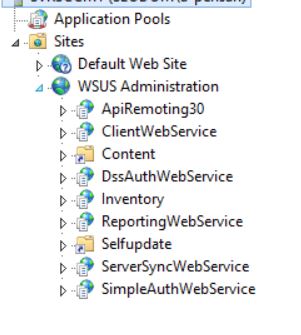
does it look like anything is missing?
Did you previously try deleting the WSUS Administration website like indicated in my guide (#3)?
' cx='32' cy='32' r='32' /%3E%3Ctext x='50%25' y='55%25' dominant-baseline='middle' text-anchor='middle' fill='%23FFF' %3ERH%3C/text%3E%3C/svg%3E)
@NP
Please follow the below steps to remove the WSUS role completely first and then we could try to reinstall the WSUS role:
To remove the WSUS completely, you need to:
a. Remove the following server roles and features through Server Manager:
Roles: Windows Server Update Server
features: Windows Server Update Services Tools(at Remote Server Administration Tools -> Role Administration Tools)
Follow the wizard prompts to complete the deletion. Then restart the server.
b. After the server is restarted, manually delete the folder or file of the following path:
c. Delete database files
If you use SQL Server Management Studio to delete a database, you can try as follow:
In Object Explorer, connect to an instance of the SQL Server Database Engine, and then expand that instance. Expand Databases, right-click the database to delete, and then click Delete. Confirm the correct database is selected, and then click OK.
If you use a WID database, it is recommended to delete the following path folders:
C:\Windows\WID
d. In the IIS Information Services (IIS) Manager, manually remove the WSUS Administration site. Then restart the server.
Please consider restarting your computer and then reinstalling WSUS after finishing above steps.
Best regards,
Rita
If the answer is the right solution, please click "Accept Answer" and kindly upvote it. If you have extra questions about this answer, please click "Comment".
Note: Please follow the steps in our documentation to enable e-mail notifications if you want to receive the related email notification for this thread.