Exchange Online
A cloud-based service included in Microsoft 365, delivering scalable messaging and collaboration features with simplified management and automatic updates.
This browser is no longer supported.
Upgrade to Microsoft Edge to take advantage of the latest features, security updates, and technical support.
' cx='32' cy='32' r='32' /%3E%3Ctext x='50%25' y='55%25' dominant-baseline='middle' text-anchor='middle' fill='%23FFF' %3EMM%3C/text%3E%3C/svg%3E)
Greetings I am currently preparing target tenant using the guide https://learn.microsoft.com/en-us/microsoft-365/enterprise/cross-tenant-mailbox-migration?view=o365-worldwide
I have reached the part where it says "Create a new migration endpoint for cross-tenant mailbox moves"
I am connected to target tenant via PowerShell remote connection and once running this script (of course all replacements done in string) :
$dehydrated=Get-OrganizationConfig | fl isdehydrated
if ($dehy -eq $true) {Enable-OrganizationCustomization}
$AppId = "[guid copied from the migrations app]"
$Credential = New-Object -TypeName System.Management.Automation.PSCredential -ArgumentList $AppId, (ConvertTo-SecureString -String "[this is your secret password you saved in the previous steps]" -AsPlainText -Force)
New-MigrationEndpoint -RemoteServer outlook.office.com -RemoteTenant "sourcetenant.onmicrosoft.com" -Credentials $Credential -ExchangeRemoteMove:$true -Name "[the name of your migration endpoint]" -ApplicationId $AppId
I am getting this error :
"Error finding certificate '' from azure key vault for tenant 'e5fcd875-c784-4c8a-9919-6c4e2fb0c40e'.
+ CategoryInfo : NotSpecified: (:) [New-MigrationEndpoint], KeyVaultFailureErrorException
+ FullyQualifiedErrorId : [Server=CY4PR12MB1927,RequestId=34a77109-32b0-4500-b929-9bdcfc24e8d3,TimeStamp=3/9/2022
6:26:22 PM] [FailureCategory=Cmdlet-KeyVaultFailureErrorException] AE8FE1BA,Microsoft.Exchange.Management.Migratio
n.MigrationService.Endpoint.NewMigrationEndpoint
+ PSComputerName : outlook.office365.com"
From what I have read in the beginning of guide this new method does not requires certificate in vault but I am getting error related to that.
Can someone please help me with this?
Regards
Mikayel
A cloud-based service included in Microsoft 365, delivering scalable messaging and collaboration features with simplified management and automatic updates.
' cx='32' cy='32' r='32' /%3E%3Ctext x='50%25' y='55%25' dominant-baseline='middle' text-anchor='middle' fill='%23FFF' %3EJS%3C/text%3E%3C/svg%3E)
According to the error information you shared above, your issue seems to be related to the target tenant.
Could you please verify again that you have correctly performed the steps introduced in this step: Prepare the target (destination) tenant by creating the migration application and secret
I am writing to see how everything is going on with this thread. If you still have further concern on this, please feel free to let us know.
If an Answer is helpful, please click "Accept Answer" and upvote it.
Note: Please follow the steps in our documentation to enable e-mail notifications if you want to receive the related email notification for this thread.
Hi @Joyce Shen - MSFT Thanks for the answer
I have solve the issue, Thanks for the answers. The problem were in command string I forgot to remove [ ] :-)
Thanks for your feedback above which shared more information and glad to know that your issue is resolved now! Since our forum has the policy that The question author cannot accept their own answer. They can only accept answers by others, and according to the scenario introduced here: Answering your own questions on Microsoft Q&A
I would make a brief summary of this post so that other forum members could easily find useful information here:
[Cross-tenant mailbox migration PS script error - Summary]
Issue Symptom:
When perform Cross-tenant mailbox migration, getting this error :
"Error finding certificate'' from azure key vault for tenant 'XXX'
Solution:
We will need to remove "[]" in the script
Reference Links:
Cross-tenant mailbox migration (preview)
You could "Accept Answer" for this summary to close this thread, and your action would be helpful to other users who encounter the same issue and read this thread. Thanks for your understanding!
If an Answer is helpful, please click "Accept Answer" and upvote it.
Note: Please follow the steps in our documentation to enable e-mail notifications if you want to receive the related email notification for this thread.
Thanks for answer already found them :-)
Hi I have one more question can someone help me wit this section
https://learn.microsoft.com/en-us/microsoft-365/enterprise/cross-tenant-mailbox-migration?view=o365-worldwide#prerequisites-for-target-user-objects
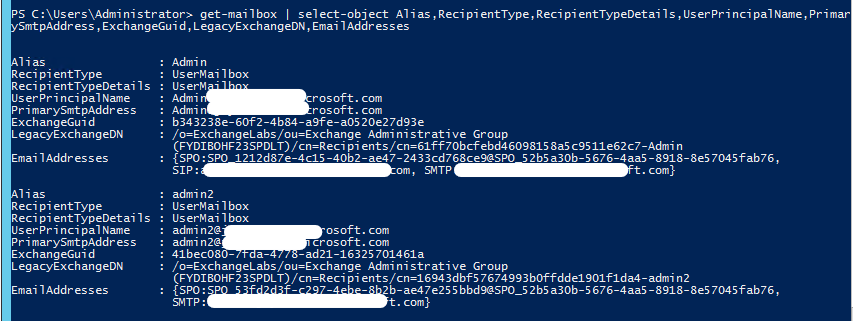
I can't find mailbox object attribute details in Exchange online both organizations fully cloud no on premise.
Thanks
Hi,
You could use Exchange online powershell to get these information
get-mailbox | select-object Alias,RecipientType,RecipientTypeDetails,UserPrincipalName,PrimarySmtpAddress,ExchangeGuid,LegacyExchangeDN,EmailAddresses
' cx='32' cy='32' r='32' /%3E%3Ctext x='50%25' y='55%25' dominant-baseline='middle' text-anchor='middle' fill='%23FFF' %3ES%3C/text%3E%3C/svg%3E)