Developer technologies | C#
An object-oriented and type-safe programming language that has its roots in the C family of languages and includes support for component-oriented programming.
This browser is no longer supported.
Upgrade to Microsoft Edge to take advantage of the latest features, security updates, and technical support.

Dear All,
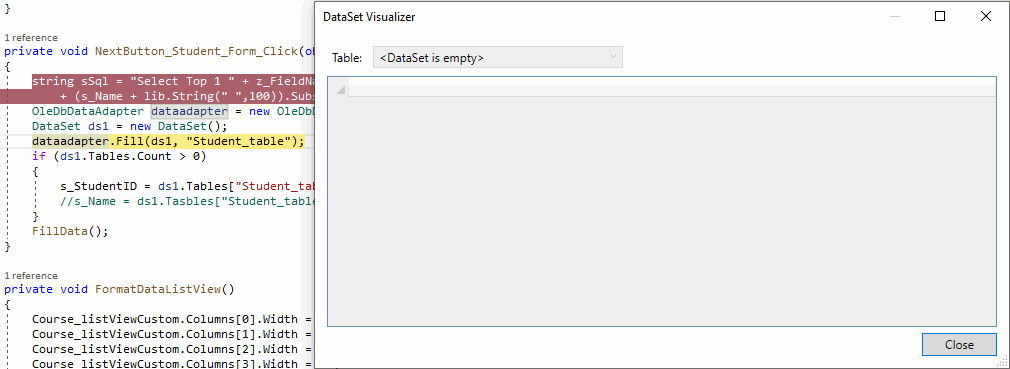
When I push the [Next] button, I find that DataSet (ds1) is null/empty. What's wrong with the following function code? I attach a screen capture and the source code below.
Screen capture:
Source code:
using System;
using System.Text;
using System.Data;
using System.Data.OleDb;
using System.Linq;
using System.Windows.Forms;
using BrightIdeasSoftware;

namespace NewTims
{
    public partial class Student_Form : Form
    {
        const string z_FieldNames = "StudentID, Name, MiddleName, ChiName, Sex, Remark"; //, ContactPerson, LastTxnDate, RegisterDate";
        const string z_Fields = "SubjectID, CourseID, Format(EnrolDate,'dd/mm/yyyy') as EnrolDate, Absence, Remark";
        static string s_Name = "";
        static string s_Remark = "";
        static string s_StudentID = "";
        static string sSql = "";
        static readonly OleDbConnection myConnection = new OleDbConnection("Provider=MSOLEDBSQL;Server=localHost;Database=" + "TIMS" + ";Trusted_Connection=yes;");
        static lib lib=new lib();

        public Student_Form(string e)
        {
            if (e != string.Empty)
                s_StudentID = e;

            InitializeComponent();
        }

        private void StudentList_Form_Load(object sender, EventArgs e)
        {
            if (s_StudentID==string.Empty)
                sSql = "Select Top 1 "+z_FieldNames+" from Student Order by Name, StudentID";
            else
                sSql = "Select Top 1 " + z_FieldNames + " from Student Where StudentID = " + s_StudentID + " Order by Name, StudentID";

            OleDbDataAdapter dataadapter = new OleDbDataAdapter(sSql, myConnection);
            DataSet ds = new DataSet();
            dataadapter.Fill(ds,"Student_table");
            s_Name = ds.Tables["Student_table"].Rows[0]["Name"].ToString();
            s_Remark = ds.Tables["Student_table"].Rows[0]["Remark"].ToString();
            if (ds.Tables.Count > 0)
            {
                var table = ds.Tables[0];
                var m_StudentID = table.AsEnumerable().Select(x => x.Field<int>("StudentID")).FirstOrDefault();
                s_StudentID=m_StudentID.ToString();
            }
            else
            {
                Course_listViewCustom.DataSource = ds;
            }
            FillData();

        }

        private void FillData()
        {
            string sSql;
            sSql = "SELECT " + z_Fields +
                " FROM StudentIDCourse" +
                " Where StudentID = '" + s_StudentID + "' Order By EnrolDate";

            OleDbDataAdapter dataadapter = new OleDbDataAdapter(sSql, myConnection);
            DataSet ds1 = new DataSet();
            dataadapter.Fill(ds1, "Course_listViewCustom_table");

            if (ds1.Tables.Count < 1)
            {
                DataTable dt = new DataTable("MyTable");

                dt.Columns.Add(new DataColumn("SubjectID", typeof(string)));
                dt.Columns.Add(new DataColumn("CourseID", typeof(string)));
                dt.Columns.Add(new DataColumn("EnrolDate", typeof(string)));
                dt.Columns.Add(new DataColumn("Absence", typeof(string)));
                dt.Columns.Add(new DataColumn("Remark", typeof(string)));

                DataRow dr = dt.NewRow();
                dr["SubjectID"] = "";
                dr["CourseID"] = "";
                dr["EnrolDate"] = "";
                dr["Absence"] = "";
                dr["Remark"] = "";

                dt.Rows.Add(dr);
                ds1.Tables.Add(dt);
            }
            //dataadapter.Fill(ds1, "Course_listViewCustom_table");
            //myConnection.Close();
            Course_listViewCustom.DataSource = ds1;
            Course_listViewCustom.DataMember = "Course_listViewCustom_table";
            FormatDataListView();

            StudentID_StudentForm.Text = int.Parse(s_StudentID).ToString("000000");
            Remark_StudentForm.Text = s_Remark;
        }

        private void NextButton_Student_Form_Click(object sender, EventArgs e)
        {
            string sSql = "Select Top 1 " + z_FieldNames + " From Student Where left(Name+replicate(' ',100),100) + Format(StudentID, '000000') > '"
                + (s_Name + lib.String(" ",100)).Substring(0,100) + int.Parse(s_StudentID).ToString("000000") + "' Order By Name, StudentID";
            OleDbDataAdapter dataadapter = new OleDbDataAdapter(sSql, myConnection);
            DataSet ds1 = new DataSet();
            dataadapter.Fill(ds1, "Student_table");
            if (ds1.Tables.Count > 0)
            {
                s_StudentID = ds1.Tables["Student_table"].Rows[0]["StudentID"].ToString();
                //s_Name = ds1.Tasbles["Student_table"].Rows[0]["Name"].ToString();
            }
            FillData();
        }

        private void FormatDataListView()
        {
            Course_listViewCustom.Columns[0].Width = 53;
            Course_listViewCustom.Columns[1].Width = 65;
            Course_listViewCustom.Columns[2].Width = 70;
            Course_listViewCustom.Columns[3].Width = 90;
            Course_listViewCustom.Columns[4].Width = 80;

            Course_listViewCustom.Columns[0].Text = "Subject";
            Course_listViewCustom.Columns[1].Text = "Course No.";
            Course_listViewCustom.Columns[2].Text = "Enrol Date";
            Course_listViewCustom.Columns[3].Text = "Absent Classes";
            Course_listViewCustom.Columns[4].Text = "Remark";

            Course_listViewCustom.OwnerDraw = true;
            Course_listViewCustom.Columns[0].TextAlign = HorizontalAlignment.Left;

            Course_listViewCustom.OwnerDraw = true;
            Course_listViewCustom.ShowGroups = false;

            Name_textBox_StudentForm.Text = s_Name;
        }
    }
}

@BenTam-3003 , I want to know if you can get the data if you exeute the query text from the sSql text in the sql server directly.
Hi @Jack J Jun
Thanks for your reply. Yes, I can get the data successfully.

According to picture, you did not execute yet the dataadapter.Fill, therefore ds1 is still empty.
Hi @Viorel
Thanks for your reply. You are right. After executing the dataadapter.Fill, ds1 is not empty.

can you check the value of sSql after the following line.
string sSql = "Select Top 1 " + z_FieldNames + " From Student Where left(Name+replicate(' ',100),100) + Format(StudentID, '000000') > '"
                 + (s_Name + lib.String(" ",100)).Substring(0,100) + int.Parse(s_StudentID).ToString("000000") + "' Order By Name, StudentID";
it seems your where condition has some problem that results in no data. Can you check and post the results?
Hi @Sreeju Nair
Thanks for your reply. I have tested the statement with the following line.
Select Top 1 * From Student Where left(Name+replicate(' ',100),100) + Format(StudentID, '000000') >
   'Accesspoint Technology Company                                                                      000038' Order By Name, StudentID
It returns the following result

So, can you doublecheck whether data is getting filled in after executing the following line.
dataadapter.Fill(ds,"Student_table");
set a breakpoint in the following line and see what is the value available in ds.
s_Name = ds.Tables["Student_table"].Rows[0]["Name"].ToString();