Share via

Project organization

Lance James 371 Reputation points
2022-03-14T15:40:33.117+00:00

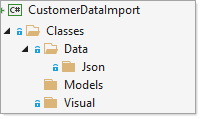
Trying to organize my project to make easier to manage.
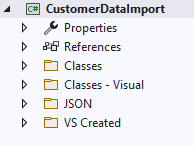
182951-image.png

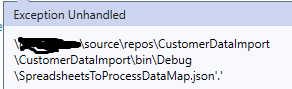
Running the debugger throws an error indicating that the JSON file cannot be found. VS is looking in the debug directory of the project for the JSON file. It seems odd that it wants the JSON file located there. Hence, I figure I must have a setting wrong somewhere.

I added reference paths to the Project for several folders thinking this would solve the issue, but it didn't.
182849-image.png

Thanks for any assistance you may share,
Lance

Developer technologies | Visual Studio | Other

A family of Microsoft suites of integrated development tools for building applications for Windows, the web, mobile devices and many other platforms. Miscellaneous topics that do not fit into specific categories.

Developer technologies | C#

An object-oriented and type-safe programming language that has its roots in the C family of languages and includes support for component-oriented programming.

0 comments No comments

Answer accepted by question author

Karen Payne MVP 35,606 Reputation points Volunteer Moderator
2022-03-14T16:11:57.683+00:00

I would not use spaces in folder names and with that provide a better structure for a project which of course is for conceptual idea of a project structure. Fill in other folders accordingly.

182906-figure1.png

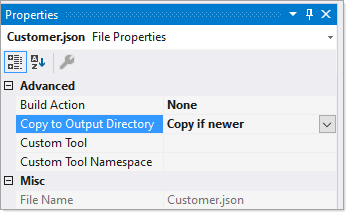
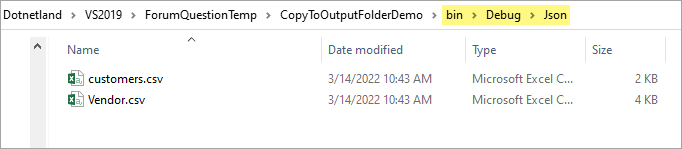
In regards to a file not found make sure to set copy to output folder. See my Microsoft article

182961-figure2.png

Was this answer helpful?


2 additional answers

Sort by: Most helpful
  1. Karen Payne MVP 35,606 Reputation points Volunteer Moderator
    2022-03-15T15:36:36.887+00:00

    For the record, seems prudent to include what can be done if you had a .NET Core 5 or higher .NET Core Framework.

    Make directory in the project file MakeDir Task

    <Target Name="MakeJsonFolder" AfterTargets="Build">  
    	<MakeDir Directories="$(OutDir)Json" />  
    </Target>	  
    

    Then Copy Task, below is a stock example

    <Project xmlns="http://schemas.microsoft.com/developer/msbuild/2003">  
      
        <ItemGroup>  
            <MySourceFiles Include="a.cs;b.cs;c.cs"/>  
        </ItemGroup>  
      
        <Target Name="CopyFiles">  
            <Copy  
                SourceFiles="@(MySourceFiles)"  
                DestinationFolder="c:\MyProject\Destination"  
            />  
        </Target>  
      
    </Project>  
    

    Was this answer helpful?

    0 comments No comments

  2. Lance James 371 Reputation points
    2022-03-14T17:14:46.82+00:00

    Thank you for the answer and I enjoyed your article.

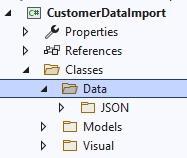
    Mimicking your structure, I have this.

    183001-image.png

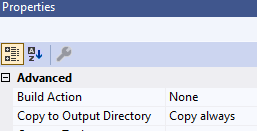
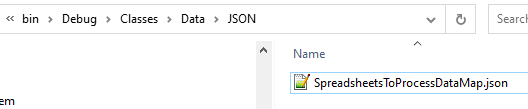
    Struggling a bit (Hopefully, there isn't a glaring omission on my part), so I chose to Copy Always for all JSON files.

    182934-image.png

    After I clean and rebuild I have the necessary structure and files.

    182964-image.png

    But the error indicates that the folder structure is ignored as it wants it in the root of the build directory.

    182946-image.png

    Regards,
    Lance

    Was this answer helpful?


Your answer

Answers can be marked as 'Accepted' by the question author and 'Recommended' by moderators, which helps users know the answer solved the author's problem.