Azure Machine Learning
An Azure machine learning service for building and deploying models.
This browser is no longer supported.
Upgrade to Microsoft Edge to take advantage of the latest features, security updates, and technical support.
' cx='32' cy='32' r='32' /%3E%3Ctext x='50%25' y='55%25' dominant-baseline='middle' text-anchor='middle' fill='%23FFF' %3ESZ%3C/text%3E%3C/svg%3E)
now I would like to migrate the machine learning component from 'dev environment' to 'prd environment', may I know how I can do step by step, thanks。
' cx='32' cy='32' r='32' /%3E%3Ctext x='50%25' y='55%25' dominant-baseline='middle' text-anchor='middle' fill='%23FFF' %3EB%3C/text%3E%3C/svg%3E)
With Azure Machine Learning Service, once the data scientist builds a satisfactory model, the trained model can be easily put into production and monitored.
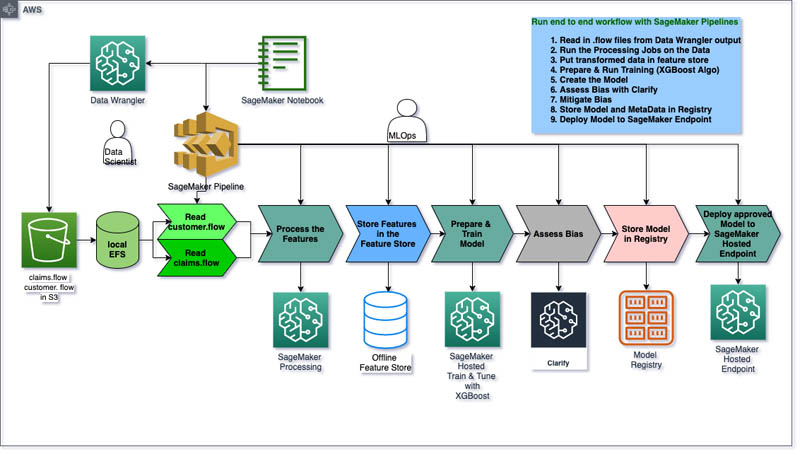
The following diagram illustrates the complete deployment workflow (compare Amazon AWS with Microsoft Azure):
Amazon AWS:
Microsoft Azure:
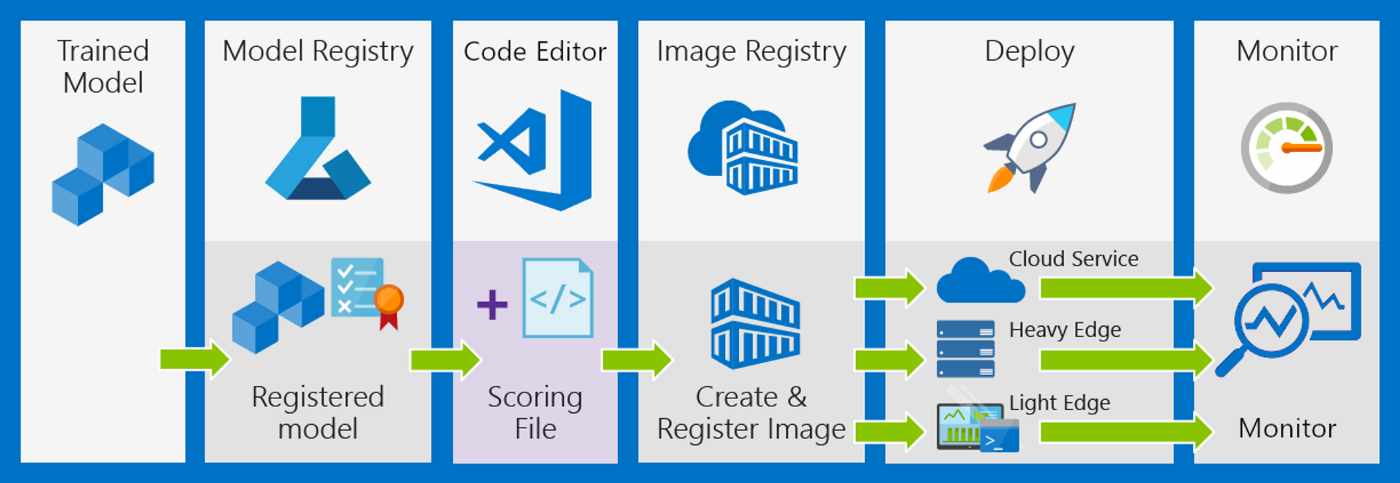
Basically, you should perform the following steps:
' cx='32' cy='32' r='32' /%3E%3Ctext x='50%25' y='55%25' dominant-baseline='middle' text-anchor='middle' fill='%23FFF' %3EYM%3C/text%3E%3C/svg%3E)
Hello @Seiya Sum
Thanks for reaching out to us. I think you are mentioning how to register and reuse your Azure Machine Learning Component. Components are automatically shared with users in the same workspace. You can reuse components across pipelines, environments, workspaces, and subscriptions. Built-in version-tracking lets you keep track of changes and reproduce results.
To do that, you need to register your created component as below guidance and reuse your component by changing the YAML file.
Hope this helps.
Regards,
Yutong
-Please kindly accept the answer if you feel helpful, thanks.
no, I think I need to describe more, it's about migrated from 'resource group A' to 'resource group B', resource group A is dev environment, resource group B is prd environment, meanwhile I need to rename the 'machine learning' name. e.g. from 'ml-dev' -> 'ml-prd'. thanks.
Hello @Seiya Sum
I am sorry if I missed your scenario. I think you are talking about how to migrate from dev resource group to product group, which means move whole workspace including components/ environments to another resource group, there is a guidance to do so: https://learn.microsoft.com/en-us/azure/machine-learning/how-to-move-workspace
Please let me know if I am still not in the correct thinking path.
To add more, if you just want to reuse the component, you don't need to move. If you want to do the dev-product migration, you can refer to above.
Thanks.
Regards,
Yutong