Azure Data Factory
An Azure service for ingesting, preparing, and transforming data at scale.
This browser is no longer supported.
Upgrade to Microsoft Edge to take advantage of the latest features, security updates, and technical support.

First of, I know there are similar solutions exists but this problem is somewhat different.
I have a process that produces multiple csv files based on user input 'n' (Where n > 1 and n <100). Means user can generate any number of files.
These files have same columns:
file1 -> Col1 Col2 Col3 Col4 Col5 output
file2 -> Col1 Col2 Col3 Col4 Col5 output
file3 -> Col1 Col2 Col3 Col4 Col5 output
These files are stored in azure blob with some datapath.
I want to read all the files and produce a result file like this:
Col1 Col2 Col3 Col4 Col5 output1 output2 output3
Is there any way of doing this dynamically. I.e without creating multiple sources in data flow and joining them because the files generated depends on the user and I cannot hardcode it.

Hi @Obaid Ur Rehman ,
If below answer helps you, then please consider marking it as Accepted Answer. Accepted answers helps community as well. Please let us know if any further queries. Thank you.
Ofcourse! :)

Hi @Obaid Ur Rehman ,
Thank you for the ask.
You can try the following:
Please see the screenshots for details. Hope this helps, thanks!


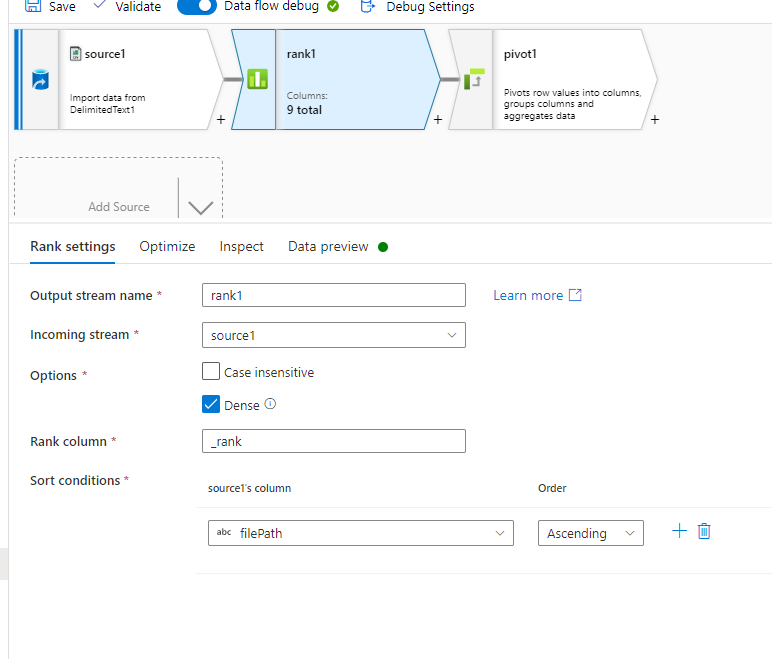
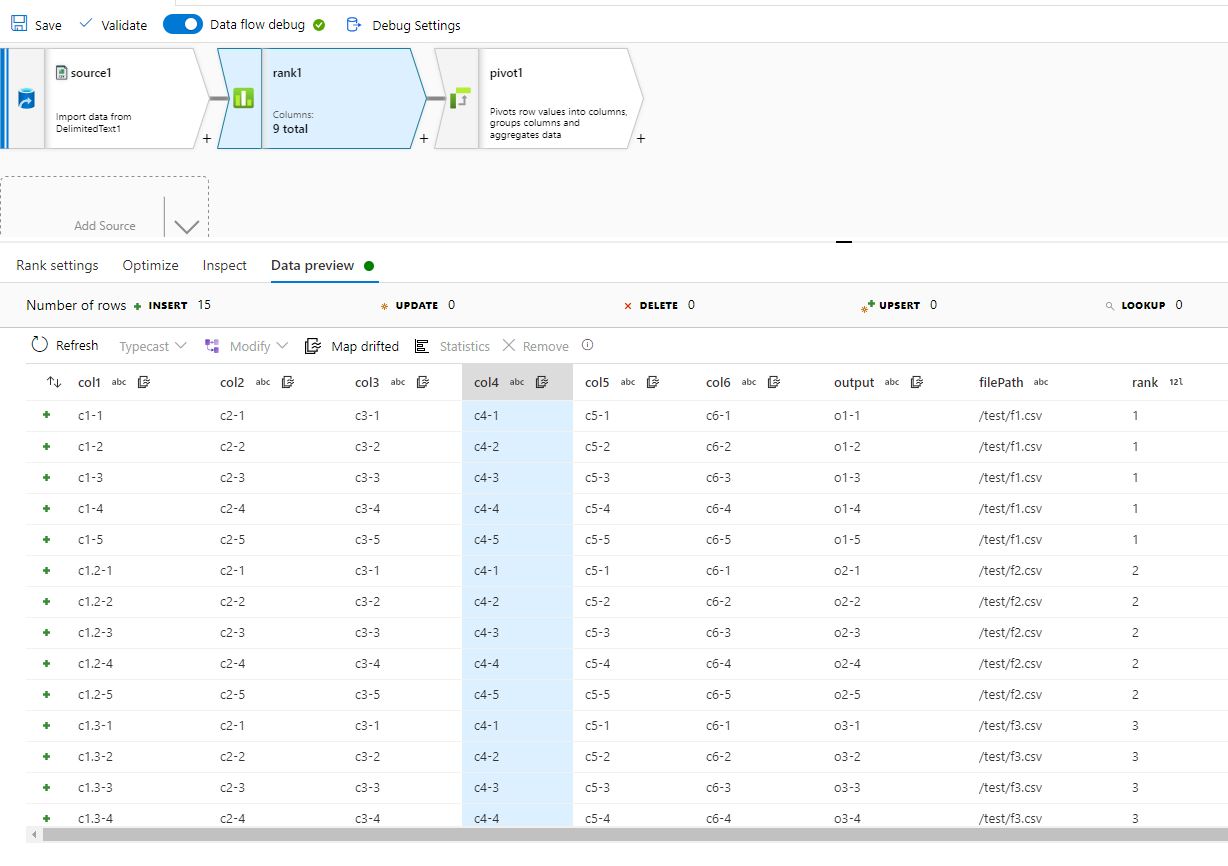
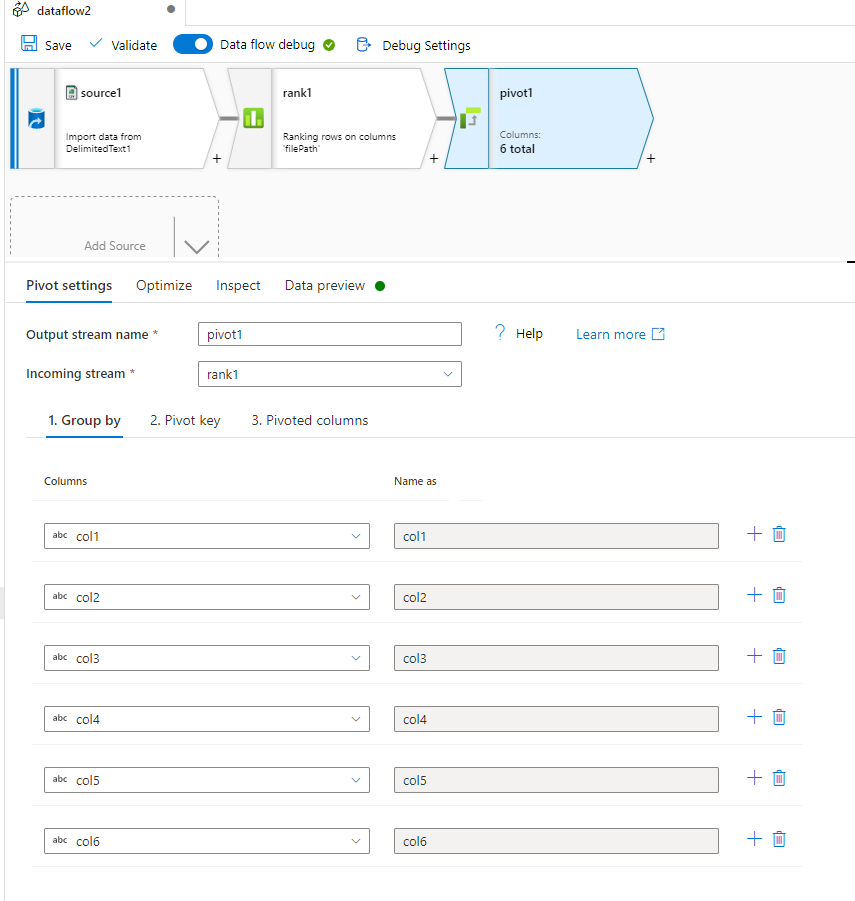


Thanks you so much for elaborate answer.
One confusion thought, all the files have same number of rows and columns. In your answer, the last image, it shows a lot of NULL where as in my desired output there should be no NULL. This is how the desired output will look like
 Col1 Col2 Col3 Col4  Output1       Output2       Output3
    c11   c21   c31   c41   o12           o21         o31
    c12   c22    c32   c42  o22           o22         o32
    c13   c23    c33   c43  o23           o23         o33
Can you please help with that :)
Hi @Obaid Ur Rehman ,
In your output, you are not seeing any null values because I believe all your files have exact same column-values for col1-4 except output column. So, when you are doing the GroupBy in Pivot with col1-4, it only returning unique records based on the groupby. Hope this helps. Thanks!
Thanks for the reply, it was mistake on my end, the col1-4 stays the same and I have no NULLs now. I would be thankful if you can help with this last issues:)
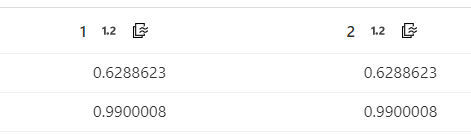
Hi @Obaid Ur Rehman ,
for Question#1: Unfortunately, I do not see any option to do Column Expression in the PIVOT :(
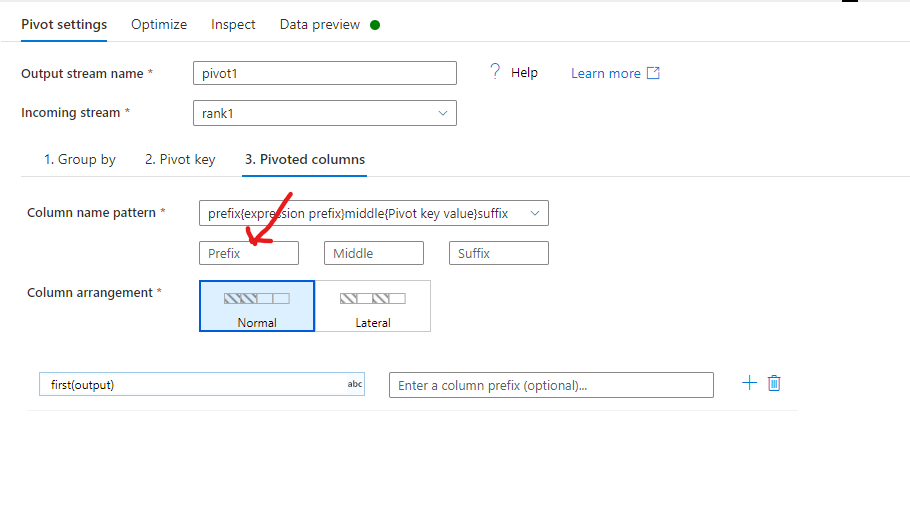
for Question#2: If you delete the output TEXT from Pivoted Columns --> Column name pattern, you will only get 1, 2, .... values from _rank column.
Hi @Nasreen Akter
Although this is an accepted answer. I would be thankful if you can help with an issue int he answer.
In the datasource:
Column to store file name is set to a column fileName, so that in the output I have a column which contains the file names the data came from:
fileName
somefolder/folder/file_number_1.csv
somefolder/folder/file_number_3.csv
somefolder/folder/file_number_5.csv
The problem is, in Rank transform, the checked Dense option generate ranks in an order but I want the rank value as the number in file:
_Rank
1
3
5
Is it possible to use expression and split fileName column to extract the number before '.csv' part.
Thanks:)
Hi @Obaid Ur Rehman , you do not need the RANK then, use a DerivedColumns instead --> regexReplace(fileName, '(\D+)','')
Hi, @Nasreen Akter
Thanks for the reply.
I have tried this but doesnt return the correct, may be because my example earlier doesnt show actual fileName. Here is the actual filename
/april/AprilMaterial/DayZeroFF_New/output/Test%20_1/scored_cf_1.csv
/april/AprilMaterial/DayZeroFF_New/output/Test%20_1/scored_cf_3.csv
@Obaid Ur Rehman , please try the following. Thanks!
regexReplace(split(fileName, '/')[size(split(fileName, '/'))], '(\\D+)','')
Thank you so much! :)