Developer technologies | Universal Windows Platform (UWP)
A Microsoft platform for building and publishing apps for Windows devices.
This browser is no longer supported.
Upgrade to Microsoft Edge to take advantage of the latest features, security updates, and technical support.
' cx='32' cy='32' r='32' /%3E%3Ctext x='50%25' y='55%25' dominant-baseline='middle' text-anchor='middle' fill='%23FFF' %3EWW%3C/text%3E%3C/svg%3E)
Hi everyone,
I am writing an UWP application, which should take images from a Canon camera. I found no way to use Canon SDK directly in UWP so, I wrote a .NET Framework application, which does it and gets command to take an image from the UWP app via socket and returns the picture bytes via socket. Since the app needs to start also a second application and UWP FullTrust allows only one application, I use a launcher app, which gets the parameters for starting the two programms via socket. So the whole concept looks like:
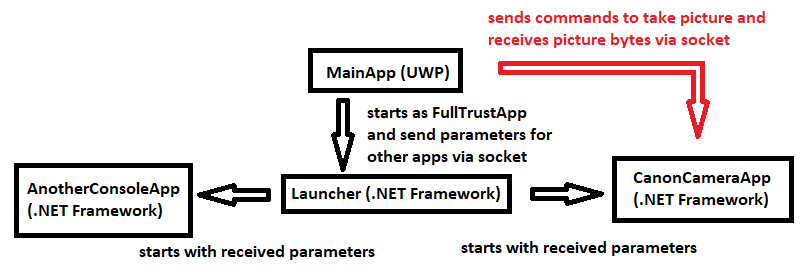
If I run this application in VisualStudio, the communication works.
If I create a package, install and run it on my PC, the communication works.
But if a colleague installs the same package, the communication with the Launcher and even the CanonCameraApp, if I start it manually does not work (timeout).
When the colleague after that runs the application in VisualStudio, the communication works on his version but still not on the reinstalled package version.
So nobody else simple can install and use the package.
Can anyone tell me the reason for this problem and what I can do to fix it?
A Microsoft platform for building and publishing apps for Windows devices.
' cx='32' cy='32' r='32' /%3E%3Ctext x='50%25' y='55%25' dominant-baseline='middle' text-anchor='middle' fill='%23FFF' %3EA%3C/text%3E%3C/svg%3E)
So the issue is that your UWP app can't communicate with the launcher after being installed on a new machine, right? How do you communicate between the UWP app and the .net framework app?
Correct, the UWP app can't communicate with the launcher after being installed on a new machine.
In the .net framwork apps I use an async server socket based on asynchronous-server-socket-example and the UWP app uses an async client socket based on asynchronous-client-socket-example.
Do you have an idea to fix the problem?
Have you checked if the local loopback is enabled first when you install your package on a new machine?
To enable loopback use this command:
c:\>checknetisolation loopbackexempt -a -n=<package family name>
To disable loopback use this command:
c:\>checknetisolation loopbackexempt -d -n=<package family name>
You could refer to this document about how to enable it: Enabling loopback for a UWP application.
Thank you for your response!
The applications works, when it was compiled with VisualStudio on the PC (directly from VisualStudio or from the start menu after it was deployed from VisualStudio).
But it does not work when I uninstall that application and reinstall it from package. So I think, the loop back is not the problem.
And on my PC even the installed version from package works.
Do you have any other ideas? Can it be that VisualStudio adds a library to deployed version, which is missed in packae version or what else be a reason for different behavour of these two versions?
Kind regards,
Wolfgang
Sometimes the loopback will be the reason for many networking issues. So could you please check this first?
Answer accepted by question author
Hello,
Welcome to Microsoft Q&A!
UWP apps are running in the sandbox so it is isolated from the real system. To maintain security and network isolation, loopback connections for IPC are blocked by default for packaged applications. You need to enable the local loopback for the UWP app so that it could communicate with localhost.
To enable loopback use this command:
c:\>checknetisolation loopbackexempt -a -n=<package family name>
To disable loopback use this command:
c:\>checknetisolation loopbackexempt -d -n=<package family name>
You could refer to these document for more information: Interprocess communication (IPC) and Enabling loopback for a UWP application
Thank you.
If the answer is the right solution, please click "Accept Answer" and kindly upvote it. If you have extra questions about this answer, please click "Comment".
Note: Please follow the steps in our documentation to enable e-mail notifications if you want to receive the related email notification for this thread.
RoyLi-MSFT found the solution!
After executing
checknetisolation loopbackexempt -a -n=<name of application>
the application works.
Thank you very much!!
Glad to hear that! I'll convert my comment into a reply and you could accept it as answer.