Azure Logic Apps
An Azure service that automates the access and use of data across clouds without writing code.
This browser is no longer supported.
Upgrade to Microsoft Edge to take advantage of the latest features, security updates, and technical support.
' cx='32' cy='32' r='32' /%3E%3Ctext x='50%25' y='55%25' dominant-baseline='middle' text-anchor='middle' fill='%23FFF' %3ES%3C/text%3E%3C/svg%3E)
Hi,
I have a logic app triggered by HTTP, it works fine from Postman but when i try to call it from a Power Automate flow I get this http 401 error :
{
"error": {
"code": "AuthorizationFailed",
"message": "Vous n’êtes pas autorisé à effectuer l’action « run » sur l’étendue « /triggers/manual/paths/ ». Vérifiez que votre demande utilise la méthode HTTP appropriée. Pour plus de détails, voir http://aka.ms/logic-trigger."
}
}
An Azure service that automates the access and use of data across clouds without writing code.

@Sylvain Thanks for reaching out. The issue is more towards power automation how the HTTP action creates the request. I have done a quick test at my end creating the power app and found that the HTTP trigger accepts the Queries parameter which you need to pass separately. If you are passing the queries parameter in the URL then looks like power automation doesn't send the Queries parameter while creating the request. As the authentication parameter (sig) was not passed to the logic app correctly therefore you are getting the AuthorizationFailed error.
To resolve the issue you need to break the query parameter of your logic app URL and pass the query parameter in the Queries parameter in your power apps as below to resolve the issue.
You need to update the sp, sig, and URI parameters as per your logic app URL that is generated.
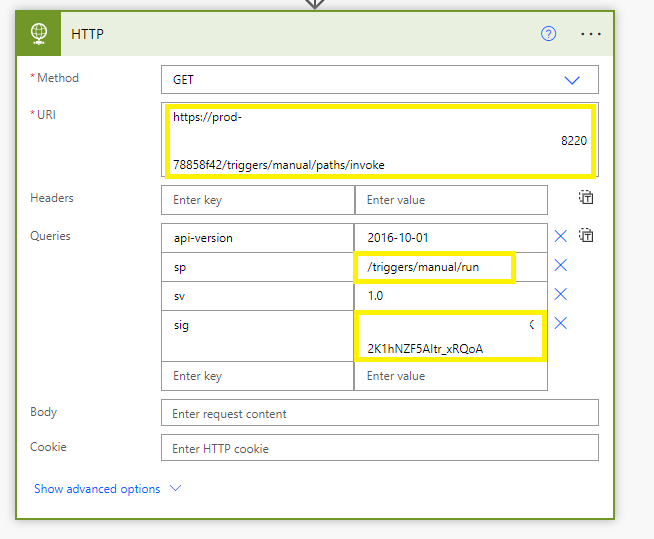
For any Power automation issue, you can always reach out to the team in the dedicated forums here as it is not currently supported here on QnA.
Thanks @MayankBargali-MSFT for your detailed explanation.
I already split the url and wrote the query parameters in the Queries section, but I realized the value of the "sp" parameter was wrong: "%2Ftriggers%2Fmanual%2Frun" instead of "/triggers/manual/run"
Now it's working :)
@Sylvain Thanks for your response and glad to know that the issue is resolved now.