Azure Notification Hubs
An Azure service that is used to send push notifications to all major platforms from the cloud or on-premises environments.
This browser is no longer supported.
Upgrade to Microsoft Edge to take advantage of the latest features, security updates, and technical support.
' cx='32' cy='32' r='32' /%3E%3Ctext x='50%25' y='55%25' dominant-baseline='middle' text-anchor='middle' fill='%23FFF' %3EA%3C/text%3E%3C/svg%3E)
Hi,
I have a notification hub in Azure that is used by a Java service that handles the push notifications for an app developed for both, Android and iOS. Everything works just fine with Android but the behaviour with Apple is quite weird:
Is there anything I could check to know what can be happening? the error message is not very descriptive and the fact that it randomly works does not help either...
Thanks in advance
' cx='32' cy='32' r='32' /%3E%3Ctext x='50%25' y='55%25' dominant-baseline='middle' text-anchor='middle' fill='%23FFF' %3EA%3C/text%3E%3C/svg%3E)
@afcec , Thanks for the detailed question. Apologies you’re experiencing this issue.
-As I understand the issue only affects iOS device, 1/10 times it works and also you mentioned about (1) configurating the APNS for both, production and sandbox application modes – just to clarify -
(if you haven’t done this already)- You must upload the certificate you use in a sandbox environment to a separate hub than the certificate/hub you'll use in production. If you have uploaded different types of certificates to the same hub. It may cause notification failures.
--If you inadvertently upload different types of certificates to the same hub, you should delete the hub and start fresh with a new hub. If for some reason you can't delete the hub, you must at least delete all the existing registrations from the hub. || Reference -APN configuration
--If you're leveraging a lower tier, please try upgrading to an higher tier and perform a quick test.
--Also, review Diagnose and solve problems blade to fetch some more details about the error -
Navigate to your Notification Hub on Azure Portal and select ‘Diagnose and solve problems’
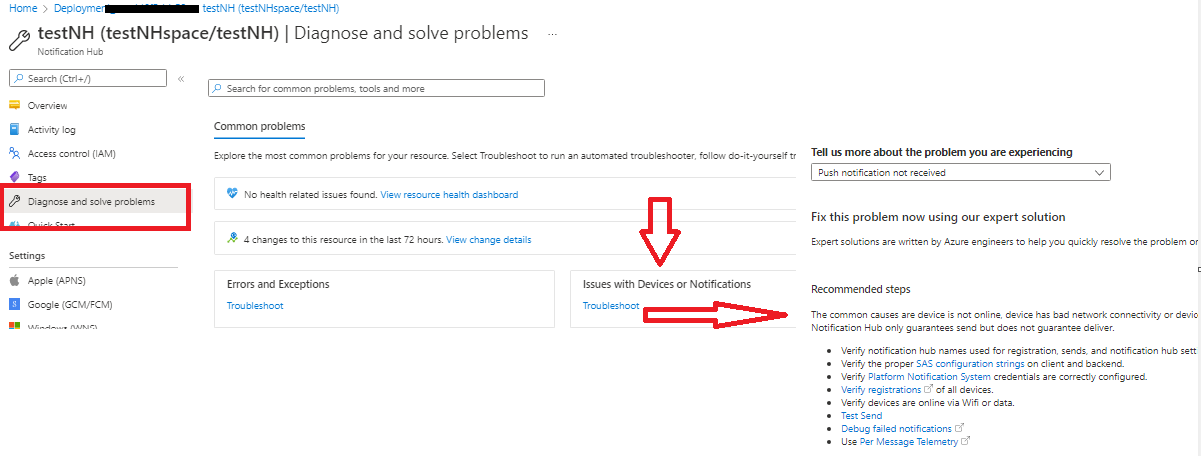
Adding more info:
Also, when test send is enabled, the following occurs:
• All notifications only reach up to 10 devices for each send call.
• The Send* methods return a list of the outcomes for all those notification deliveries. The possible outcomes are the same as displayed in telemetry. Outcomes includes things like authentication errors, throttling errors, successful deliveries, and so on.
Note: This mode is for test purposes only, not for production, and is throttled.
--Also, see - Azure Notification Hubs updates for iOS 13
Kindly let us know how it goes, I'll follow-up with you further.
Hi @Anonymous , it seems we just did it wrong when we configured both environtments (sandbox and production) in the same notification hub. As we did not want to create a new hub, we changed the authentication mode from certificate to token and now everything is working fine.
Thank you for your help, it is really appreciated.
@afcec , Glad to know that the issue is sorted out. Thanks for the update. We're very happy to help.
To benefit the community, find the right answers, please do mark the post which was helpful by clicking on ‘Accept Answer’ & ‘Up-Vote’.