Microsoft 365 and Office | SharePoint Server | For business
A family of Microsoft on-premises document management and storage systems.

This browser is no longer supported.
Upgrade to Microsoft Edge to take advantage of the latest features, security updates, and technical support.
' cx='32' cy='32' r='32' /%3E%3Ctext x='50%25' y='55%25' dominant-baseline='middle' text-anchor='middle' fill='%23FFF' %3EAA%3C/text%3E%3C/svg%3E)
Hi
I want to change the code behind the Save button on Sharepoint online. Can I only change it using sharepoint designer? The admin has not give rights to open the code in sharepoint designer.
If i try to edit the form online , the Save and Cancel buttons are always greyed out .
Thanks
' cx='32' cy='32' r='32' /%3E%3Ctext x='50%25' y='55%25' dominant-baseline='middle' text-anchor='middle' fill='%23FFF' %3ER%3C/text%3E%3C/svg%3E)
Hi @Asher A ,
Could you please share us where is the save button you want to change?
It is the save and cancel buttons by default on form.
Thanks
Hi @Asher A ,
SharePoint Online modern page doesn't support script editor. So we can return to classic experience or use spfx to add custom script.
If you want to use classic experience. You can just follow the steps
Click list setting >> advanced setting

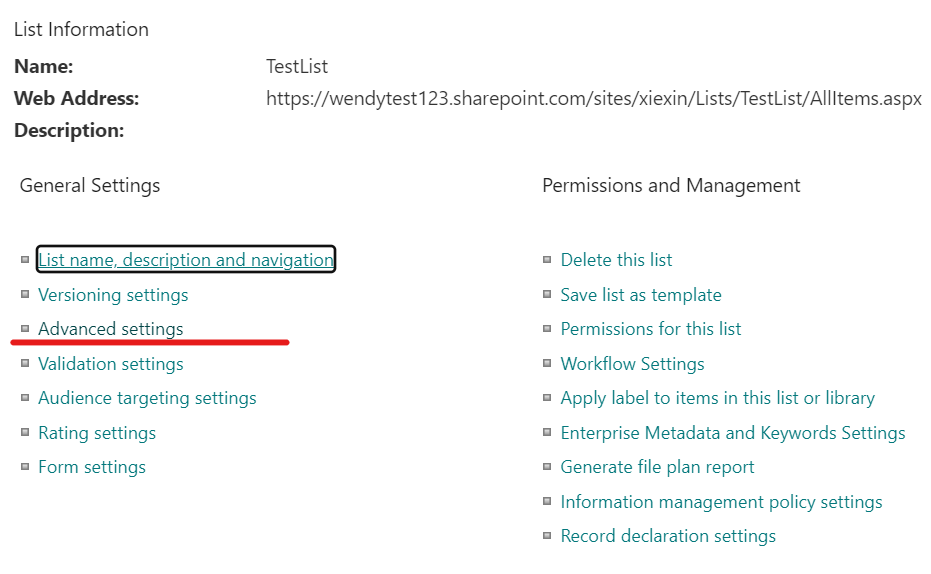
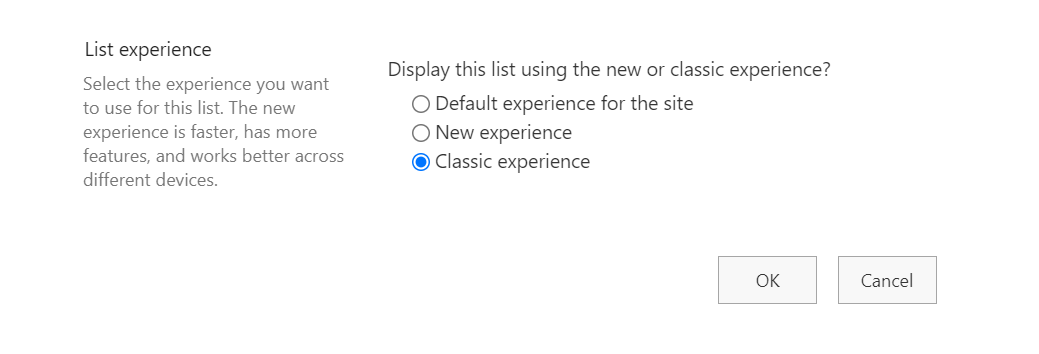
Then you can add a Script Editor by click Edit Page >> add a web part
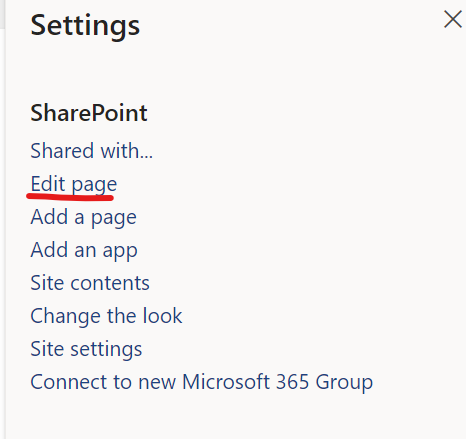

Finally post your code to the webpart

If you are using modern page. The only way is to use spfx to insert js and css code. You can refer to following document.
https://learn.microsoft.com/en-us/sharepoint/dev/spfx/sharepoint-framework-overview
https://www.sharepointdiary.com/2020/11/add-custom-css-to-sharepoint-online-modern-page.html
And you can also deploy a Script Editor to sharepoint modern page by following example
https://github.com/pnp/sp-dev-fx-webparts/tree/main/samples/react-script-editor
If the answer is helpful, please click "Accept Answer" and kindly upvote it. If you have extra questions about this answer, please click "Comment".
Note: Please follow the steps in our documentation to enable e-mail notifications if you want to receive the related email notification for this thread.
I am not getting the media and content option at all and many other features after I do these steps.
I read that if i open that form in Sharepoint designer i can see the code behind the save and cancel but i am not able to open the form . It says disallowed to open in designer.
Thanks
Hi @Asher A ,
SharePoint will set DenyAddAndCustomizePages disabled as default. So if you account is a tenant administrator account. You can enable this feature by following steps.
Get to following link https://xxx-admin.sharepoint.com/_layouts/15/online/TenantSettings.aspx
Allow users to run custom script on personal sites
Allow users to run custom script on self-service created sites
It should looks like below:
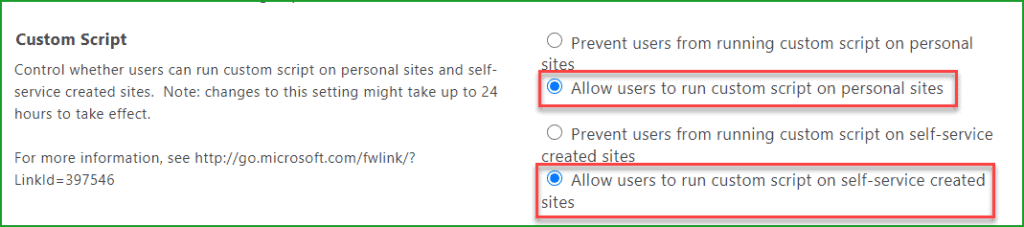
Note: This may take up to 24 hours to reflect the changes. Sometimes it may take more than that and sometimes it may take 3/4 hours also.
You can also use following script to set. It won't take 24 hours to enable it.
$username="******@xxx.onmicrosoft.com"
$userCredential = Get-Credential -UserName $username -Message "Your password"
Connect-SPOService -Url https://tsinfo-admin.sharepoint.com -Credential $userCredential
Set-SPOsite https://tsinfo.sharepoint.com -DenyAddAndCustomizePages 0
Hi @Asher A ,
Have you tried the solution I proposed?
If you have any questions or progress, you can contact me in time.
Looking forward to your reply
Have a lucky day!
Thanks,
Raytheon Xie
Hi @Asher A ,
Would you tell me whether your issue has been resolved or have any update?
I am looking forward to your reply.
Have a nice day!
Thanks,
Raytheon Xie
Hello
I am sorry about the delay . I am trying to see the code behind the Save and Cancel buttons .
Somehow the sharepoint designer rights have been blocked .
I read the code behind those buttons could only be viewed through the designer.
Thanks
I am trying to move list from one site to anothef subsite .
Do these this come under configuration or Administration ?
If i search for a book or a course what should I find it as ?
Thanks
Hi @Asher A ,
You can follow the steps to migrate list from one site to another site.
https://www.manageengine.com/sharepoint-management-reporting/kb/how-to-migrate-list-from-one-site-collection-to-another.html
Note: Microsoft is providing this information as a convenience to you. The sites are not controlled by Microsoft. Microsoft cannot make any representations regarding the quality, safety, or suitability of any software or information found there. Please make sure that you completely understand the risk before retrieving any suggestions from the above link.
Hi @Asher A ,
Have you tried the solution I proposed?
If you have any questions or progress, you can contact me in time.
Looking forward to your reply
Have a lucky day!
Thanks,
Raytheon Xie