Microsoft 365 and Office | SharePoint | For business | Windows
A group of Microsoft Products and technologies used for sharing and managing content, knowledge, and applications.

This browser is no longer supported.
Upgrade to Microsoft Edge to take advantage of the latest features, security updates, and technical support.
' cx='32' cy='32' r='32' /%3E%3Ctext x='50%25' y='55%25' dominant-baseline='middle' text-anchor='middle' fill='%23FFF' %3EA%3C/text%3E%3C/svg%3E)
I have created a default SPFx extension with no custom code. I deployed it on the App Catalog and added it on the Site from the Site Content. The Extension works well when I log in using my company laptop but fails when I log in using a personal laptop.
I started an investigation and found that this is due the MIME Type. This error message is from the Chrome Console.
Refused to execute script from 'https://xxx.sharepoint.com/sites/AppCatalog/ClientSideAssets/xxxxxxxxxxxxxxx/MyMmtExtensionApplicationCustomizerStrings_en-us_9e4e260121b17b42d15c0d16c5238742.js' because its MIME type ('text/html') is not executable, and strict MIME type checking is enabled.
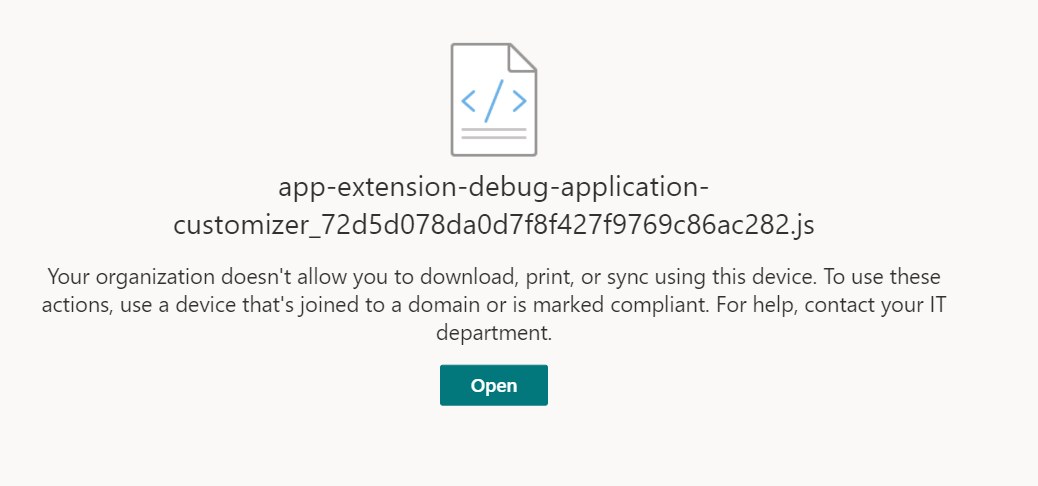
Now, ClientSiteAssets is a hidden library where the reference of the SPFx on the pages deployed is used. So, basically, I tried to click the .js file and the below error appears. However, using my company device, this issue isn't there.
How do get this fixed now? I know that it could be from the Conditional Access Policy set by the organization but that should not stop my solution from working.
' cx='32' cy='32' r='32' /%3E%3Ctext x='50%25' y='55%25' dominant-baseline='middle' text-anchor='middle' fill='%23FFF' %3ER%3C/text%3E%3C/svg%3E)
Hi @Anonymous ,
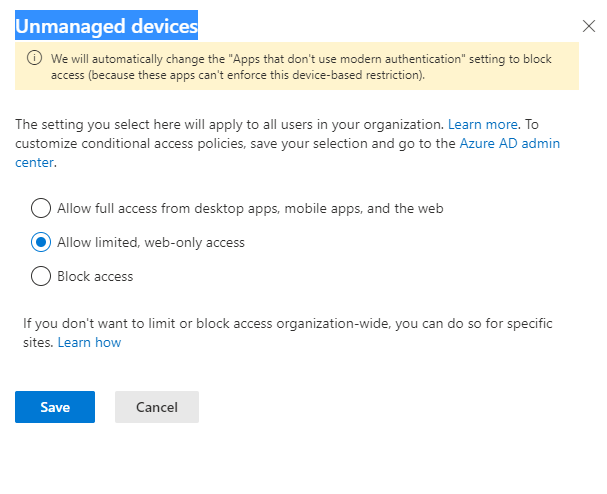
This issue might caused by limit access in your organization. Users on unmanaged devices will have browser-only access with no ability to download, print, or sync files. The following document might help
https://learn.microsoft.com/en-us/sharepoint/control-access-from-unmanaged-devices?redirectSourcePath=%252fen-us%252farticle%252fControl-access-from-unmanaged-devices-5ae550c4-bd20-4257-847b-5c20fb053622
If the answer is helpful, please click "Accept Answer" and kindly upvote it. If you have extra questions about this answer, please click "Comment".
Note: Please follow the steps in our documentation to enable e-mail notifications if you want to receive the related email notification for this thread.
@Raytheon - Thank you So much.
I can understand the root cause of the issue but not able to resolve the problem I am facing.
My organization is big and can't simply do any changes at a central level. There are lot of restrictions. Moreover when the conditional access policy is enabled, why does even the default spfx fails to work? I am not even downloading any thing. Just reference fo the JS and image files.
Any suggestion on how to tackle it without central admin?
Hi @Anonymous ,
Since I haven't found any article about the scope of Unmanaged devices will block. But per my test, spfx web part will be blocked by the policy. There is no other function but to set in central admin.
Hi @Anonymous ,
Would you tell me whether your issue has been resolved or have any update?
I am looking forward to your reply.
Have a nice day!
Thanks,
Raytheon Xie
A solution has been found yet but I have created a ticket with MS. Hoping to see some solution by next week.
Thanks
Aniruddha
So, we have to exclude two libraries to make the spfx work. There is a hidden library called ClientSideAsset in the AppCatalog and another one is the SiteAssets. The Conditional Access Rule can be removed using the PowerShell script.
' cx='32' cy='32' r='32' /%3E%3Ctext x='50%25' y='55%25' dominant-baseline='middle' text-anchor='middle' fill='%23FFF' %3EAS%3C/text%3E%3C/svg%3E)
@Anonymous can you please be more specific about how you managed to solve the problem? We are facing the same issue and a more detailed answer would be appreciated. Thanks !
' cx='32' cy='32' r='32' /%3E%3Ctext x='50%25' y='55%25' dominant-baseline='middle' text-anchor='middle' fill='%23FFF' %3EJS%3C/text%3E%3C/svg%3E)
How could you solve it?