Developer technologies | C#
An object-oriented and type-safe programming language that has its roots in the C family of languages and includes support for component-oriented programming.
This browser is no longer supported.
Upgrade to Microsoft Edge to take advantage of the latest features, security updates, and technical support.
' cx='32' cy='32' r='32' /%3E%3Ctext x='50%25' y='55%25' dominant-baseline='middle' text-anchor='middle' fill='%23FFF' %3EJ%3C/text%3E%3C/svg%3E)
I have this code in a Program and it works correctly. But when i try to insert them into a Controller to be called in api/Controller it didn't work.
static async Task Main(string[] args)
{
    var result = await searchReviewsByIdProductAsync("hhcbaaczbzj");
    System.Environment.Exit(1);
}

private static async Task<string> searchReviewsByIdProductAsync(string idProduct)
{
    var result = "";
    Console.WriteLine("searchReviewByIdProduct:" + idProduct);

    //define connections
    var conn1Config = new Dictionary<string, object>();

    //config connection 1
    conn1Config.Add("baseUrl", "https://test.ipdb.io");
    BlockchainConnection conn1 = new BlockchainConnection(conn1Config);

    //add connections
    IList<BlockchainConnection> connections = new List<BlockchainConnection>();
    connections.Add(conn1);

    //multiple connections
    var builderWithConnections = BigchainDbConfigBuilder
        .addConnections(connections)
        .setTimeout(20000); //override default timeout of 20000 milliseconds

    // single connection
    var builder = BigchainDbConfigBuilder
        .baseUrl("https://test.ipdb.io");

    if (!AsyncContext.Run(() => builder.setup()))
    {
        Console.WriteLine("Failed to setup");
    };

    // prepare your key
    var algorithm = SignatureAlgorithm.Ed25519;
    var privateKey = Key.Import(algorithm, Utils.StringToByteArray(privateKeyString), KeyBlobFormat.PkixPrivateKey);
    var publicKey = PublicKey.Import(algorithm, Utils.StringToByteArray(publicKeyString), KeyBlobFormat.PkixPublicKey);
    var assets = await AssetsApi<object>.getAssetsAsync(idProduct);

    try
    {
        for (int i = 0; i < assets.Count; i++)
        {

            JsonSerializer serializer = new JsonSerializer();
            //ReviewsAsset review = (ReviewsAsset)serializer.Deserialize((Newtonsoft.Json.Linq.JObject)assets[i].Data, typeof(ReviewsAsset));
            var json = assets[i].Data.ToString().Substring(0, assets[i].Data.ToString().Length);

            string jsonCliente = JsonConvert.SerializeObject(assets[i].Data);

            //var dictionary = serializer.Deserialize<Dictionary<string, object>>(assets[i].Data);

            result += assets[i].Data.ToString() + "@|@";
        }
    }
    catch (Exception e)
    {
        Console.WriteLine("Error: " + e.Message);
    }

    return result;
}
Here the code in a controller
[System.Web.Http.HttpGet]
        public async Task<string> searchReviewsByIdProductAsync(string id)
        {
            var result = "";

            try
            {
                //define connections
                var conn1Config = new Dictionary<string, object>();

                //config connection 1
                conn1Config.Add("baseUrl", "https://test.ipdb.io");
                BlockchainConnection conn1 = new BlockchainConnection(conn1Config);

                //add connections
                IList<BlockchainConnection> connections = new List<BlockchainConnection>();
                connections.Add(conn1);

                //multiple connections
                var builderWithConnections = BigchainDbConfigBuilder
                    .addConnections(connections)
                    .setTimeout(20000); //override default timeout of 20000 milliseconds


                if (!AsyncContext.Run(() => builder.setup()))
                {
                    Console.WriteLine("Failed to setup");
                };

                // prepare your key
                var algorithm = SignatureAlgorithm.Ed25519;
                var privateKey = Key.Import(algorithm, Utils.StringToByteArray(privateKeyString), KeyBlobFormat.PkixPrivateKey);
                var publicKey = PublicKey.Import(algorithm, Utils.StringToByteArray(publicKeyString), KeyBlobFormat.PkixPublicKey);
                var assets = await AssetsApi<object>.getAssetsAsync(id);

                if (assets != null)
                {
                    if (assets.Count > 0)
                    {
                        for (int i = 0; i < assets.Count; i++)
                        {

                            JsonSerializer serializer = new JsonSerializer();
                            //ReviewsAsset review = (ReviewsAsset)serializer.Deserialize((Newtonsoft.Json.Linq.JObject)assets[i].Data, typeof(ReviewsAsset));
                            var json = assets[i].Data.ToString().Substring(0, assets[i].Data.ToString().Length);

                            string jsonCliente = JsonConvert.SerializeObject(assets[i].Data);

                            //var dictionary = serializer.Deserialize<Dictionary<string, object>>(assets[i].Data);

                            result += assets[i].Data.ToString() + "@|@";
                        }
                    }
                    else
                    {
                        result = "No Assets";
                    }
                }
                else
                {
                    result = "No Assets";
                }

            }
            catch (Exception e)
            {
                Console.WriteLine("Error: " + e.Message);
                result = e.Message;
            }

            //sw.Stop();

            return result;

        }
The code stop int this line:
!AsyncContext.Run(() => builder.setup())
Any sugestion for what's that happends? Whats the diference bewtween Program-Controller with await methods? I don't not have experience with this type of methods and probably i have a basic error but i don't know.
An object-oriented and type-safe programming language that has its roots in the C family of languages and includes support for component-oriented programming.
A set of technologies in .NET for building web applications and web services. Miscellaneous topics that do not fit into specific categories.

@JuniorDyanmics , Could you tell me what is your specific controller, is asp.net controller and asp.net core controller?
I am not sure..
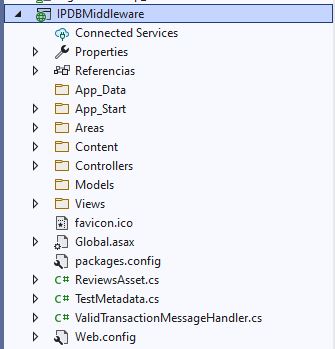
public class HomeController : ApiController
How can i see or hwats the difference bewteen them?
' cx='32' cy='32' r='32' /%3E%3Ctext x='50%25' y='55%25' dominant-baseline='middle' text-anchor='middle' fill='%23FFF' %3EBS%3C/text%3E%3C/svg%3E)
AsyncContext.Run is used when async processing has not been set. typically command line programs be async main was supported, or the new min api. change to:
await builder.setup();
but this startup code should be moved program.cs startup code anyway.
after seeing your answer I have realized that possibly the error is not in that line. If i change it, they don't crash but connection never works
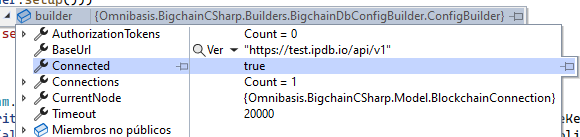
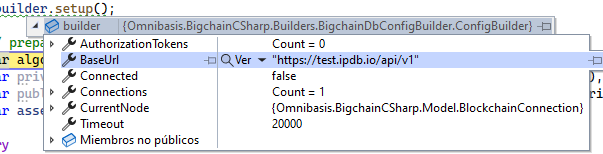
I am using this free library https://github.com/Omnibasis/bigchaindb-csharp-driver