Microsoft 365 and Office | Development | Microsoft 365 Publishing
End-to-end process of building, validating, and distributing custom apps and add-ins across Microsoft 365 platforms

This browser is no longer supported.
Upgrade to Microsoft Edge to take advantage of the latest features, security updates, and technical support.
' cx='32' cy='32' r='32' /%3E%3Ctext x='50%25' y='55%25' dominant-baseline='middle' text-anchor='middle' fill='%23FFF' %3EMS%3C/text%3E%3C/svg%3E)
Estoy intentando conectarme a mi cuenta de correo empresarial con los siguientes datos:
Ya hicimos todo en azure, luego de confirmar mi cuenta de correo, muestra lo siguiente:
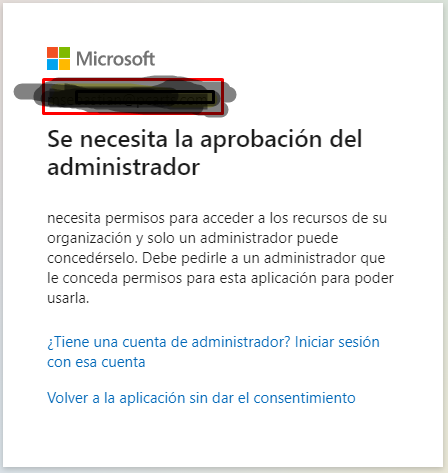
necesito saber que podria faltar, ya que los permisos ya fueron dados
End-to-end process of building, validating, and distributing custom apps and add-ins across Microsoft 365 platforms
A Microsoft app for iOS and Android devices that enables authentication with two-factor verification, phone sign-in, and code generation
An API that connects multiple Microsoft services, enabling data access and automation across platforms

Hi @Martin Sebastian The admin consent URL is tenant-level consent, and only an administrator can grant tenant-level consent.
Answer accepted by question author
The admin consent URL is to grant tenant-wide admin consent, it includes administrator permissions and user permissions, which requires you to log in with an administrator account and consent. Your normal user cannot log into the admin consent URL and consent, it can only grant user consent to the application on its own behalf (like when acquiring an access token), not on behalf of the entire tenant.
If the answer is helpful, please click "Accept Answer" and kindly upvote it. If you have extra questions about this answer, please click "Comment".
Note: Please follow the steps in our documentation to enable e-mail notifications if you want to receive the related email notification for this thread.
Entonces para poder probar una aplicación si o si tiene que iniciar sesión el administrador, no hay manera que un usuario, pueda iniciar sesión, aunque el administrador de los permisos en azure, tiene que iniciar sesión el administrador si o si, pq yo estaba queriendo hacer una prueba conectándome con mi usuario, para poder ver mis correos y cuando fuera la definitiva, ya si se haría con otro usuario de la empresa
Hi @Martin Sebastian I'm not sure if I fully understand what you mean (sorry I'm not proficient in spanish), yes, the admin consent url has to be an admin to log in and consent, as this is tenant-wide consent not a user-specific consent, normal users don't have that permission. However, you can use normal user approval consent when obtaining an access token! https://learn.microsoft.com/en-us/azure/active-directory/manage-apps/grant-admin-consent#construct-the-url-for-granting-tenant-wide-admin-consent
Hi @Martin Sebastian Would you please provide us with an update on the status of your issue? If the answer is helpful, please Accept the answer, thanks a lot.
' cx='32' cy='32' r='32' /%3E%3Ctext x='50%25' y='55%25' dominant-baseline='middle' text-anchor='middle' fill='%23FFF' %3EZY%3C/text%3E%3C/svg%3E)
Hi @Martin Sebastian , Did you refer to Carl's answer above? Is it helpful to you? Comment here when you still need any help.