Azure Data Factory
An Azure service for ingesting, preparing, and transforming data at scale.
This browser is no longer supported.
Upgrade to Microsoft Edge to take advantage of the latest features, security updates, and technical support.

Hi,
I have a dataset which looks like:
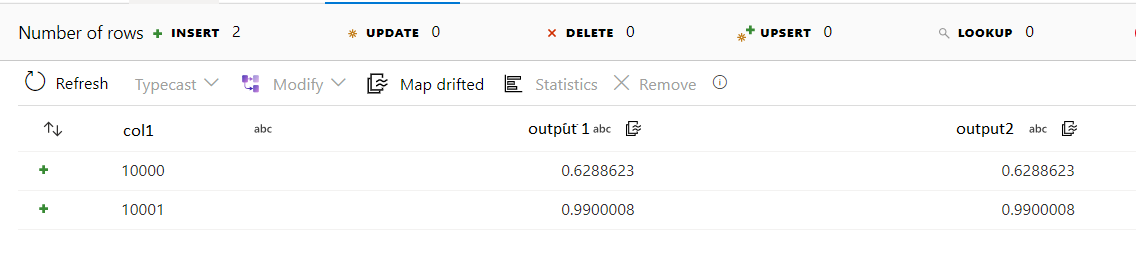
except that, there could be multiple columns col1-col500 and multiple output cols output1-output10. The image above shows only one col and two outputs. The outputs values are same but they might note be in real case.
I want to convert this data to somewhat like this format:
No    col1        number    output
  1    10000       1           0.6288623
  2    10000        2          0.6288623
  3    10001        1          0.9900...
  4    10001        2          0.9900...
It is also possible that I have output5 and output7 (or any number), in that case it would look like this
   No    col1        number    output
      1    10000       5           0.6288623
      2    10000        7          0.6288623
      3    10001        5          0.9900...
      4    10001        7          0.9900...
I have tried using conditional split but that doesnt serve the purpose.
After that, I intend to produce some group aggregates:
Group By Id and calculate output*sum(Value), Value is another float column. I have tried Aggregate activity, but it raises error that output should be part of GroupBy which doesnt make sense. Also, If I use expression $$ = first($$) then it returns only the first output for each groupby.
Thanks

Hi @Obaid Ur Rehman ,
Wondering if the output are coming from the same dataset you have posted below:
https://learn.microsoft.com/en-us/answers/questions/773711/combine-columns-from-multiples-csv-files-in-azure.html
If yes, then the RANK before PIVOT activity will give you the expected result you are looking for here. Thanks!
Thanks for the reply. I have used unpivot activity:
Ungroup By: Col1
Unpivot Key: output
Unpivoted Column: value
Now I have the desired results:
The only thing now is, I have to generate group aggregates like this:
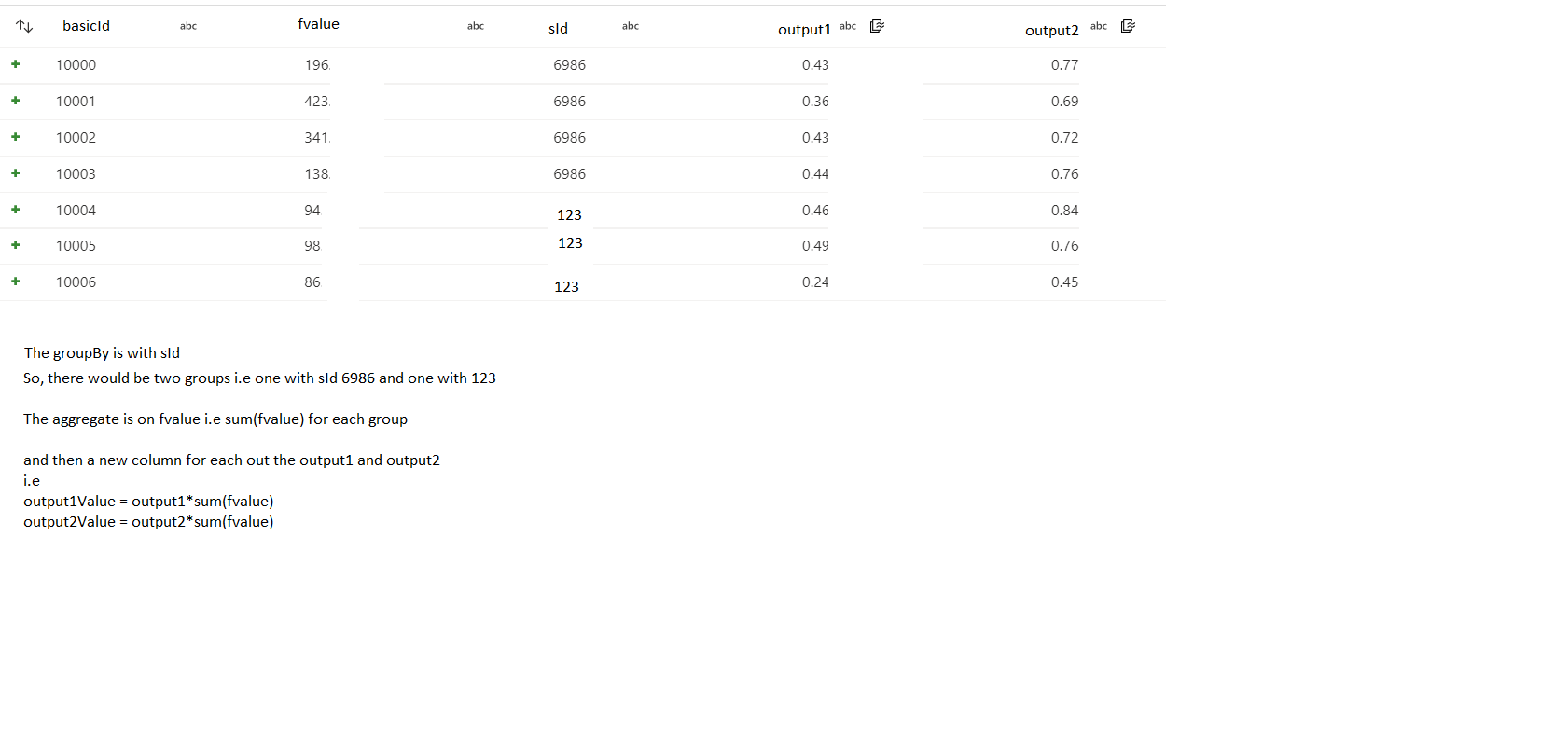
I have tried using aggregate activity but it only gives sum(fvalue) but cant multiply it with output1 or output2 as it gives error that output1 is not in groupby or aggregate columns.
@Obaid Ur Rehman , If you do groupby sId, you are going to get two rows, right. Now the main question is what are you expecting for output1 and output2 columns. I can see different values for them e.g., for sID 6986, output1 values are 0.43, 0.36, 0.43 and 0.44. As these 4 rows will merge into one, you have to decide what you want for output1/output2. There are some aggregate functions e.g., first(output1), last(output1), sum(output1), avg(output1) etc. After you decided how the aggregation will be for output1 and output2 column, then add a Derived Activity in the Dataflow to derive output1Value which would be output1*fvalue. Please let me know if you have questions or concerns. Thanks!
I understand. But the problem is I cannot loose any value of output1 and output2, I have to multiply each value in these two columns with sum of fvalue.
@Obaid Ur Rehman , In that case, you can create a NewBranch from the mainstream (all the records) --> then do aggregate (drop the output1 and output2 columns) --> then join back to the mainstream by sId.