Azure Functions
An Azure service that provides an event-driven serverless compute platform.
This browser is no longer supported.
Upgrade to Microsoft Edge to take advantage of the latest features, security updates, and technical support.
' cx='32' cy='32' r='32' /%3E%3Ctext x='50%25' y='55%25' dominant-baseline='middle' text-anchor='middle' fill='%23FFF' %3EVQ%3C/text%3E%3C/svg%3E)
Hi everyone, I am create a logic as below.
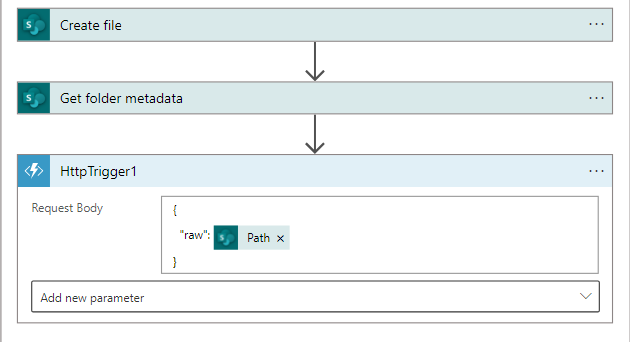
The Azure function in the logic app will process the files from the link gotten from the request body.
Below is my 2 questions.
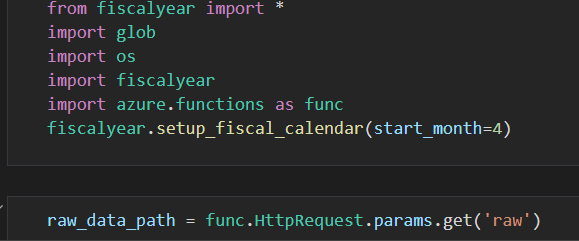
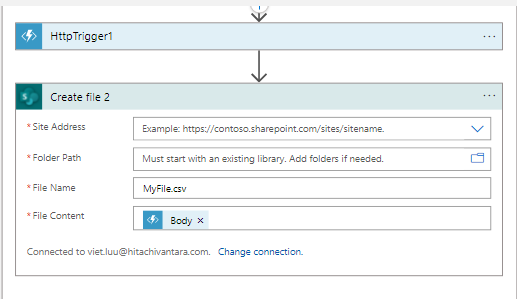
2) This function will return a data frame. Will sharepoint csv file accept a data frame as its file content?

' cx='32' cy='32' r='32' /%3E%3Ctext x='50%25' y='55%25' dominant-baseline='middle' text-anchor='middle' fill='%23FFF' %3EMM%3C/text%3E%3C/svg%3E)
@Viet Quoc Luu , I am looking into this question. I will get back to you as soon as I have an answer
@MughundhanRaveendran-MSFT thank you in advance
Hi @MughundhanRaveendran-MSFT , sorry to bother you. But can you show me a way to do it?
@Python Automation @HitPython @PythonGo @svc_python @Anonymous @Samuel Python @Python Kera @Miguel Lopes @Python data analysis @sajjadvafaeiofficialpython @Power Automate 開発 @Servicio Power Automate 1 @GLR PowerAutomate Can you please show me a way to do this?
@MughundhanRaveendran-MSFT sorry to bother you. But have you found any solutions to this. If yes, can you please tell me?
@Logic App @svcLogicApp EmailConnector @Azure,LogicApps @Logic app devloper @testinglogicapps @Kartheeswaran Natrayan - LogicApps Technologies @azure function @Scott Azure RTOS @AaronHughes @Azure Apprentice @Azurebegginer @MSAzure101 @AzureSDE @Kevin Azure @AzureUser-9588 @MrAzureAD @JS Azure Do you have any answer for this? Please answer
@Andy David - MVP @Andreas Baumgarten @AmanpreetSingh-MSFT @Anonymous @Erland Sommarskog @Castorix31 @PRADEEPCHEEKATLA @MayankBargali-MSFT @AmanpreetSingh-MSFT @PRADEEPCHEEKATLA @Anonymous @Sharon Zhao-MSFT MSFT @JimmyYang-MSFT @Sharon Zhao-MSFT @MelissaMa-msft @JarvanZhang @Jason Sandys can you please give me an answer?
@NguyenThiVlet-3673, For the question (1), you can explore : https://stackoverflow.com/questions/16923898/how-to-get-the-raw-content-of-a-response-in-requests-with-python
You will have to try and see if the sharepoint csv file accept a data frame as its file content as I dont have expertise in Sharepoint unfortunately.
' cx='32' cy='32' r='32' /%3E%3Ctext x='50%25' y='55%25' dominant-baseline='middle' text-anchor='middle' fill='%23FFF' %3EMN%3C/text%3E%3C/svg%3E)
@Viet Quoc Luu I'm trying to do something similar. Let me know how did it go for you.