Developer technologies | VB
An object-oriented programming language developed by Microsoft that can be used in .NET.
This browser is no longer supported.
Upgrade to Microsoft Edge to take advantage of the latest features, security updates, and technical support.
' cx='32' cy='32' r='32' /%3E%3Ctext x='50%25' y='55%25' dominant-baseline='middle' text-anchor='middle' fill='%23FFF' %3EBB%3C/text%3E%3C/svg%3E)
End Sub
Select Case dblTaxPay
    Case Is <= 166
        dblFedWthTax = 0
    Case Is <= 525
        dblFedWthTax = 0.1 * (dblTaxPay - 166)
    Case Is <= 1626
        dblFedWthTax = 35.9 + 0.15 * (dblTaxPay - 525)
    Case Is <= 3111
        dblFedWthTax = 201.05 + 0.25 * (dblTaxPay - 1626)
    Case Is <= 4654
        dblFedWthTax = 572.3 + 0.28 * (dblTaxPay - 3111)
    Case Is <= 8180
        dblFedWthTax = 1004.34 + 0.33 * (dblTaxPay - 4654)
    Case Is <= 9218
        dblFedWthTax = 2167.92 + 0.35 * (dblTaxPay - 8180)
    Case Else
        dblFedWthTax = 2531.22 + 0.396 * (dblTaxPay - 9218)
End Select
Return dblFedWthTax
These Codes are overloading and that is the error but that what I am supposed to have written according to the book. The errors are in red the GetSingleFwt and the GetMarriedFwt.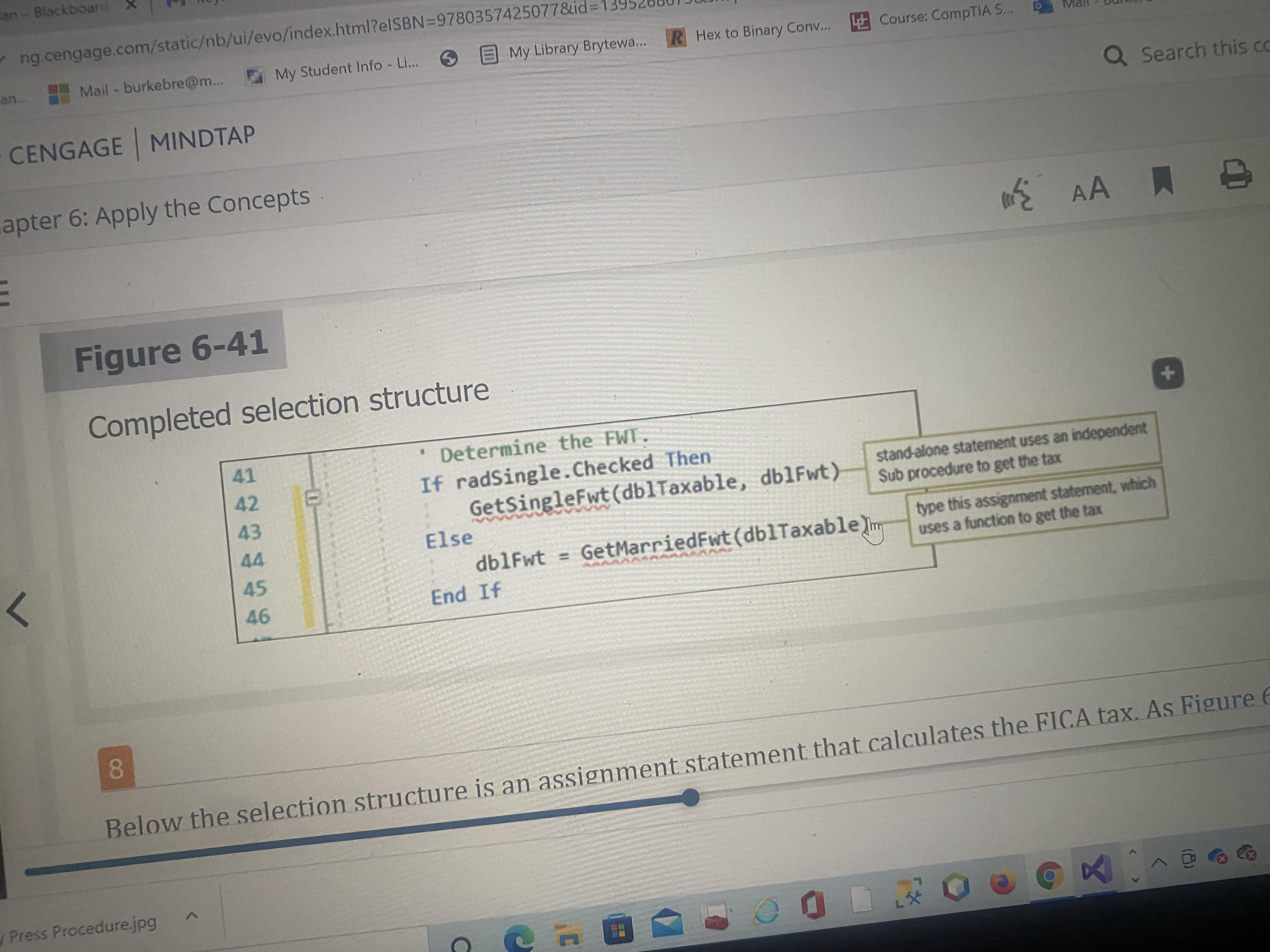
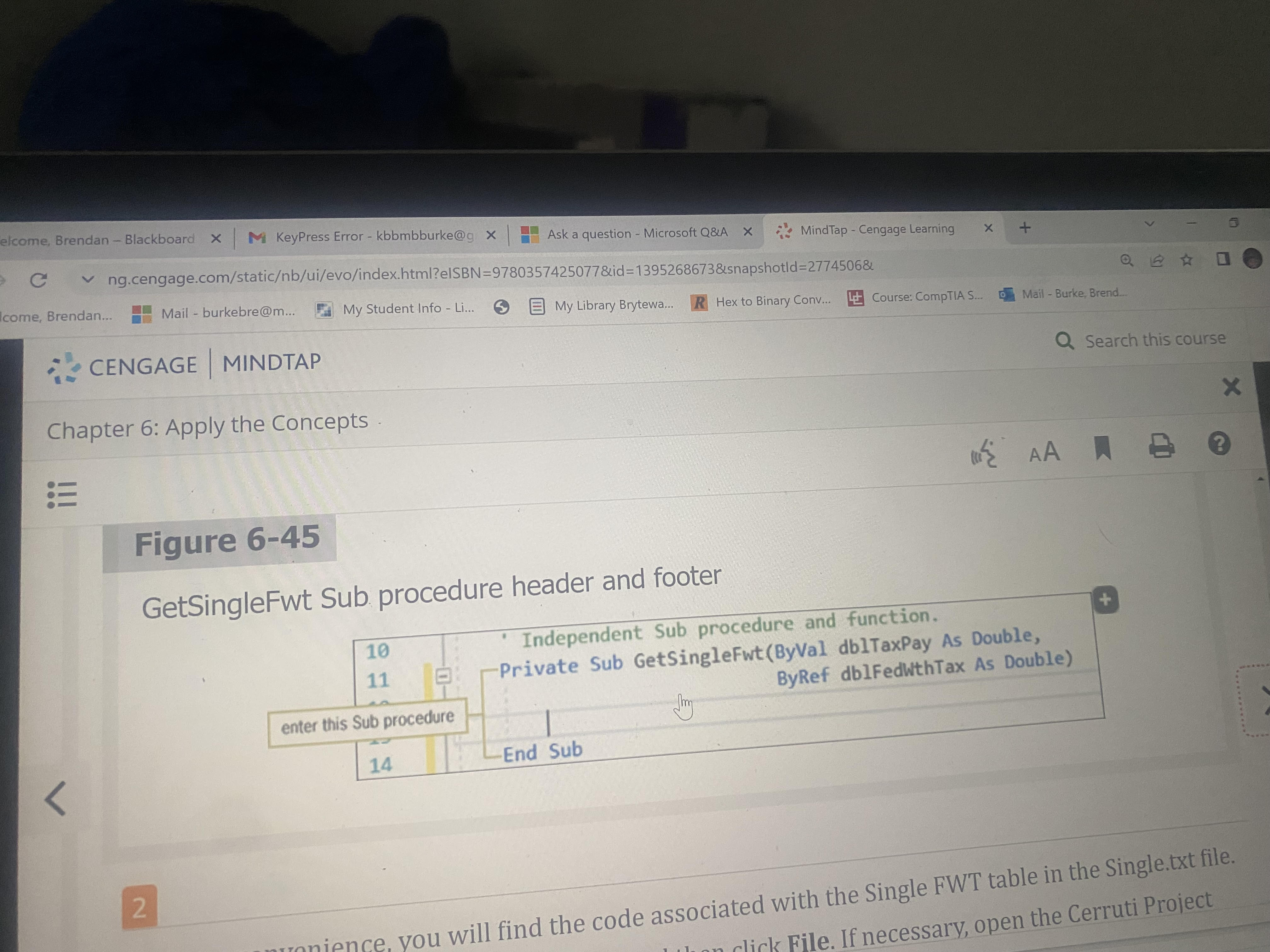
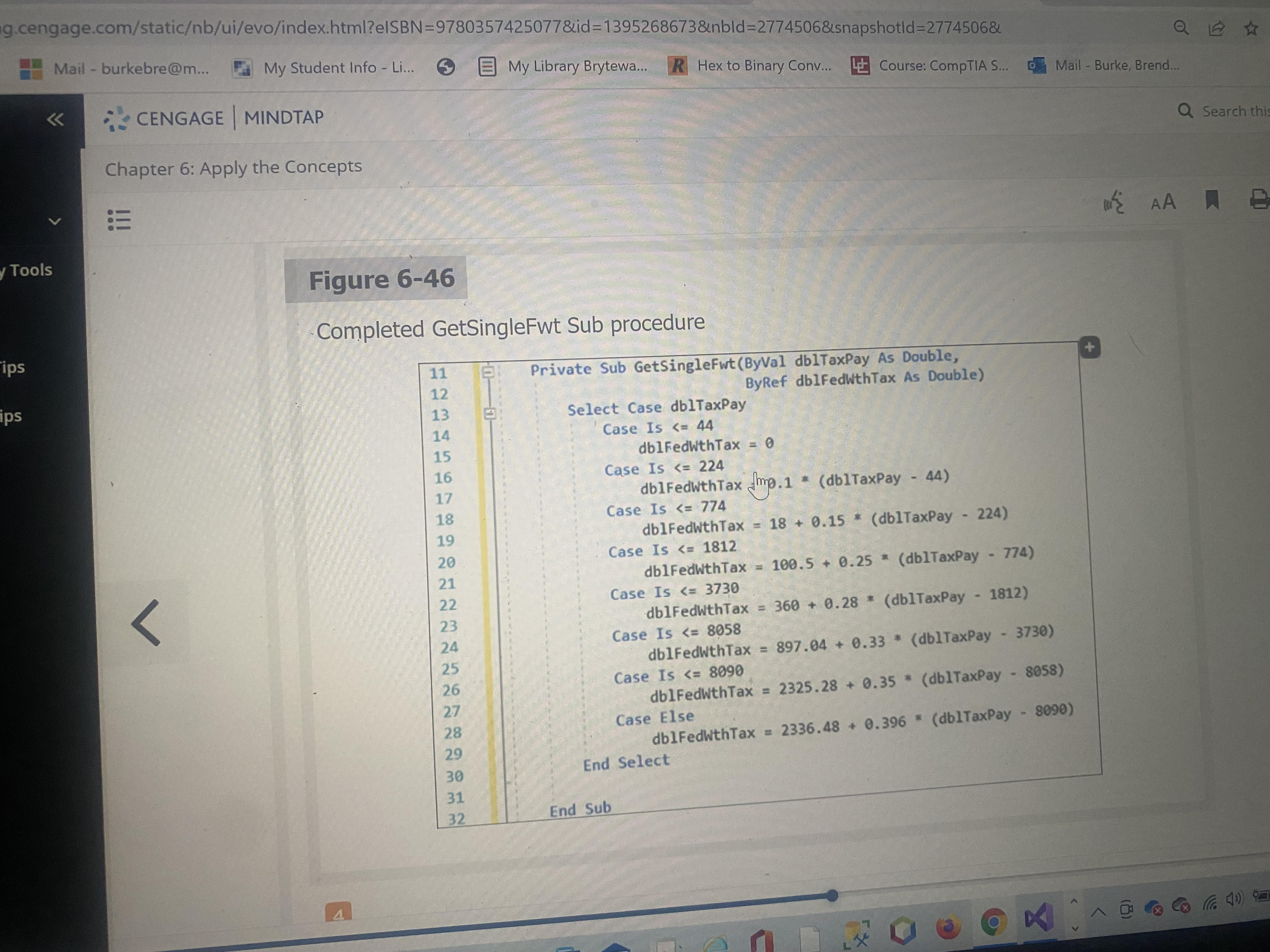
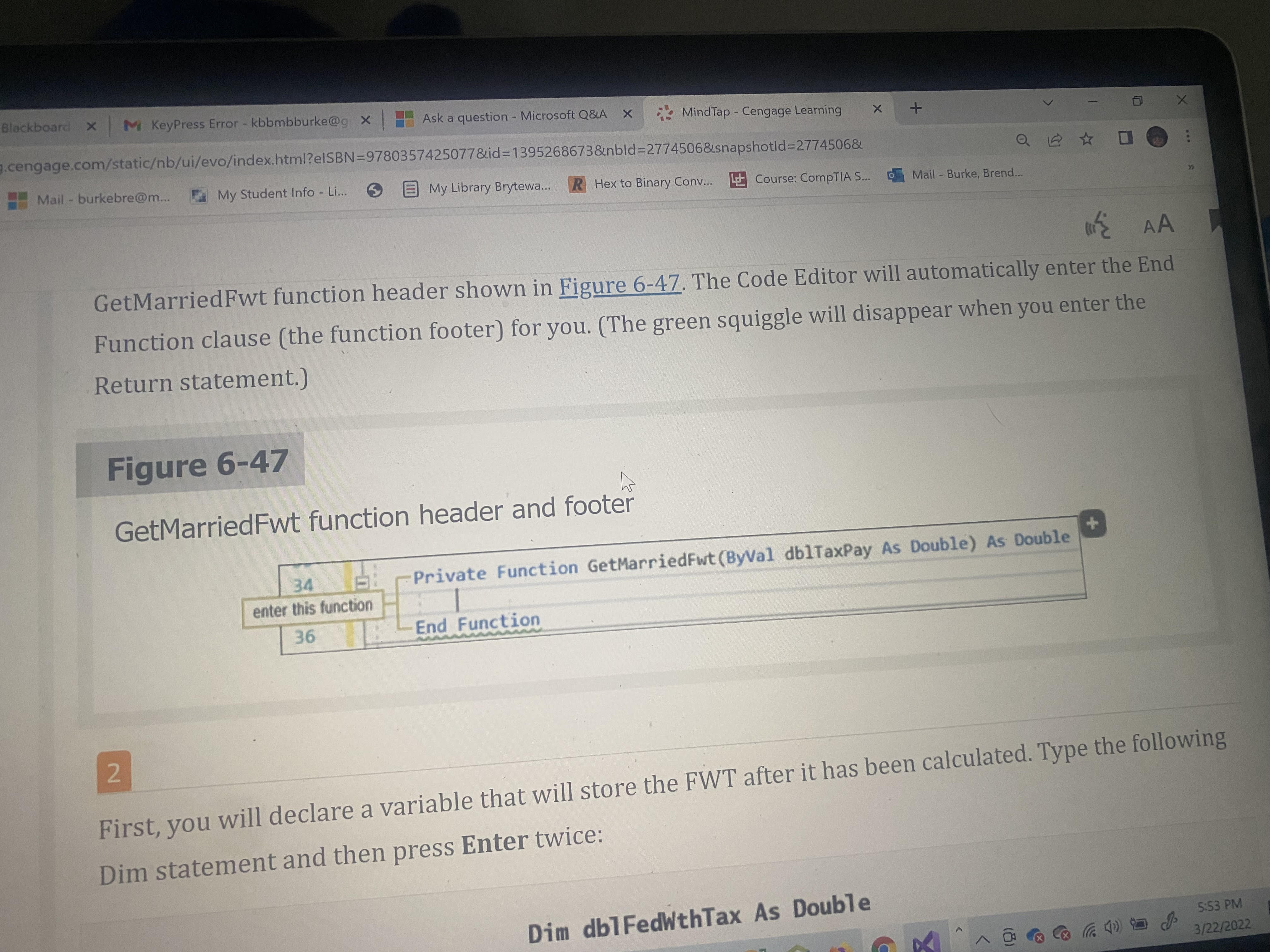

I attached these images because that is the exact part of the code where each of the errors have to do with. Figure 6-45 and 6-46 have to do with the same part as well as 6-47 and 6-48. In other words Figure 6-48 is the completed version of Figure 6-47. Figure 6-46 is the completed version of 6-45. So the main visuals to focus on are Figures 6-41, 6-46, 6-48. The errors on lines 11,34,88,90 are all related to the same issue. In other words they all have to do with each other. I have posted the code and visuals in there so it makes it clear on what parts I am talking about. The numbers at the beginning are to let you know that they are all different sub procedures that relate to the same issue.


I hope this makes it as clear as possible.
' cx='32' cy='32' r='32' /%3E%3Ctext x='50%25' y='55%25' dominant-baseline='middle' text-anchor='middle' fill='%23FFF' %3EJL%3C/text%3E%3C/svg%3E)
Hi @Burke, Brendan J ,
Based on the information you provided, I cannot reproduce your problem.
I added your code but didn't find the error.
Could you please provide more information about the thrown exception?
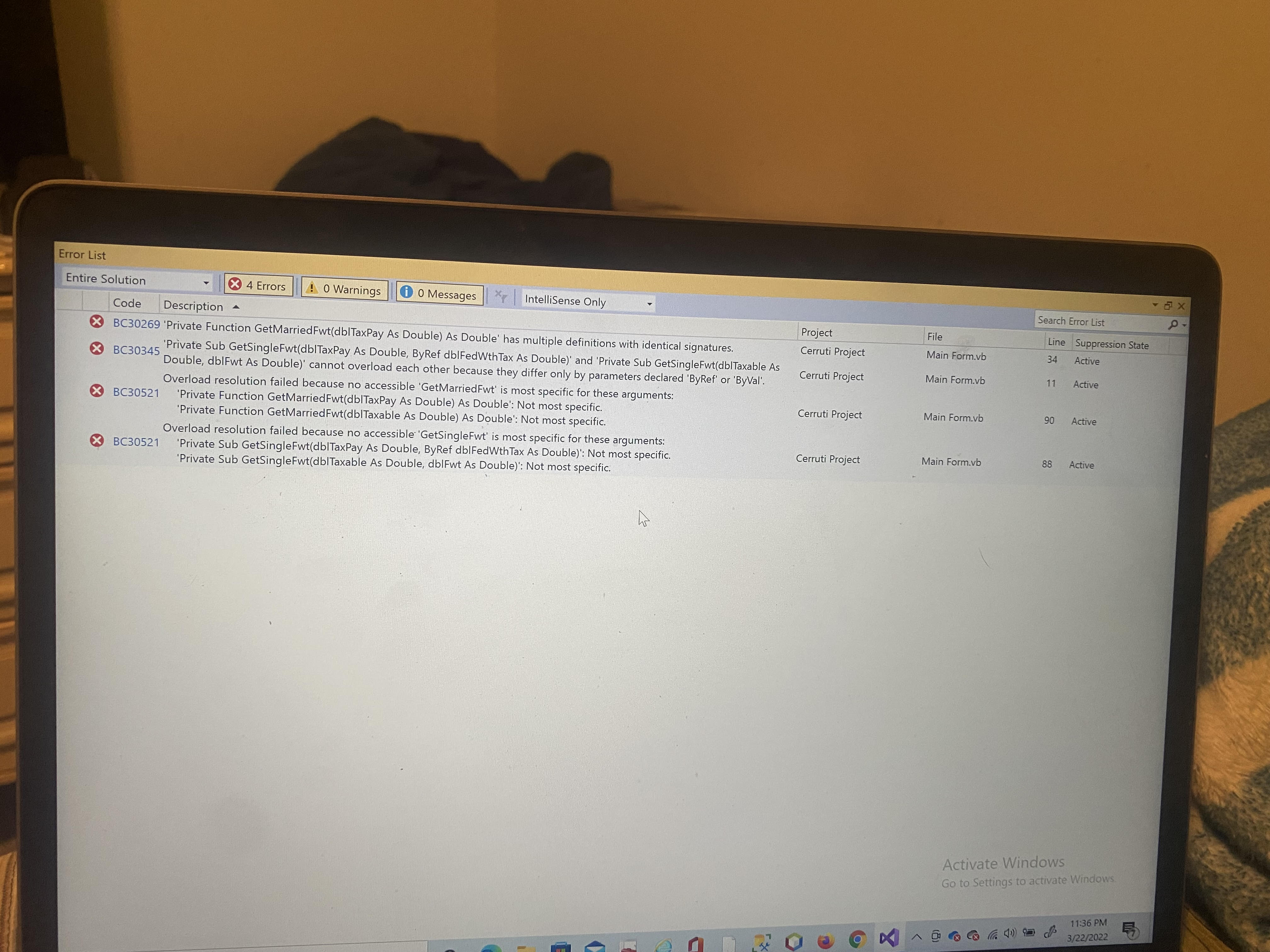
These are the 4 errors that I don't understand on lines 11, 34, 88, 90 as you see above in the images with the red lines. They are in the code editor window on the last 2 images of the question.
Hi @Burke, Brendan J ,
Please check if there are two identical (with the same name and parameters) methods defined in your code.
Removing the redundant function of the same name will solve the problem.
Best Regards.
Jiachen Li
----------
If the answer is helpful, please click "Accept Answer" and upvote it.
Note: Please follow the steps in our documentation to enable e-mail notifications if you want to receive the related email notification for this thread.

Hi
Whatever that book is, it seems to be a very old one. Some of the methods used seem to hark back to a very old style Basic code type.
Without looking to far, Images are being ignored. If the code you actually posted for the Sub
Private Sub GetSingleFwt(ByVal dblTaxPay As Double,
ByRef dblFedWthTax As Double)
then you need to re-read the book - it seems you have missed a Arithmatic operators - looks like missing some * characters maybe. (that Sub should have been a Function returning the calculated value).
Anyway, what are the details of the book? Published when? Author? You would REALLY do well to take your studies online and uptodate.
No this is a brand new book
I have read what I needed to do I will post the codes that are overloading with each do not ignore my images I'll wait for someone who can answer my question.
' Determine the FWT.
        If radSingle.Checked Then
            GetSingleFwt(dblTaxable, dblFwt)
        Else
            dblFwt = GetMarriedFwt(dblTaxable)
        End If


Private Function GetMarriedFwt(ByVal dblTaxPay As Double) As Double
        Dim dblFedWthTax As Double

 Private Sub GetSingleFwt(ByVal dblTaxPay As Double,
                             ByRef dblFedWthTax As Double)
OK then, I'll leave you to find that other person.
Everything I have provided is valuable to the answer I need.