Microsoft 365 and Office | SharePoint | Development
The process of building custom applications and tools that interact with Microsoft SharePoint, including SharePoint Online in Microsoft 365.

This browser is no longer supported.
Upgrade to Microsoft Edge to take advantage of the latest features, security updates, and technical support.
' cx='32' cy='32' r='32' /%3E%3Ctext x='50%25' y='55%25' dominant-baseline='middle' text-anchor='middle' fill='%23FFF' %3EKS%3C/text%3E%3C/svg%3E)
Hi, I have two web parts: first is a simple List and second is my custom spfx web part for displaying item's data. I'm trying to connect these two web parts so that when an item from the list is selected, my web part would display its properties (just like the "List properties" web part). However, I can't figure out how to achieve that using dynamic data. When connecting two custom web parts, everything works fine, but I need to connect the already provided List web part with my custom web part.
What I have so far:
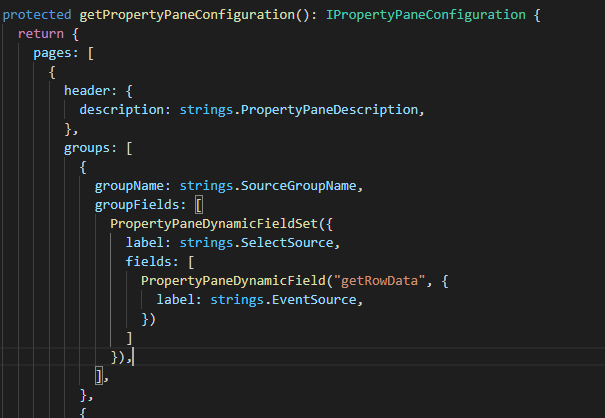
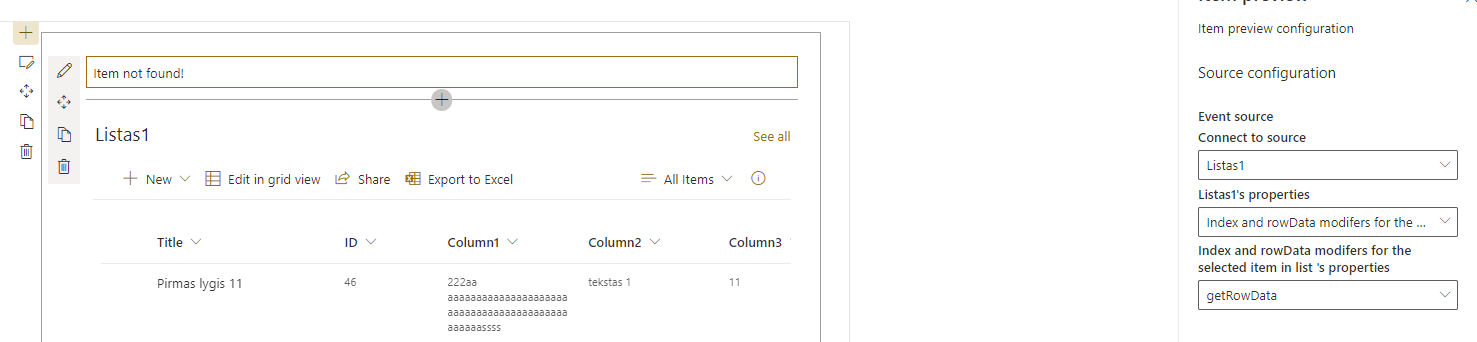

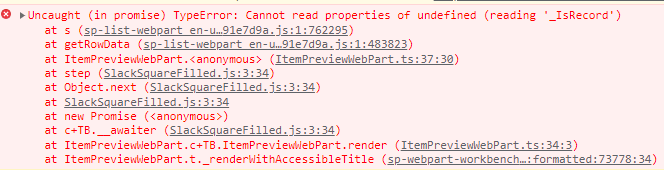
Am I doing something wrong or this is simply not possible?
Any help is appreciated :)
' cx='32' cy='32' r='32' /%3E%3Ctext x='50%25' y='55%25' dominant-baseline='middle' text-anchor='middle' fill='%23FFF' %3ER%3C/text%3E%3C/svg%3E)
Hi @karolis.stoncius ,
Per my research, We are unable to connect custom spfx web part to List web part using dynamic data. We can only connect two or more custom SPFx webpart by dynamic data. For the OOB list, we cannot write custom code with it. You could use the OOB List properties web part to connect it. We can only connect OOB webparts between each other. However there is no such function to connect a custom SPFx webpart to the OOB webparts. Here is the similar issue link
https://learn.microsoft.com/en-us/answers/questions/307847/how-can-we-connect-listwebpart-present-on-modern-p.html
If the answer is helpful, please click "Accept Answer" and kindly upvote it. If you have extra questions about this answer, please click "Comment".
Note: Please follow the steps in our documentation to enable e-mail notifications if you want to receive the related email notification for this thread.
Thanks for info!