Microsoft Security | Microsoft Graph
An API that connects multiple Microsoft services, enabling data access and automation across platforms

This browser is no longer supported.
Upgrade to Microsoft Edge to take advantage of the latest features, security updates, and technical support.
' cx='32' cy='32' r='32' /%3E%3Ctext x='50%25' y='55%25' dominant-baseline='middle' text-anchor='middle' fill='%23FFF' %3EDS%3C/text%3E%3C/svg%3E)
We are using the following Microsoft Graph API to delete OneNote page.
https://learn.microsoft.com/en-us/graph/api/page-delete?view=graph-rest-1.0&tabs=http
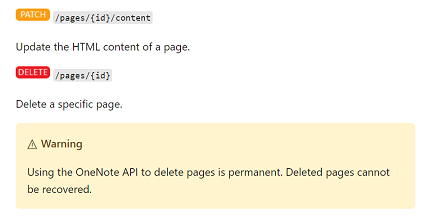
When deleting the page using API its permanently getting deleted and is not moved in the Deleted notes, but if we delete from OneNote client then the page is moved under delete notes.
We really need a way to recover deleted notes, this should work consistent from OneNote client UI and API.
An API that connects multiple Microsoft services, enabling data access and automation across platforms
' cx='32' cy='32' r='32' /%3E%3Ctext x='50%25' y='55%25' dominant-baseline='middle' text-anchor='middle' fill='%23FFF' %3EH%3C/text%3E%3C/svg%3E)
Hope you are doing well.
I'm also able to replicate this issue. Yes agreed, In graph API there is no documentation clearly called it out. But I could able to find some reference related to OneNote Office 365 REST APIs and I think the graph API also behaves the same way as Office 365 REST APIs like before.
If the answer is helpful, please click "Accept Answer" and kindly upvote it. If you have further questions about this answer, please click "Comment".
' cx='32' cy='32' r='32' /%3E%3Ctext x='50%25' y='55%25' dominant-baseline='middle' text-anchor='middle' fill='%23FFF' %3EZY%3C/text%3E%3C/svg%3E)
Hello @Deepak Sharma , According to my understanding, the delete operation of graph means that the data has been completely removed. You can open a support ticket and ask for help in the Microsoft back end to see if there are any good suggestions.
If the answer is helpful, please click "Accept Answer" and kindly upvote it. If you have extra questions about this answer, please click "Comment".
Note: Please follow the steps in our documentation to enable e-mail notifications if you want to receive the related email notification for this thread.
Well that's not consistent, If I delete a folder/file in SharePoint using Graph call it still moves in Recycled bin folder. Its only OneNote that behaves different here.