
IIS: Issue when creating a new website using Shared Configuration
' cx='32' cy='32' r='32' /%3E%3Ctext x='50%25' y='55%25' dominant-baseline='middle' text-anchor='middle' fill='%23FFF' %3ERB%3C/text%3E%3C/svg%3E)
Raymond Brink
1
Reputation point
Hi all,
We have Shared Configuration setup in IIS 10.0.203348.1 (Windows Server 2022 Datacenter). The shared configuration is on a UNC share and used by two servers. A designated user is in place with access to that UNC share.
When creating a new website in either server in de webfarm the apppool and website start successfully on the server used to create the website, but not on the other server. The other server marks both the apppool and the website with a red cross, like so:
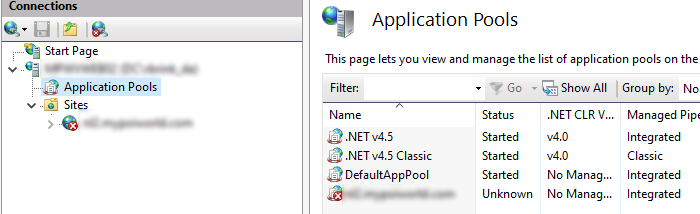
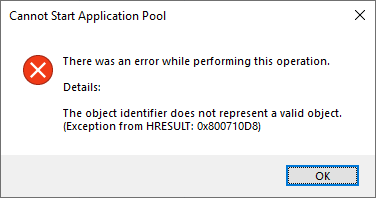
Manually starting the apppool results in an error:
When hitting the website with a browser the results are mixed (as expected). When hitting the server that the website was created on, everything is fine. When hitting the other server, it returns a 404.
So far I've been able to determine, that initially this is added to the applicationHost.config:
<add name="my.domain.com" />
The whole section looks like this.
<applicationPools>
 <add name="DefaultAppPool" />
 <add name=".NET v4.5 Classic" managedRuntimeVersion="v4.0" managedPipelineMode="Classic" />
 <add name=".NET v4.5" managedRuntimeVersion="v4.0" />
 **<add name="my.domain.com" />**
 <applicationPoolDefaults managedRuntimeVersion="v4.0">
 <processModel identityType="ApplicationPoolIdentity" />
 </applicationPoolDefaults>
</applicationPools>
When I the double click the apppool on the other server and hit OK to close the dialog again, the red crosses for the apppool and website are removed and the website runs as expected. Runningiisreset fixes the issue too. Both of these are just work-arounds to me, as both are unacceptable on a public facing production webfarm.
Looking at the configuration after opening and closing the apppool's properties dialog something has changed. Now it looks like this:
<applicationPools>
 <add name="DefaultAppPool" />
 <add name=".NET v4.5 Classic" managedRuntimeVersion="v4.0" managedPipelineMode="Classic" />
 <add name=".NET v4.5" managedRuntimeVersion="v4.0" />
 **<add name="my.domain.com" managedRuntimeVersion="v4.0" />**
 <applicationPoolDefaults managedRuntimeVersion="v4.0">
 <processModel identityType="ApplicationPoolIdentity" />
 </applicationPoolDefaults>
</applicationPools>
Basically this...
<add name="my.domain.com" />
...changes to this:
<add name="my.domain.com" managedRuntimeVersion="v4.0" />
Manually making this change to the applicationHost.config doesn't do anything btw.
I've read loads of threads on this issue but nobody seems to have a permanent solution for it (dating way back):
https://social.msdn.microsoft.com/Forums/en-US/5e9898f7-7a19-42b7-8564-47f01639b3a0/add-new-web-site-with-shared-configuration-need-an-iisreset?forum=iiswebfarms
https://social.msdn.microsoft.com/Forums/en-US/88d02789-4d96-4593-b002-909c22511777/application-pool-created-remains-in-state-unknown?forum=iis7general
Am I doing something wrong or has this been an issue in IIS for ages that never got fixed?
Cheers,
Ray
Windows development | Internet Information Services
{count} votes
-
' cx='32' cy='32' r='32' /%3E%3Ctext x='50%25' y='55%25' dominant-baseline='middle' text-anchor='middle' fill='%23FFF' %3ESW%3C/text%3E%3C/svg%3E) Sam Wu-MSFT 7,566 Reputation points Microsoft External Staff
Sam Wu-MSFT 7,566 Reputation points Microsoft External Staff2022-03-25T07:39:47.643+00:00 @Raymond Brink You need more information to analyze your problem, you can check the Event viewer for detailed error messages or use failed request trace to see information about 404 errors.
-
' cx='32' cy='32' r='32' /%3E%3Ctext x='50%25' y='55%25' dominant-baseline='middle' text-anchor='middle' fill='%23FFF' %3ECL%3C/text%3E%3C/svg%3E) Chris Lyon 0 Reputation points
Chris Lyon 0 Reputation points2023-08-02T12:54:24.88+00:00 Any luck sorting this out? I've run into same issue
Sign in to comment
Sign in to answer