Azure App Service
Azure App Service is a service used to create and deploy scalable, mission-critical web apps.
This browser is no longer supported.
Upgrade to Microsoft Edge to take advantage of the latest features, security updates, and technical support.
' cx='32' cy='32' r='32' /%3E%3Ctext x='50%25' y='55%25' dominant-baseline='middle' text-anchor='middle' fill='%23FFF' %3EDS%3C/text%3E%3C/svg%3E)
Getting "Content Encoding Error" when launching Kudu from App Service Editor
Azure App Service is a service used to create and deploy scalable, mission-critical web apps.
' cx='32' cy='32' r='32' /%3E%3Ctext x='50%25' y='55%25' dominant-baseline='middle' text-anchor='middle' fill='%23FFF' %3EAK%3C/text%3E%3C/svg%3E)
DwightSands-7291, To better assist you on this, what is the app framework that you’re working on (Dotnet, PHP, Node, Java, etc)? Do you recall making any changes prior to the issue happening?
Does the error appear upon clicking on “Open Kudu Console” from App Service Editor or navigating to Kudu Console?
--As a test, you may try to access Kudu Console directly via:
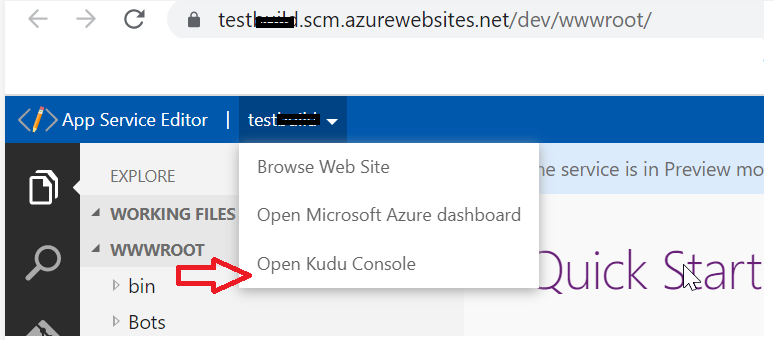
--On my test site, I’m ‘Open Kudu Console’ fine via App Service Editor. (screenshot below)
--You could capture a network trace via F12 developer tools in the browser to fetch more details on the error.
--Also, review the web.config/and Content Type:
"Content-Type: application/json"
Checkout these docs for more info.
https://github.com/projectkudu/kudu/wiki/Analyzing-a-git-client-trace
https://github.com/projectkudu/kudu/wiki/REST-API
-- If feasible (if you have tried), you may consider restart the WebApp and then test.
Also, please post a screenshot after concealing any private details.