Offline Windows Deployment

Jaydan T Harvey 21 Reputation points
2022-03-25T06:30:40.63+00:00

Hello,

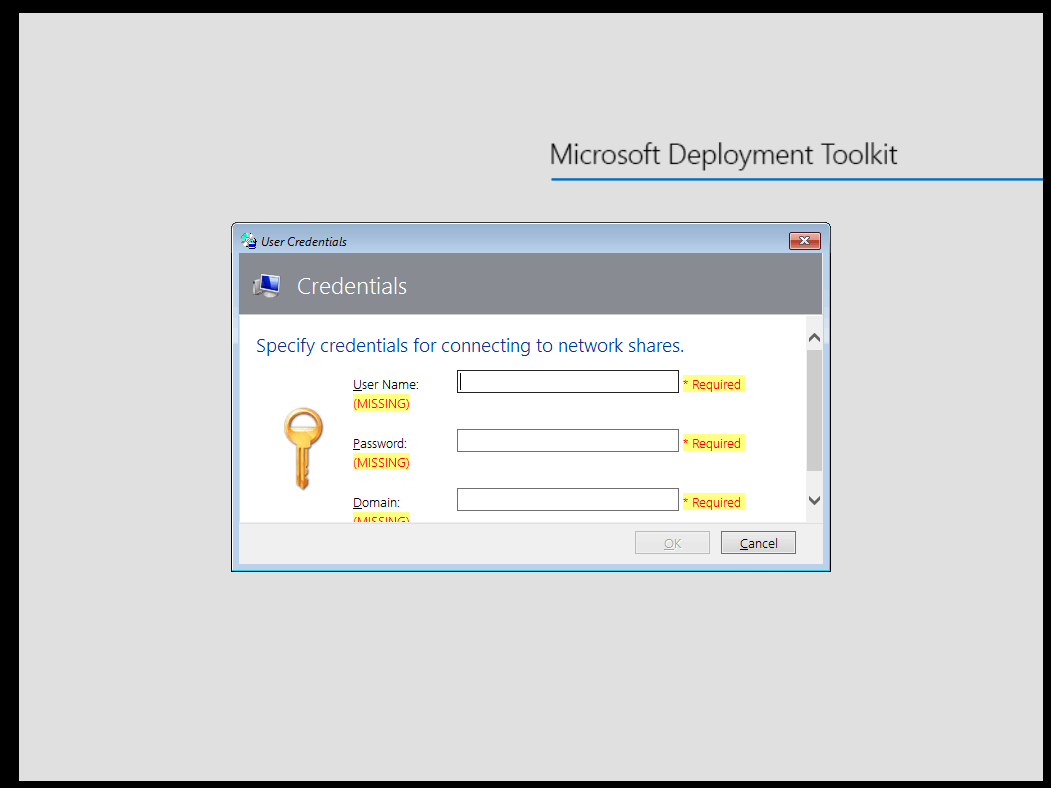
I am using Windows Deployment toolkit, and am wanting to see if its possible to somehow "skip" this step (see attached) and have the image either part of the ISO in some form, so it doesnt ask me for credentials to the network share to access the .wim file

I am wanting to do this so i can do offline/off-site windows deployments.

I accidently deleted the original text for this question, and its been a long day and i dont want to have to re-type, so i didnt include everything. If you want more info just let me know and i can happily provide :)

186853-image.png

Windows for business | Windows Server | User experience | Other
0 comments No comments
{count} votes

2 answers

Sort by: Most helpful
  1. LoudCloudDragon_caseyDB 191 Reputation points
    2022-03-27T22:25:01.377+00:00

    I believe you may have luck with the MDT deployment share rules which are configured in CustomSettings.ini (Drive:\pathtoBuildLab\Control folder) and/or the Bootstrap.ini file. It is recommended to go lite on the Bootstrap.ini and put most of your rules in the CustomSettings.ini for ease of management reasons. Here is the link.create-a-windows-10-reference-image
    @Jaydan T Harvey

    0 comments No comments

  2. Limitless Technology 40,076 Reputation points
    2022-03-31T14:00:41.167+00:00

    Hi @Jaydan T Harvey

    I am not sure if we can skip these steps but If you are planning to make an offline deployment you can follow the below steps as follows:

    -Import your captured WIM file into MDT
    -Create a new task sequence and point it to your WIM image
    -(optional) Create a selection profile. By creating a Selection Profile you control what’s included in the deployment media.
    -Create offline media.

    Here are is step-by-step guides that will walk you through the process:
    https://learn.microsoft.com/en-us/windows/deployment/deploy-windows-mdt/deploy-a-windows-10-image-using-mdt

    offline deployment using windows 10 using usb
    https://social.technet.microsoft.com/Forums/ie/en-US/f758e07c-2888-435d-a170-d1e5c868b1c9/offline-deployment-using-windows-10-using-usb?forum=mdt

    Hope this resolves your Query!!

    --
    --If the reply is helpful, please Upvote and Accept it as an answer–

    0 comments No comments

Your answer

Answers can be marked as 'Accepted' by the question author and 'Recommended' by moderators, which helps users know the answer solved the author's problem.