Developer technologies | Transact-SQL
A Microsoft extension to the ANSI SQL language that includes procedural programming, local variables, and various support functions.
This browser is no longer supported.
Upgrade to Microsoft Edge to take advantage of the latest features, security updates, and technical support.
' cx='32' cy='32' r='32' /%3E%3Ctext x='50%25' y='55%25' dominant-baseline='middle' text-anchor='middle' fill='%23FFF' %3EKM%3C/text%3E%3C/svg%3E)
Hi,
I have a table ##tab1 and ##tab2 like below
create table ##tab1 (code nvarchar(10), MinValue float, MaxValue float)
insert into ##tab1 values ('1001', 35, 500);
insert into ##tab1 values ('1002', 100, 1000);
insert into ##tab1 values ('1003', 50, 800);
create table ##tab2 (id nvarchar(10), code nvarchar(10), comment nvarchar(100))
insert into ##tab2 values ('1', '1001',';T=ABC C="CR" V="95" U="1111";')
insert into ##tab2 values ('2', '1001',';T=ABC C="CR" V="20" U="1111";')
insert into ##tab2 values ('3', '1002',';T=XYZ C="CR" V="15" Z="2222";')
insert into ##tab2 values ('4', '1002',';T=XYZ C="CR" V="102" U="1111";')
insert into ##tab2 values ('5', '1003',';T=XYZ C="CR" V="700" U="1111";')
insert into ##tab2 values ('6', '1004',';T=XYZ C="CR" V="200" U="1111";')
in ##tab1 having code with minvalue and max values. i need to match the ##tab1 code
with ##tab2 code and comment 'V' value should be between ##tab1 min and maxvalue.
if not i need that record
am expecting the below result.
create table ##Result (id nvarchar(10), code nvarchar(10), comment nvarchar(100))
insert into ##Result values ('2', '1001',';T=ABC C="CR" V="20" U="1111";')
insert into ##Result values ('3', '1002',';T=XYZ C="CR" V="15" Z="2222";')
select * from ##tab1;
select * from ##tab2;
select * from ##Result
drop table ##tab1
drop table ##tab2
drop table ##Result
Thanks
' cx='32' cy='32' r='32' /%3E%3Ctext x='50%25' y='55%25' dominant-baseline='middle' text-anchor='middle' fill='%23FFF' %3EBZ%3C/text%3E%3C/svg%3E)
Welcome to Microsoft T-SQL Q&A Forum!
The answer below is a change based on NaomiNNN's answer, maybe it can be done better, I will explain the implementation idea to you:
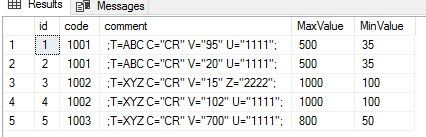

Here is the result:
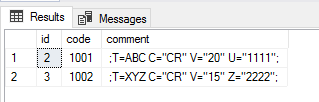
Best regards,
Bert Zhou
If the answer is the right solution, please click "Accept Answer" and kindly upvote it. If you have extra questions about this answer, please click "Comment".
Note: Please follow the steps in our Documentation to enable e-mail notifications if you want to receive the related email notification for this thread.
Thanks alot Bert
You're welcome, glad to see your issue is resolved.
' cx='32' cy='32' r='32' /%3E%3Ctext x='50%25' y='55%25' dominant-baseline='middle' text-anchor='middle' fill='%23FFF' %3ENN%3C/text%3E%3C/svg%3E)
This is a case when EXCEPT opeator may come handy, e.g.
;WITH cte AS (SELECT t2.*, TRY_CAST(v.VValue AS FLOAT) AS vValue
FROM ##tab2 t2
CROSS APPLY (SELECT CHARINDEX('V="', comment) AS StartPos) X
CROSS APPLY (SELECT CHARINDEX('"', comment, StartPos+4) AS EndPos) Y
CROSS APPLY (SELECT CASE WHEN X.StartPos > 0 THEN SUBSTRING (comment, X.StartPos + 3, EndPos - StartPos - 3) END AS VValue) V)

SELECT * FROM cte
EXCEPT
SELECT t2.* FROM cte t2 INNER JOIN ##tab1 t1 ON t2.code = t1.code AND
t2.VValue BETWEEN t1.MinValue AND t1.MaxValue
Thanks alog Naomi