Microsoft 365 and Office | SharePoint | For business | Windows
A group of Microsoft Products and technologies used for sharing and managing content, knowledge, and applications.

This browser is no longer supported.
Upgrade to Microsoft Edge to take advantage of the latest features, security updates, and technical support.
' cx='32' cy='32' r='32' /%3E%3Ctext x='50%25' y='55%25' dominant-baseline='middle' text-anchor='middle' fill='%23FFF' %3EHN%3C/text%3E%3C/svg%3E)
Hi Team
Is it possible to have certain columns auto-populate when the end user selects a specific field in a modern SP list form.
As an example, If the end user selects "New Recruit" under the "Request Type" field it will then auto populate the below 3 fields to reflect;
Field Name: "Resource Type" and for it to select: "Contractor"
Field Name: "Vacancy Reason?" and for it to select "New Position"
Field Name: "RPS attached*" and for it to select: "Yes"
I don't have access to power-apps so I'm trying to find a work-around
Cheers,
Harry
' cx='32' cy='32' r='32' /%3E%3Ctext x='50%25' y='55%25' dominant-baseline='middle' text-anchor='middle' fill='%23FFF' %3EED%3C/text%3E%3C/svg%3E)
Thank you for your question.
We are currently looking into this issue and will give you an update as soon as possible.
Thank you for your understanding and support.
Thank you for the reply.
I hope you and the team can find a work around as this will be game changing for my team.
I look forward to hearing from you :)
Kind Regards,
Harry
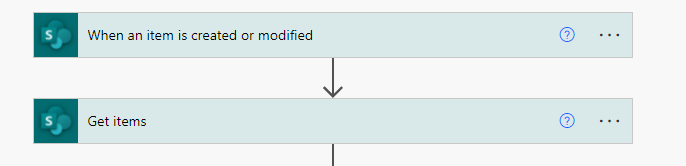
As a workaround, you could create a automated flow to update item field when end user selects "New Recruit" in the "Request Type" field.
Here is the example:


If the answer is helpful, please click "Accept Answer" and kindly upvote it. If you have extra questions about this answer, please click "Comment".
Note: Please follow the steps in our documentation to enable e-mail notifications if you want to receive the related email notification for this thread.
I’m checking how the things are going on about this issue. Whether the answer helps you?
If there is any problem with this issue, feel free to let me know.