Developer technologies | ASP.NET | ASP.NET Core
A set of technologies in the .NET Framework for building web applications and XML web services.
This browser is no longer supported.
Upgrade to Microsoft Edge to take advantage of the latest features, security updates, and technical support.
' cx='32' cy='32' r='32' /%3E%3Ctext x='50%25' y='55%25' dominant-baseline='middle' text-anchor='middle' fill='%23FFF' %3ESA%3C/text%3E%3C/svg%3E)
Do you know how to activate ViewBag in PageModel (x.cshtml.cs files) of asp.net core 3.1? Thanks

Razor Pages use TempData.
It is not razor pages. It is all about ViewBag which is not recognizable in x.cshtml.cs:
public class Index: PageModel
{
. . .
ViewBag.kvp = kvpArray;
}
' cx='32' cy='32' r='32' /%3E%3Ctext x='50%25' y='55%25' dominant-baseline='middle' text-anchor='middle' fill='%23FFF' %3EBS%3C/text%3E%3C/svg%3E)
PageModel is for Razor Pages, and they do not use ViewBag. ViewBag is property of a mvc razor view, passed via the ViewContext.
I think you are very confused. The PageModel is a Razor Page. The ViewBag is an MVC construct to pass a dynamic type from a controller to a View. Whether you know it or not, you're building a Razor Page. Razor Pages do not have controllers. This is main concept in Razor Pages. You might want to go through tutorial to learn the basics rather than making assumptions.
Tutorial: Get started with Razor Pages in ASP.NET Core
Razor Pages with Entity Framework Core in ASP.NET Core - Tutorial 1 of 8
Unfortunately it is you who misunderstood the question !
See what @Michael Taylor says !
' cx='32' cy='32' r='32' /%3E%3Ctext x='50%25' y='55%25' dominant-baseline='middle' text-anchor='middle' fill='%23FFF' %3EMT%3C/text%3E%3C/svg%3E)
You do not have access to ViewBag inside PageModel. There are hacks to get it to work but there is no reason to do so.
To store data temporarily you must use TempData or ViewData. If you need access to the data in the view then use ViewData instead of ViewBag.
public class Index: PageModel
{
   //Preferred approach
   [ViewData]
   public KeyValuPair<string, string>[] Values { get; set; }

   public void OnGet ()
   {
      //Only if really, really needed
      ViewData["Values"] = kvpArray;
   }
}

@page
@{
   var kvp = ViewData["Values"] as KeyValuePair<string, string>[];
}
I should point out that an array of KeyValuePair is really just a dictionary so if you simply use Dictionary<K,V> your code would be easier to work with I believe.
Thank you @Michael Taylor , but "var kvp = ViewData["Values"] as KeyValuePair<string, string>[];" - is not recognized !!!
I just showed the relevant code and I'm assuming you already had a working page. For example after the @page directive you would have also had a @model directive pointing to your PageModel type. I'm wondering if there is a disconnect between what you're actually doing and what we are assuming based upon the snippets of code you posted. Let's cut to the chase here.
Please post the actual error you're getting when you say it isn't recognized. It would be useful if you'd post the entirety of your cshtml file up to the point where you're using HTML. It would also be useful to see the entirety of your page model class.
See please the post of @Anonymous . There are both PageModel and cshtml files. In PageModel I'm usuíng ViewBag which is not accessible and in cshtml I'm declaring var kvp = ViewData["Values"] as KeyValuePair<string, string>[]; which is not recognizable.
You ae doing something wrong. There's not much the community can do to help without an example that illustrates this issue.
' cx='32' cy='32' r='32' /%3E%3Ctext x='50%25' y='55%25' dominant-baseline='middle' text-anchor='middle' fill='%23FFF' %3EA%3C/text%3E%3C/svg%3E)
Hi @S A ,
ViewBag is a wrapper around the ViewData dictionary and provides an alternative way to access ViewData contents within ASP.NET Core MVC controllers using dynamic properties instead of string-based indexes. A design decision was made NOT to include a ViewBag property in the Razor Pages PageModel class, but you can use ViewBag to reference ViewData entries from within a Razor content page or layout page:
Like this:
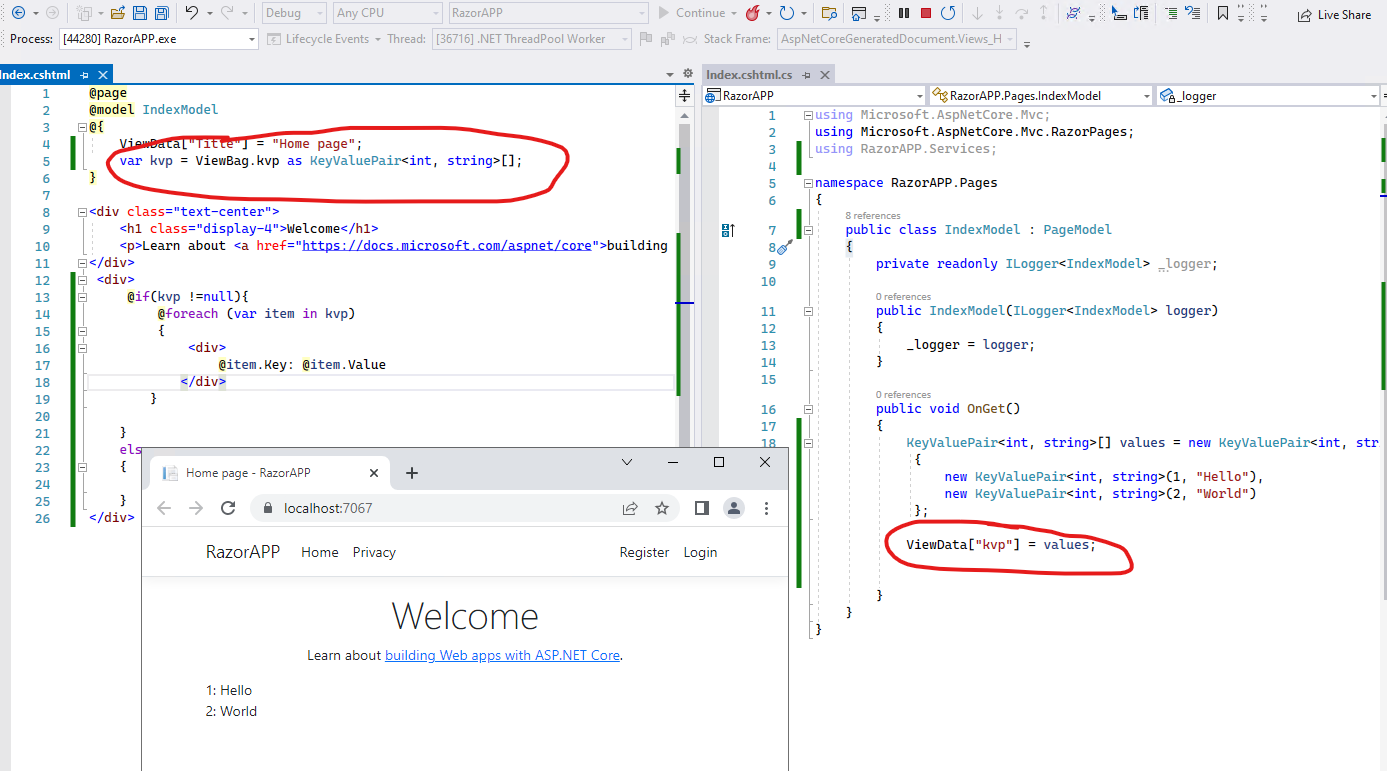
If the answer is the right solution, please click "Accept Answer" and kindly upvote it. If you have extra questions about this answer, please click "Comment".
Note: Please follow the steps in our documentation to enable e-mail notifications if you want to receive the related email notification for this thread.
Best regards,
Dillion
Dear @Anonymous , var kvp= ViewBag.kvp as KeyValuePair<int, string>[]; is not acceptable!!! The compile error is: "The variable of the static type "KeyValuePair" cannot be declared."
Sounds like you might have accidentally declared the type KeyValuePair. Right click the type and go to definition on it from within your CSHTML file. Alternatively it sounds like maybe you're just using KeyValuePair with the generic parameters.
//var kvp = ViewData["kvp"] as KeyValuePair;  //Compiler error, KeyValuePair is a static type
var kvp = ViewData["kvp"] as KeyValuePair<string, string>[]; //Valid compilation
You haven't yet showed us all your code as we keep asking. Please provide the exact code in your PageModel that you're trying to use + any declarations that type references. Also post the same block for your CSHTML file.
Again your "var kvp = ViewData["kvp"] as KeyValuePair<string, string>[];" is wrong! I'm using .Net Core 3.1. My code is shown in the picture of @Anonymous .
Hi @S A ,
I have checked the code in Asp.net core 3.1 web application, everything still works well:
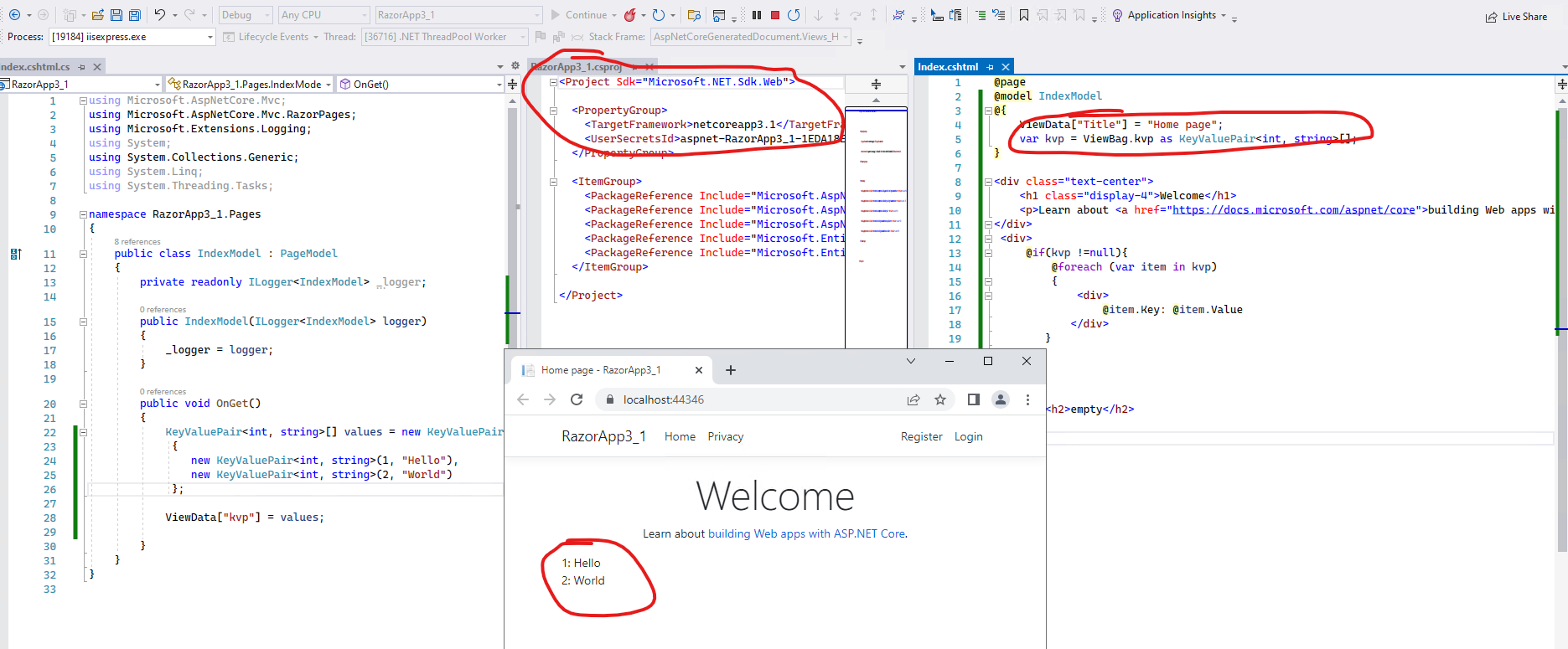
Have you ever override the KeyValuePair? Try to create a new asp.net core web application and test the code, if still meet the same error, can you share it via the Github or OneDrive, then we can might help us to reproduce the problem.
Best regards,
Dillion
Thank you very much for everyone.