Developer technologies | Windows Forms
A set of .NET Framework managed libraries for developing graphical user interfaces.
This browser is no longer supported.
Upgrade to Microsoft Edge to take advantage of the latest features, security updates, and technical support.
' cx='32' cy='32' r='32' /%3E%3Ctext x='50%25' y='55%25' dominant-baseline='middle' text-anchor='middle' fill='%23FFF' %3ES%3C/text%3E%3C/svg%3E)
Hello everyone here,
I want to ask a question if someone got an idea can help me to implement it using C# with a Windows Form .
I import excel sheet which among columns there are two columns containing same data. for instance you can find 0700 in column1, and in column2 but on different row. I tried to iterate and count how many times a certain number occurs in both columns of a sheet and put its repetition number in other dataGridView as shown below but I'm failing to do so.
Note: Data are stored in Excel Sheet not from SQL database or DataTable.
Please, Can anyone here help me to achieve as the following?
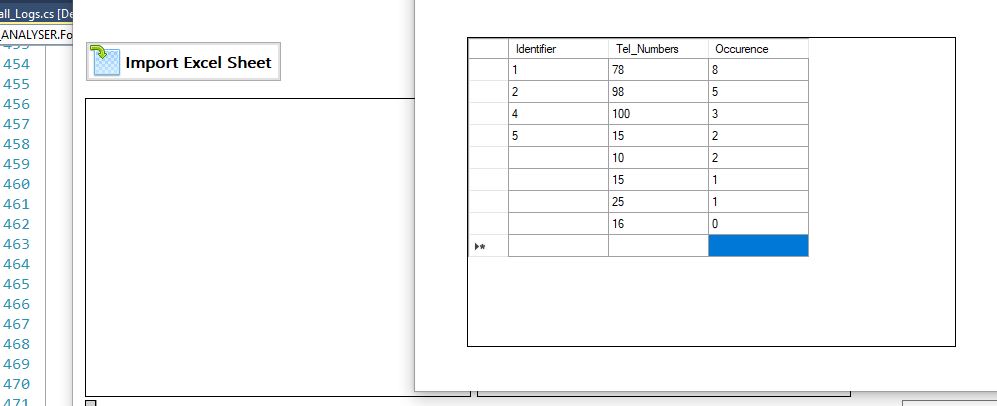
I tried this but count in only one column and doesn't display result in a dgv.
private void btn_CountRepetition_Click(object sender, EventArgs e)
{
var q = dataGridView1.Rows.OfType()
.GroupBy(x => x.Cells[3].Value.ToString())
.Select(g => new { Value = g.Key, Count = g.Count(), Rows = g.ToList() })
.OrderByDescending(x => x.Count);
foreach (var x in q)
{
DialogResult Result = MessageBox.Show("Quantity: " + x.Value + " " + " Repetion: " + x.Count + " " + "Times", "------COUNT RESULT----", MessageBoxButtons.OKCancel, MessageBoxIcon.Information);
if (Result == DialogResult.OK)
{

            }
            else
            {
                Close();

            }
        }
I will appreciate your help!!

@SValen , Welcome to Microsoft Q&A, based on your description, you want to show the value and repeat times in the datagirdview.
First, We could get the data from the excel file.
Second, Please combine two colunm's data to a list.
Third, you could use the code you provided to show data in datagirdview.
Here is a code example you could refer to.
private void button1_Click(object sender, EventArgs e)
        {
            DataTable dt = READExcel(@"C:\Users\username\Desktop\test1.xlsx");
            dataGridView1.DataSource= dt;
            var q1 = dt.AsEnumerable().Select(r => r.Field<string>("Col1")).ToList();
            var q2 = dt.AsEnumerable().Select(r => r.Field<string>("Col2")).ToList();
            List<string> list = new List<string>();
            list.AddRange(q1);
            list.AddRange(q2);
            var result = list.GroupBy(x => x)
 .Select(g => new { Value = g.Key, Count = g.Count() })
 .OrderByDescending(x => x.Count);
            int count = 1;
            dataGridView2.Columns.Add("Id","Id");
            dataGridView2.Columns.Add("Tel_Numbers", "Tel_Numbers");
            dataGridView2.Columns.Add("Occurence", "IOccurence");
            foreach (var item in result)
            {
                dataGridView2.Rows.Add(count,item.Value,item.Count);
                count++;
            }

        }

            public DataTable READExcel(string path)
            {
                Microsoft.Office.Interop.Excel.Application objXL = null;
                Microsoft.Office.Interop.Excel.Workbook objWB = null;
                objXL = new Microsoft.Office.Interop.Excel.Application();
                objWB = objXL.Workbooks.Open(path);
                Microsoft.Office.Interop.Excel.Worksheet objSHT = objWB.Worksheets[1];

                int rows = objSHT.UsedRange.Rows.Count;
                int cols = objSHT.UsedRange.Columns.Count;
                DataTable dt = new DataTable();
                int noofrow = 1;

                for (int c = 1; c <= cols; c++)
                {
                    string colname = objSHT.Cells[1, c].Text;
                    dt.Columns.Add(colname);
                    noofrow = 2;
                }

                for (int r = noofrow; r <= rows; r++)
                {
                    DataRow dr = dt.NewRow();
                    for (int c = 1; c <= cols; c++)
                    {
                        dr[c - 1] = objSHT.Cells[r, c].Text;
                    }

                    dt.Rows.Add(dr);
                }

                objWB.Close();
                objXL.Quit();
                return dt;
            }
Result in excel and datagirdview:
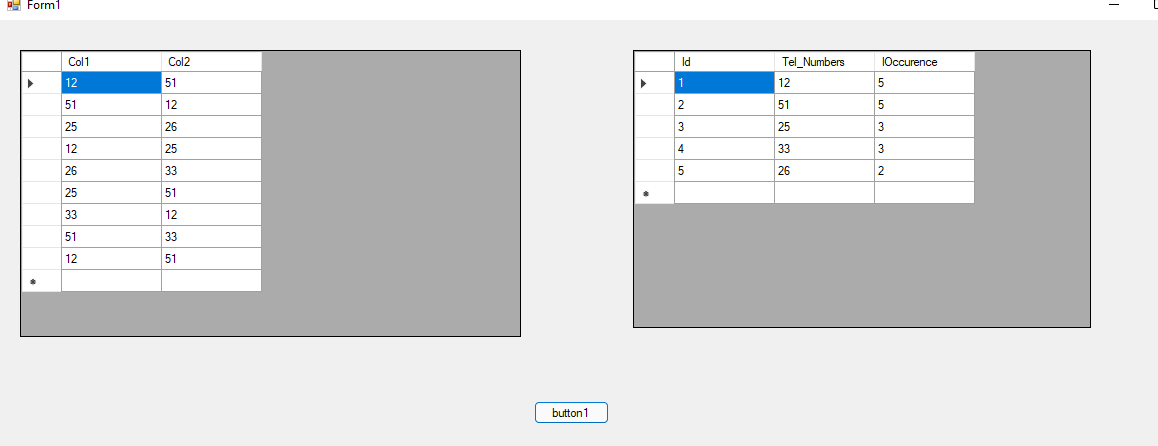
Best Regards,
Jack
If the answer is the right solution, please click "Accept Answer" and upvote it.If you have extra questions about this answer, please click "Comment".
Note: Please follow the steps in our documentation to enable e-mail notifications if you want to receive the related email notification for this thread.
Thank you for your help! but Sir,
This works when you are counting directly from excel sheet .
I already wrote codes to import excel file in dgv1 and it works.
I can count from the dgv1 and show repetition but I count data in only one column which is Col1 whereas I need to count from both Col1 and Col2 of dgv1.
What I want is: After excel file is imported in gdv1, I need to count repetition of data from different columns (Col1, Col2 for instance) in dgv1 and show results in dgv2 when show repetition btn is clicked.
The image bellow shows how I want to achieve but I used your data to be clear( count from dgv1 and show repetition in other dgv2)
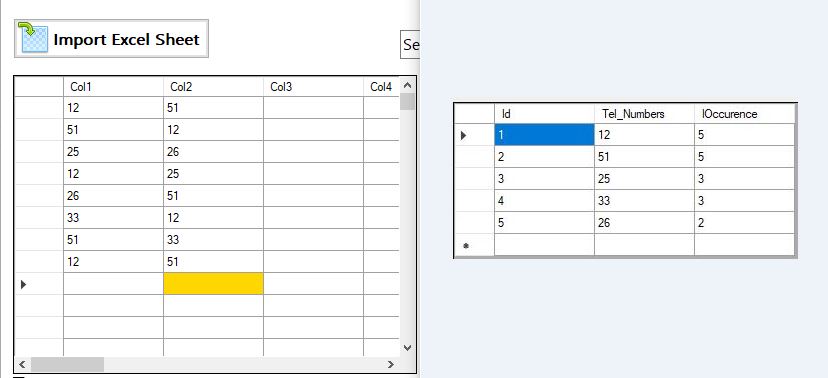
In summary I need to count from dgv1 and display the result in the second dgv2 in the same way of the above image.
Your support will be appreciated.
@SValen , thanks for the response, I have updated my answer and you could check if it works for you.
Thank you so much @Jack J Jun , It is working almost as I wish. Can you allow to choose any Excel file from PC despite using static path? because user will need to choose any excel file from any location on PC.
The following requires to write the file path in codes.
private void button1_Click(object sender, EventArgs e)
{
DataTable dt = READExcel(@"C:\Users\username\Desktop\test1.xlsx");
.
.
}
@SValen , thanks for the response, I changed to the following code, Please check if it works for you.
var filePath = string.Empty;
            using (OpenFileDialog openFileDialog = new OpenFileDialog())
            {
                openFileDialog.InitialDirectory = "c:\\";
                openFileDialog.Filter = "Excel files (*.xlsx)|*.xlsx|All files (*.*)|*.*";
                openFileDialog.FilterIndex = 2;
                openFileDialog.RestoreDirectory = true;

                if (openFileDialog.ShowDialog() == DialogResult.OK)
                {
                    //Get the path of specified file
                    filePath = openFileDialog.FileName;

                }
            }
            DataTable dt = READExcel(filePath);
            dataGridView1.DataSource= dt;
@Jack J Jun , Thank you so much! Now it is working as I wish with all codes provided!
Blessings!
Best Regards.
Hello @Jack J Jun , Is it possible to include a condition to show only data starting with 1 or 35 for example in the 2nd datagridview from the imported excel file?
Best Regards!