Microsoft Teams | Development
Building, integrating, or customizing apps and workflows within Microsoft Teams using developer tools and APIs

This browser is no longer supported.
Upgrade to Microsoft Edge to take advantage of the latest features, security updates, and technical support.
' cx='32' cy='32' r='32' /%3E%3Ctext x='50%25' y='55%25' dominant-baseline='middle' text-anchor='middle' fill='%23FFF' %3EA%3C/text%3E%3C/svg%3E)
Hey, Two questions,
On tab apps there are options to expand tab, reload tab, go to website etc, is there a way to control which of these settings appear? Limit certain ones etc.
Also is it possible to have the 'expand tab' option, from the header, and put it, or gain access to it, in a personal app, so a user can expand the tab in the actual app rather than the header?
' cx='32' cy='32' r='32' /%3E%3Ctext x='50%25' y='55%25' dominant-baseline='middle' text-anchor='middle' fill='%23FFF' %3EYS%3C/text%3E%3C/svg%3E)
Hi @AT ,
Welcome to Microsoft Q&A!
On tab apps there are options to expand tab, reload tab, go to website etc, is there a way to control which of these settings appear? Limit certain ones etc.
As far as I know, I am afraid no, currently it's not feasible to change or customize these settings.
Also is it possible to have the 'expand tab' option, from the header, and put it, or gain access to it, in a personal app, so a user can expand the tab in the actual app rather than the header?
By this, do you mean you would like to move the location of the "Expand tab" option, for example, make it show under the Headers section so that we don't need to find it via the drop down list in the header?
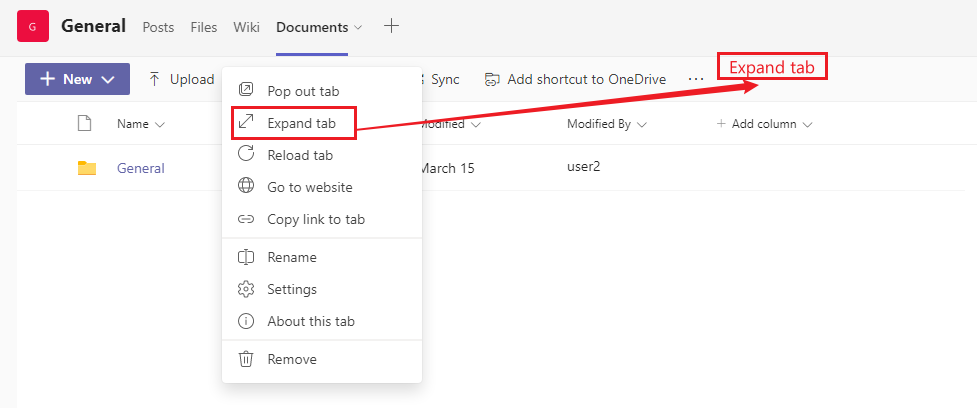
If this is the case, there's no option for this need either.
Given this, I've tried submitting this request via the dedicated feedback portal for Microsoft Teams:
Configuring Tab Options
You can add your vote or comment there as well and hopefully this feature can be added in the future.
If the answer is helpful, please click "Accept Answer" and kindly upvote it. If you have extra questions about this answer, please click "Comment".
Note: Please follow the steps in our documentation to enable e-mail notifications if you want to receive the related email notification for this thread.
Thanks @Yuki Sun-MSFT for the response :)
Yes I'd like to take those options from the header, into the actual app.
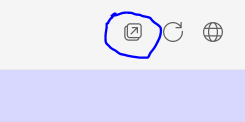
Last question, along the same lines, is that also applicable to the 'pop out chat', we'd like to remove it if possible, in our app, is this possible? See below screen shot of the option I am referring to
Hi @AT ,
along the same lines, is that also applicable to the 'pop out chat', we'd like to remove it if possible, in our app, is this possible?
That's not feasible either at present from what I am aware of.
Hi @AT ,
Just checking in to follow up with this thread. If the reply earlier was helpful, do you mind clicking the "Accept Answer" button so that it can be beneficial to others who read this thread. If you still have further concern on this, please feel free to post back. Thanks!