Custom SQL Tester: Error - Fill: SelectCommand.Connection not initialized

Nicholas Nguyen 21 Reputation points
2022-04-01T18:21:54.793+00:00

Hey everyone,

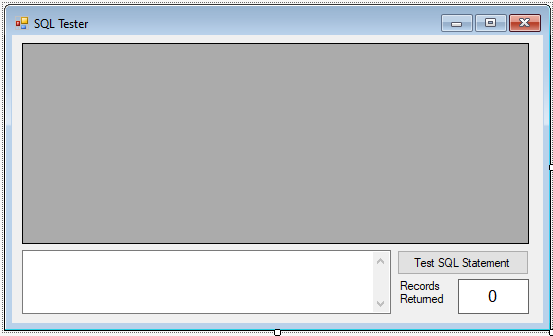
I developed a custom SQL Tester connecting C# to an Access Database, where I can enter an SQL sentence in a textbox for it to display its corresponding SQL results to a DataGridView named grdSQLTester. Here is the user interface:
189296-image.png

Here is the code:

using System;
using System.Collections.Generic;
using System.ComponentModel;
using System.Data;
using System.Drawing;
using System.Text;
using System.Windows.Forms;
using System.Data.OleDb;

namespace Example_4_1
{
public partial class frmSQLTester : Form
{
public frmSQLTester()
{
InitializeComponent();
}

// declare OleDbConnection
OleDbConnection booksConnection;

private void frmSQLTester_Load(object sender, EventArgs e)
{
// connect to books database
booksConnection
= new OleDbConnection("Provider=Microsoft.ACE.OLEDB.12.0; Data Source =
C:\Users\youraccount\access\BooksDB.accdb");
booksConnection.Open();
}

private void frmSQLTester_FormClosing(object sender, FormClosingEventArgs e)
{
booksConnection.Close();
booksConnection.Dispose();
}

private void btnTest_Click(object sender, EventArgs e)
{
// Declare Command, Adapter, DataTable object
OleDbCommand resultsCommand = null;
OleDbDataAdapter resultsAdapter = new OleDbDataAdapter();
DataTable resultsTable = new DataTable();

// Build SQL string
string cmdText = txtSQLTester.Text;
try
{
// establish command object and data adapter
resultsCommand = new OleDbCommand(cmdText, booksConnection);
resultsAdapter.SelectCommand = resultsCommand; // Error
resultsAdapter.Fill(resultsTable); // Error

// bind grid view to data table
grdSQLTester.DataSource = resultsTable;
lblRecords.Text = resultsTable.Rows.Count.ToString();
}
catch (Exception ex)
{
MessageBox.Show(ex.Message, "Error in Processing SQL", MessageBoxButtons.OK,
MessageBoxIcon.Error);
}
// Close all the connection resources
resultsCommand.Dispose();
resultsAdapter.Dispose();
resultsTable.Dispose();
}
}
}

Every time I pressed the "Test SQL" button named btnTest, I recieve the error message "Fill: SelectCommand.Connection has not been initialized", although the line "resultsAdapter.SelectCommand = resultsCommand;" is correct. How do I resolve this issue?

SQL Server | Other
Developer technologies | C#
An object-oriented and type-safe programming language that has its roots in the C family of languages and includes support for component-oriented programming.
{count} votes

1 answer

Sort by: Most helpful
  1. Erland Sommarskog 128.7K Reputation points MVP Volunteer Moderator
    2022-04-02T09:44:22.567+00:00

    Let's see here. You are accessing an Access database in C# and then you tag your question sql-server-general and dotnet-visual-basic?

    Anyway, the normal way to handle connections is to define them in a using block, which guarantees that they are closed and disposed and goes back to the connection pool when you exit the using block. I should hasten to add that this is the normal thing when you connect to SQL Server. Whether there is a connection pool with the OLE DB provider for Access, I don't know.

    Here is an untested example of how it would look like:

    private void btnTest_Click(object sender, EventArgs e)
    {
       using (OleDbConnection booksConnection = new OleDbConnection(
           @"Provider=Microsoft.ACE.OLEDB.12.0; Data Source = C:\Users\youraccount\access\BooksDB.accdb");
       {
          // Declare Command, Adapter, DataTable object
          OleDbCommand resultsCommand = null;
          OleDbDataAdapter resultsAdapter = new OleDbDataAdapter();
          DataTable resultsTable = new DataTable();
    
          // Build SQL string
          string cmdText = txtSQLTester.Text;
          try {
             booksCOnnections.open();
    
             // establish command object and data adapter
             resultsCommand = new OleDbCommand(cmdText, booksConnection);
             resultsAdapter.SelectCommand = resultsCommand; // Error
             resultsAdapter.Fill(resultsTable); // Error
    
             // bind grid view to data table
             grdSQLTester.DataSource = resultsTable;
             lblRecords.Text = resultsTable.Rows.Count.ToString();
          }
          catch (Exception ex) {
             MessageBox.Show(ex.Message, "Error in Processing SQL", MessageBoxButtons.OK,
             MessageBoxIcon.Error);
          }
       }
    }

    

Your answer

Answers can be marked as 'Accepted' by the question author and 'Recommended' by moderators, which helps users know the answer solved the author's problem.