Developer technologies | C#
An object-oriented and type-safe programming language that has its roots in the C family of languages and includes support for component-oriented programming.
This browser is no longer supported.
Upgrade to Microsoft Edge to take advantage of the latest features, security updates, and technical support.
' cx='32' cy='32' r='32' /%3E%3Ctext x='50%25' y='55%25' dominant-baseline='middle' text-anchor='middle' fill='%23FFF' %3EDU%3C/text%3E%3C/svg%3E)
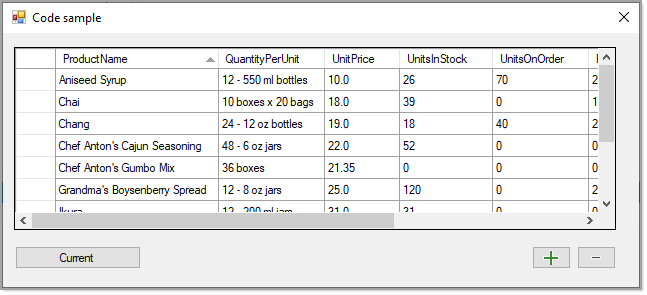
C# I want to increase the value of the selected cell with (+) and (-) buttons.

Best way to do this is have a DataSource e.g. in this case a DataTable. In the code below I increase and decrease the Qty value of the current row in the DataGridView.
The BindingSource component provides access to the current row, we cast to a DataRow than use SetField and Field extensions to change values.
Alternate to a DataTable would be a List<T>
namespace DataGridViewDemo
{
    public partial class DataGridViewForm : Form
    {
        private BindingSource bindingSource = new BindingSource();
        public DataGridViewForm()
        {
            InitializeComponent();

            Shown += OnShown;

        }

        private void OnShown(object sender, EventArgs e)
        {

            dataGridView1.AutoGenerateColumns = false;

            DataTable table = new DataTable();
            table.Columns.Add("Item", typeof(string));
            table.Columns.Add("Qty", typeof(int));
            table.Columns.Add("Price", typeof(decimal));

            table.Rows.Add("First item", 2, 60);
            table.Rows.Add("Second item", 2, 50);
            table.Rows.Add("Third item", 1, 20);

            bindingSource.DataSource = table;
            dataGridView1.DataSource = bindingSource;

        }

        private void IncreaseButton_Click(object sender, EventArgs e)
        {
            var row = ((DataRowView)bindingSource.Current).Row;
            row.SetField("Qty", row.Field<int>("Qty") +1);
        }

        private void DecreaseButton_Click(object sender, EventArgs e)
        {
            var row = ((DataRowView)bindingSource.Current).Row;
            row.SetField("Qty", row.Field<int>("Qty") -1);

        }
    }
}
Source code
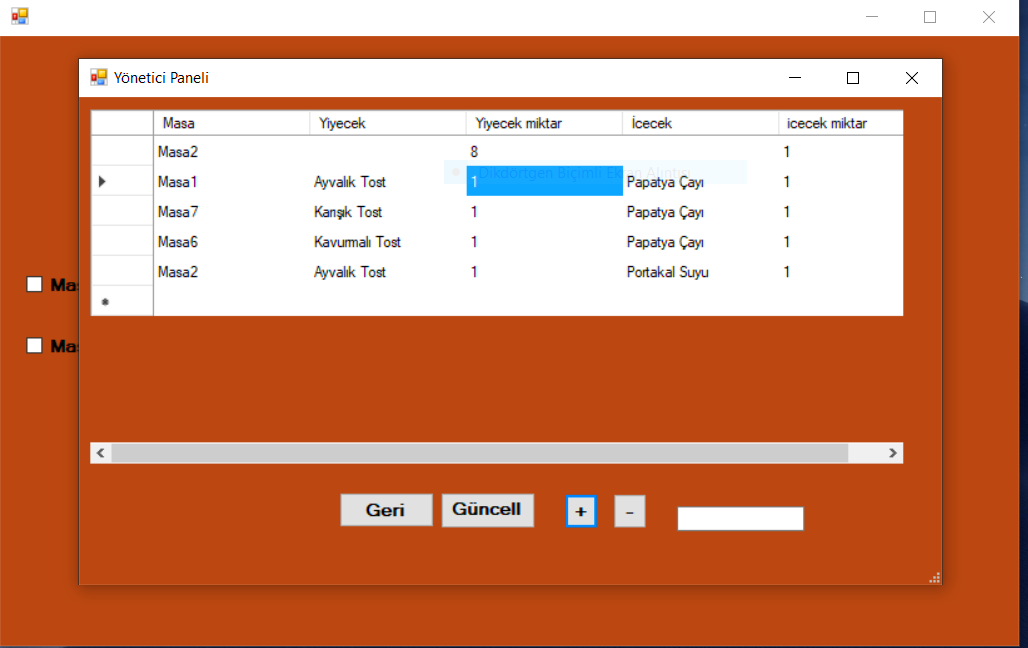
I'm sorry I don't know much, but I can't increase or decrease it again.
using System;
using System.Collections.Generic;
using System.ComponentModel;
using System.Data;
using System.Drawing;
using System.Linq;
using System.Text;
using System.Threading.Tasks;
using System.Windows.Forms;
using System.Data.SqlClient;

namespace kafe_ders
{
    public partial class Form2 : Form
    {

        SqlConnection connection = new SqlConnection("Data Source=DESKTOP-46FHV6F;Initial Catalog=ders-kafe;Integrated Security=True");
        SqlCommandBuilder commandBuilder ;
        SqlDataAdapter adtr;
        DataTable tbl= new DataTable();

        public Form2()
        {
            InitializeComponent();
            GetList();


            Shown += OnShown;
        }
        DataTable GetList()
        {
            tbl.Clear();
            adtr = new SqlDataAdapter("select * from musteri",connection);
            adtr.Fill(tbl);
            dataGridView1.DataSource = tbl;
            return tbl;
        }
        private void Form2_Load(object sender, EventArgs e)
        {
            // TODO: Bu kod satırı '_ders_kafeDataSet12.musteri' tablosuna veri yükler. Bunu gerektiği şekilde taşıyabilir, veya kaldırabilirsiniz.
            this.musteriTableAdapter2.Fill(this._ders_kafeDataSet12.musteri);
        }
        private void button2_Click(object sender, EventArgs e)
        {
            commandBuilder = new SqlCommandBuilder(adtr);
            adtr.Update(tbl);
            GetList();
        }

        private void button4_Click(object sender, EventArgs e)
        {

            this.Close();
        }
        private void selectedCellsButton_Click(object sender, System.EventArgs e)
        {
            Int32 selectedCellCount =
                dataGridView1.GetCellCount(DataGridViewElementStates.Selected);
            if (selectedCellCount > 0)
            {
                if (dataGridView1.AreAllCellsSelected(true))
                {
                    MessageBox.Show("All cells are selected", "Selected Cells");
                }
                else
                {
                    System.Text.StringBuilder sb =
                        new System.Text.StringBuilder();

                    for (int i = 0;
                        i < selectedCellCount; i++)
                    {
                        sb.Append("Row: ");
                        sb.Append(dataGridView1.SelectedCells[i].RowIndex
                            .ToString());
                        sb.Append(", Column: ");
                        sb.Append(dataGridView1.SelectedCells[i].ColumnIndex
                            .ToString());
                        sb.Append(Environment.NewLine);
                    }

                    sb.Append("Total: " + selectedCellCount.ToString());
                    MessageBox.Show(sb.ToString(), "Selected Cells");
                }
            }
        }
        int deger ;
        private void dataGridView1_CellMouseClick_1(object sender, DataGridViewCellEventArgs e)
        {

        }
        private BindingSource bindingSource = new BindingSource();
        private void OnShown(object sender, EventArgs e)
        {

            dataGridView1.AutoGenerateColumns = false;

            DataTable table = new DataTable();
            table.Columns.Add("Item", typeof(string));
            table.Columns.Add("Qty", typeof(int));
            table.Columns.Add("Price", typeof(decimal));

            table.Rows.Add("First item", 2, 60);
            table.Rows.Add("Second item", 2, 50);
            table.Rows.Add("Third item", 1, 20);

            bindingSource.DataSource = table;
            dataGridView1.DataSource = bindingSource;
        }
        private void button1_Click_1(object sender, EventArgs e)
        {
            var row = ((DataRowView)bindingSource.Current).Row;
            row.SetField("Qty", row.Field<int>("Qty") + 1);
        }
        private void button3_Click(object sender, EventArgs e)
        {
            var row = ((DataRowView)bindingSource.Current).Row;
            row.SetField("Qty", row.Field<int>("Qty") - 1);
        }
    }
}
See the link for source code in my first reply. It shows two different ways to perform increase and decrease of a column.

@Doğukan Çakır , based on my test, karen's solution is good for me, I suggest that you could set a breakpoint to check the problem.
@Doğukan Çakır , is any update? Do you still have the problem about the code provided by karen?