Microsoft Security | Intune | Configuration
Setting up and managing device configurations using Intune

This browser is no longer supported.
Upgrade to Microsoft Edge to take advantage of the latest features, security updates, and technical support.
' cx='32' cy='32' r='32' /%3E%3Ctext x='50%25' y='55%25' dominant-baseline='middle' text-anchor='middle' fill='%23FFF' %3EI%3C/text%3E%3C/svg%3E)
I am using Get-IntuneManagedDevice -managedDeviceId <Device ID> to fetch device details in my Intune tenant.
For Windows Device the output is:

However I do not see the ManagementState for Android and iOS device.
Is there any way I can retrieve the same information using a powershell command ?
Setting up and managing device configurations using Intune
Other Intune-related topics, including unsupported scenarios and platform-specific behaviors
Answer accepted by question author

@IntuneUser Thanks for posting in our Q&A.
For this issue, I have done the test in my lab and I can see my iOS device's ManagementState. Here are the commands I tried in my lab.
Install-Module Microsoft.Graph.Intune
Import-Module Microsoft.Graph.Intune
Update-MSGraphEnvironment -SchemaVersion beta
Connect-MSGraph
Get-IntuneManagedDevice -managedDeviceId <Device ID>
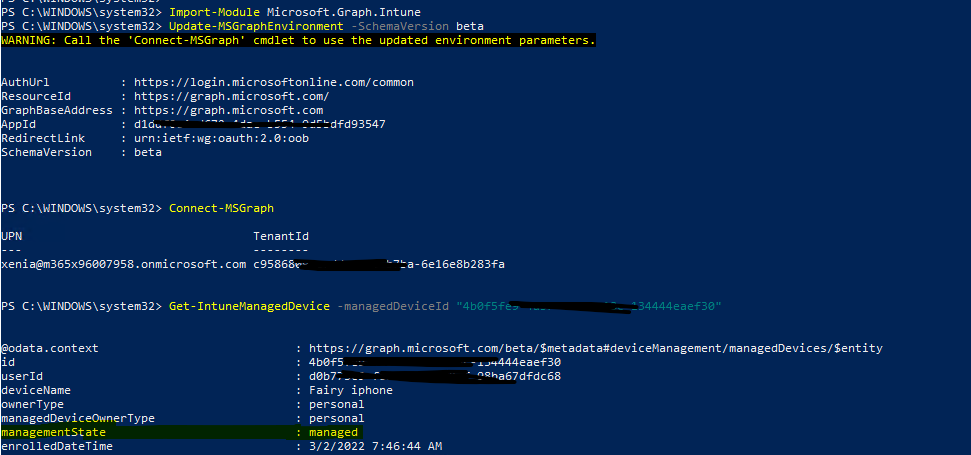

Hope it will help.
If the answer is the right solution, please click "Accept Answer" and kindly upvote it. If you have extra questions about this answer, please click "Comment".
Note: Please follow the steps in our documentation to enable e-mail notifications if you want to receive the related email notification for this thread.