Azure Virtual Machines
An Azure service that is used to provision Windows and Linux virtual machines.
This browser is no longer supported.
Upgrade to Microsoft Edge to take advantage of the latest features, security updates, and technical support.
' cx='32' cy='32' r='32' /%3E%3Ctext x='50%25' y='55%25' dominant-baseline='middle' text-anchor='middle' fill='%23FFF' %3EMA%3C/text%3E%3C/svg%3E)
Hi, I've set up an azure ubuntu 20.04 VM, installed docker, configured docker-container, and installed and configured gitlab in one container. I get the go ahead that the webserive is up and running.
However, when I go to my browser, and type in my VM's public IP, I get a connection timed out answer, every time, and I've checked with docker ps that the service is up and running and have currently been running for some 5 hours. I have also tried curl -v <ip-adress> and it just spins. how do I go about this?
I'd like to be able to connect to the vm through browser so I can get on with my gitlab.
thanks for all and any help
An Azure service that is used to provision Windows and Linux virtual machines.
Answer accepted by question author

If you want to connect from outside the machine then you need to open the firewall of the machine and the firewall of the Azure vNet of the machine
To open the Azure vNet, (1) navigate to your machine in the Azure portal, (2) Select the VM, (3) On the left menu click on networking
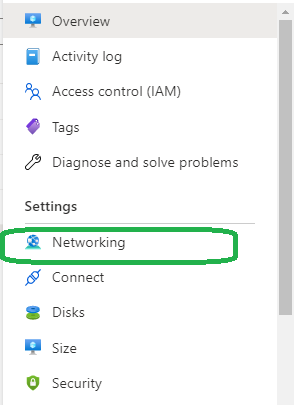
Add Inbound port rules to allow your IP to connect to the VM
And don't forget to configure the machine firewall as well (configuration depend on the firewall you use)