Azure Logic Apps
An Azure service that automates the access and use of data across clouds without writing code.
This browser is no longer supported.
Upgrade to Microsoft Edge to take advantage of the latest features, security updates, and technical support.
' cx='32' cy='32' r='32' /%3E%3Ctext x='50%25' y='55%25' dominant-baseline='middle' text-anchor='middle' fill='%23FFF' %3EPP%3C/text%3E%3C/svg%3E)
Hi ,
I am trying to listen events from eventhub using logic apps.i used when events available in eventhub trigger .
I have used root policy connection string from eventhub.
But I am getting unauthorised error.no other error statements.
Can anybody help me how to fix it? Or what to check to fix this.
The eventhub and logic app are in different tenants
Thanks.
' cx='32' cy='32' r='32' /%3E%3Ctext x='50%25' y='55%25' dominant-baseline='middle' text-anchor='middle' fill='%23FFF' %3EBL%3C/text%3E%3C/svg%3E)
' cx='32' cy='32' r='32' /%3E%3Ctext x='50%25' y='55%25' dominant-baseline='middle' text-anchor='middle' fill='%23FFF' %3EAM%3C/text%3E%3C/svg%3E)
Hi @pratap palukuru ,
Welcome to Microsoft Q&A! Thanks for posting the question.
Based on my understanding, you are trying to trigger LogicApps using EventHub trigger, i.e., whenever events arrive in a particular EventHub instance. I tested a sample scenario with EventHub in different subscription/tenant than the LogicApps and following are the high-level steps that I followed, which resulted in successful run of LogicApps:
 --> copied the Connection string–primary key. (This would contain the endpoint as well as the access key).
 When events are available in Event Hub" trigger and created connection using the Access Key option: 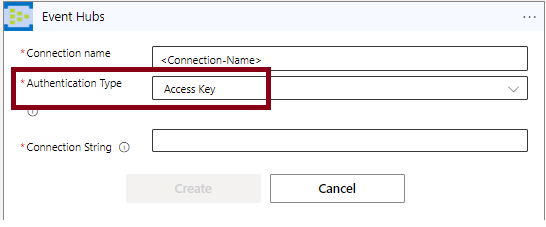
The trigger looks as below:

This worked as expected for me. In case you are facing issues with this workflow, please check the following:
1. Where are you getting the error of "un-authorized"? If you are getting it in LogicApps, please check the "Run History". You get this the "Run history" on the Overview page of Logic Apps. Ensure that the connection string was properly copied and EventHub name in LogicApps trigger matches to the EventHub instance name (In Azure Portal --> Event Hub --> Event Hubs.
2. Once you see a failed instance in "Run history", click on it to observe the successful and failed activities/trigger in the LogicApps. Check the Trigger/activity which failed and click on it to gain more details. You may also check the "raw inputs" and "raw outputs" for these activities/triggers to gain more insights of the error.
3. You may also check the "Activity log" of Logic Apps for more details on failure.
4. In case you are still facing issues with this workflow, please comment here with a screenshot of the error, run history details (which shows the exact activity that failed) along with the details of failure (raw input/output).
Please let me know if you have any questions.
---
Please 'Accept as answer' and ‘Upvote’ if it helped so that it can help others in the community looking for help on similar topics.
@pratap palukuru , I wanted to check if you had a chance to review my answer above. Please let me know if you have any queries or concerns.
Please 'Accept as answer' if it helped so that it can help others in the community looking for help on similar topics.