Hi,
We have a server hosting an app, which runs as a domain account with run as service permissions.
The app relies on shares hosted on this same server, and dumps output of a task to those shares.
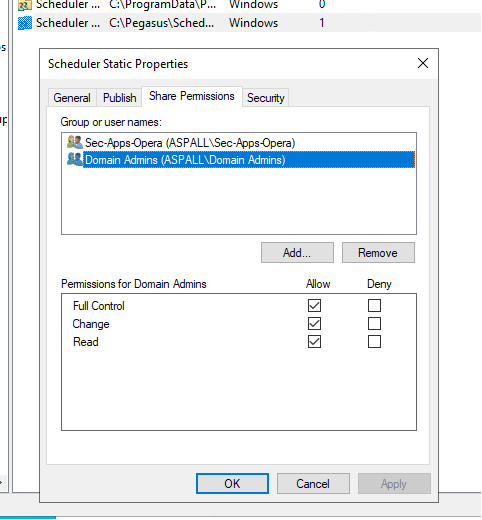
On the shares, we have a domain security group added with modify permissions, and domain admins with full control.
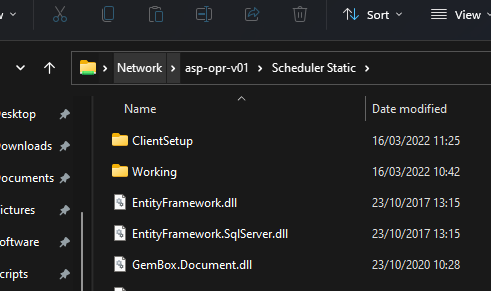
If I access the share from a remote machine using my domain admin account, I can access the share.
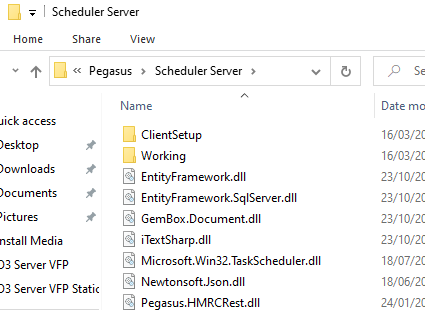
If I browse the folder the share points to, locally on that app server using my domain admin account, I can access the folder in its entirety.
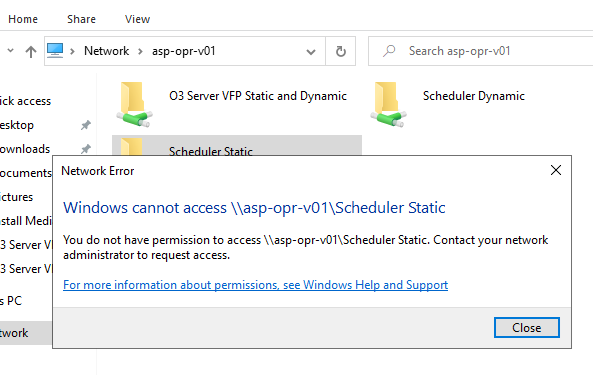
However, if I try to browse the share locally on that app server, using my domain admin account, I am unable to load the share:
Can anyone think of any reason I would not be able to access the share from the server, and can only access it from a remote machine?
If I add EVERYONE with modify permissions to the share permissions, it works fine locally.
We don't really want to have EVERYONE on the share permissions, but without it, the app seems to be unable to dump files to the share locally, likely because it too is having issues accessing the share locally like I am.
Many thanks
James
' cx='32' cy='32' r='32' /%3E%3Ctext x='50%25' y='55%25' dominant-baseline='middle' text-anchor='middle' fill='%23FFF' %3EJE%3C/text%3E%3C/svg%3E)

' cx='32' cy='32' r='32' /%3E%3Ctext x='50%25' y='55%25' dominant-baseline='middle' text-anchor='middle' fill='%23FFF' %3ENJ%3C/text%3E%3C/svg%3E)