Microsoft 365 and Office | SharePoint | For business | Windows
A group of Microsoft Products and technologies used for sharing and managing content, knowledge, and applications.

This browser is no longer supported.
Upgrade to Microsoft Edge to take advantage of the latest features, security updates, and technical support.

Hello,
Thanks in advance for any support offered, and hopefully this is the right thread for the job!
I'm using Microsoft Lists to compile some data, and am looking for a way to embed it as a view-only document on a public website that is external from the Sharepoint on which it is hosted.
I can easily create a shareable link that allows external users to view-only the document, but any time I try to actually embed the List using an iframe for example, I receive an error back saying that my.sharepoint.com refused to connect.
I asked the question earlier on a thread elsewhere (see here), and a friendly Microsoft Agent named Sukie very helpfully suggested using the Microsoft Graph API to solve this problem.
In this guidance that they linked to, it is suggested that one use the following HTML code to display the list using a Microsoft Graph API:
GET https://graph.microsoft.com/v1.0/sites/{site-id}/lists/{list-id}/items?expand=fields(select=Name,Color,Quantity)
Whilst that seems fairly simple, I don't know HTML well enough to know how the GET function fits into HTML web code, nor do I really how to source the {site-id} or {list-id} referenced in the above code.
Any advice that someone in this forum can offer on the above would be really helpful.
Cheers in advance for any support, and let me know if there's something extra I can provide to make that any easier!
All the best,
Hal
' cx='32' cy='32' r='32' /%3E%3Ctext x='50%25' y='55%25' dominant-baseline='middle' text-anchor='middle' fill='%23FFF' %3ETZ%3C/text%3E%3C/svg%3E)
Hi @Hal Morrissey Gilman ,
According to my research and testing, 'GET' is a HTTP method ,it means "Read data from a resource" .Here is a document about HTTP method you can refer to.
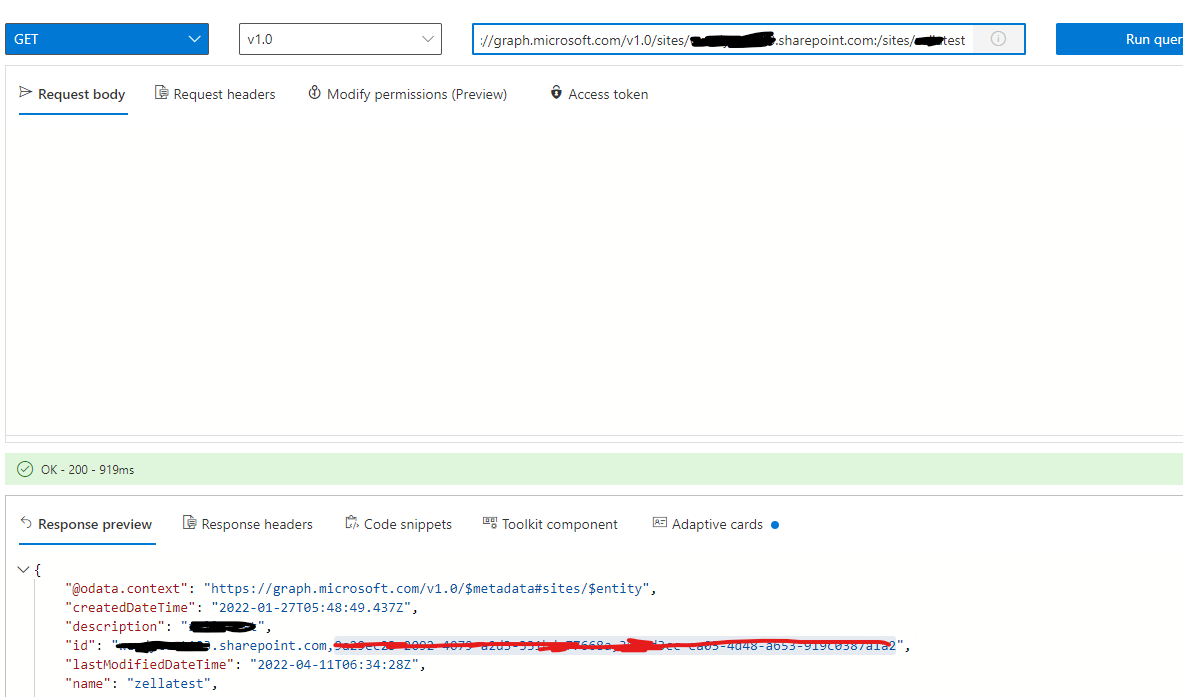
You can use the following URL to get the {site-id}:(Refer to the image below, the red part is the {site-id})
GET https://graph.microsoft.com/v1.0/sites/{hostname}:/{server-relative-path}
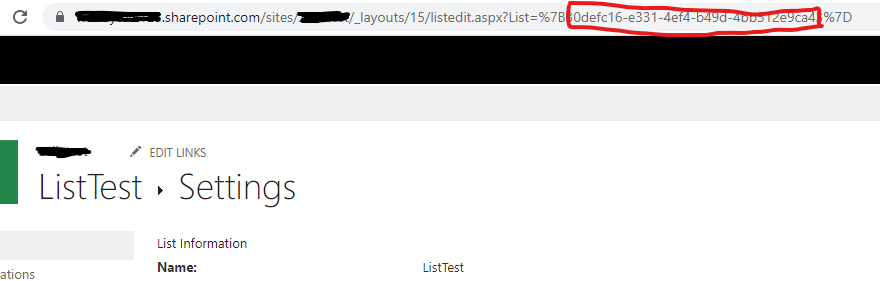
Then, go to List setting, and you will see the {list-id} from the browser address ,as shown in the picture below: (the red part is the {list-id}, please change “%7B” to “{” ,and change “%7D” to “}” )
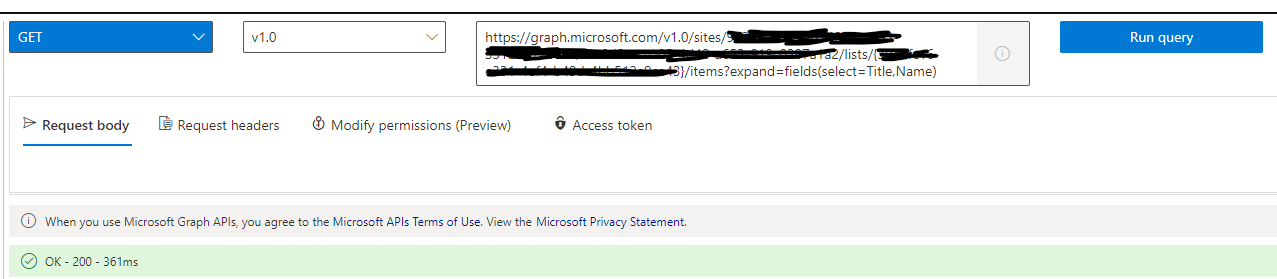
Finally, use the following code to display the list:
https://graph.microsoft.com/v1.0/sites/{site-id}/lists/{list-id}/items?expand=fields(select=Name,Color,Quantity)
If the answer is helpful, please click "Accept Answer" and kindly upvote it. If you have extra questions about this answer, please click "Comment".
Note: Please follow the steps in our documentation to enable e-mail notifications if you want to receive the related email notification for this thread.
Hey TongZhangMSFT-7548,
Thanks for all your help and screenshots, etc., really appreciate the effort you have done to there.
Unfortunately, it does not seem to have worked, as the List exists in Microsoft Lists under my personal section of the Sharepoint, which seems to change the URL formatting, and maybe even the information required for the GET function to work properly?
I'm going to put this particular query on hold as I've managed to use a workaround for now, but thanks all the same – really appreciated :)
Cheers,
Hal
Hi @Hal Morrissey Gilman ,
I'm glad to hear you solve the problem ,if you have any issue about SharePoint, you are welcome to raise a ticket in this forum.
Thank you for your understanding and support.
Thanks,
Zella Zhang
' cx='32' cy='32' r='32' /%3E%3Ctext x='50%25' y='55%25' dominant-baseline='middle' text-anchor='middle' fill='%23FFF' %3EJT%3C/text%3E%3C/svg%3E)
Hi @Hal Morrissey Gilman could you please also share your workaround? we face the same problem here. I'm trying to seek a kind of generating embed code from List, but seems it's in possible.
Thanks for raising the issue here and appreciate your help.