Developer technologies | C#
An object-oriented and type-safe programming language that has its roots in the C family of languages and includes support for component-oriented programming.
This browser is no longer supported.
Upgrade to Microsoft Edge to take advantage of the latest features, security updates, and technical support.
' cx='32' cy='32' r='32' /%3E%3Ctext x='50%25' y='55%25' dominant-baseline='middle' text-anchor='middle' fill='%23FFF' %3ENN%3C/text%3E%3C/svg%3E)
Hi everyone,
I want to login to a website (any website with a login screen) but instead of typing my credentials into a website's login text fields, I want my C# code to do it for me automatically.
The issue is that I don't know how to connect my .Net project to interactive with an external website. I tried using a webBrowser control but it's not efficient.

@Nicholas Nguyen , is your .net project a winform project? Could you provide the related code about your problem and the specific error information?
My project is a windows form application. When I use the web browser control, the code works fine but I keep getting the error shown below:
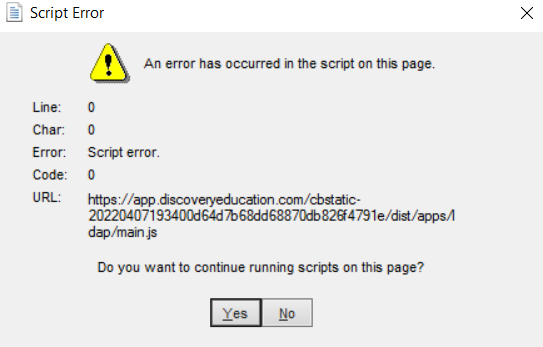
Assuming it's because of Javascript error, how do I directly connect my windows form to fill in a website's text fields instead of using a web browser to do so?
@Nicholas Nguyen , thanks for the response, I suggest that you could try to set WebBrowser.ScriptErrorsSuppressed to be true to solve the script error.
By the way, I am still not understand your meaning about connect my windows form to fill in a website's text fields. Could you give an example for it?
For example, I want to login to a website (any website with a login screen) but instead of typing my credentials into a website's login text fields, I want my C# code to do it for me automatically.
To do this, I want my C# windows form application to interactive with the website somehow to automatically fill in the website's login text fields so that my code can log in for me. The issue is that I don't know how to do this.
@Nicholas Nguyen , based on your description, you could try the following code to login into a website in the winform:
private void Form1_Load(object sender, EventArgs e)
        {
            webBrowser1.Navigate("https://somesite.com/");
        }

        private void button1_Click(object sender, EventArgs e)
        {
            if (webBrowser1.ReadyState == WebBrowserReadyState.Complete)
            {
                HtmlDocument htmlDoc = this.webBrowser1.Document;
                ////set account
                HtmlElement id = htmlDoc.GetElementById("username");
                id.SetAttribute("value", txtName.Text.Trim());
                //set password
                HtmlElement pwd = htmlDoc.GetElementById("password");
                pwd.SetAttribute("value", txtPassword.Text.Trim());
                //login
                var btn = htmlDoc.GetElementsByTagName("div").Cast<HtmlElement>().Where(i=>i.InnerText== "sign in ").First();
                if (btn != null)
                {
                    btn.InvokeMember("click");
                }
            }

        }
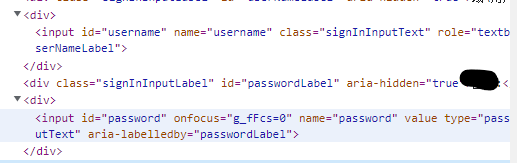
Note: We need to achieve the htmlelement for username, password and sign in button and set the value for username and password and finally click the button.
Example html:
Best Regards,
Jack
If the answer is the right solution, please click "Accept Answer" and upvote it.If you have extra questions about this answer, please click "Comment".
Note: Please follow the steps in our documentation to enable e-mail notifications if you want to receive the related email notification for this thread.
This code is good but every time I run it, I still get the script error and when I allowed the WebBrowser.ScriptErrorsSuppressed to be true, the webbrowser doesn't login to a website. Is there another way of doing this but without using the webBrowser control?
@Nicholas Nguyen , If you want to another way without using the webBrowser control, It will be hard to do it. My environment is vs2022 and win11, there is no problem for me. Maybe that update your vs to vs2022 will help you to solve the problem.