Microsoft 365 and Office | Development | Other
Building custom solutions that extend, automate, and integrate Microsoft 365 apps.

This browser is no longer supported.
Upgrade to Microsoft Edge to take advantage of the latest features, security updates, and technical support.
' cx='32' cy='32' r='32' /%3E%3Ctext x='50%25' y='55%25' dominant-baseline='middle' text-anchor='middle' fill='%23FFF' %3EMM%3C/text%3E%3C/svg%3E)
Hi,
I added the VBA code for each worksheet to allow multiple selections in a drop-down List, but it runs slowly and lags. Thus,
How to integrate all VBA code in an optimized way from each worksheet and exist to ThisWorkbook, and keep its basic function unchanged?
How to update to code to sort the selections according to the order of the drop-down menu in the cells?
How update the code to available to delete a part of selections (such as remove unwanted options) in a cell?
Example 1:
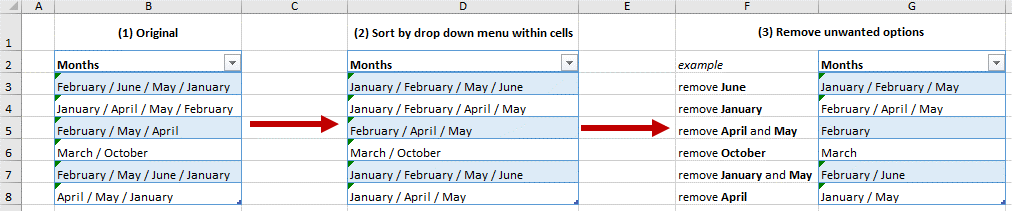
Example 2:

This is the file as reference:
https://1drv.ms/x/s!AibaAz5STOvFiCsPGAWn6Vnw48Po?e=tzfabV
Many thanks
J.